How to Download Netflix Movies/Shows to External Hard Drive
The official Netflix offline download feature is only available for mobile phones and tablets. This led many users to eventually run into the same problem: mobile device storage fills up quickly. Many people searching this topic are not just looking for a technical guide. They are trying to solve a very practical issue:
How can I download and store Netflix movies outside my device so I don't lose them or run out of space?
This becomes even more urgent when a favorite show is about to leave Netflix or when internal storage is already full. In this guide, you'll learn what Netflix allows, why downloaded Netflix files can't simply be copied to an HDD or SSD, and the practical methods available for downloading Netflix movies to external hard devices for keeping permanently.
Part 1. Can I Download Netflix Movies to an External Hard Drive Directly?
The short answer is no. Netflix does not currently provide a built-in option to download movies directly to an external hard drive on Windows, Mac, or mobile devices.
In fact, Netflix has significantly changed its offline download support in recent years. The latest Windows Netflix app no longer supports offline downloads, leaving mobile devices such as Android phones, tablets, iPhones, and iPads as the primary platforms for downloading content.
However, even on supported devices, you cannot simply choose an external SSD or USB hard drive as the download destination and save Netflix movies there like ordinary MP4 files.
Why Netflix Downloads Can't Be Copied to an External Hard Drive
- Strict DRM Encryption: Netflix uses Digital Rights Management (DRM) to encrypt downloaded content. The files are not standard video formats (like MP4 or MKV) and cannot be played on third-party media players like VLC.
- App & Device Lock-In: Downloads are strictly tethered to your specific Netflix account, the official app, and the authorized device. Moving the files to another drive breaks this digital chain, rendering them unplayable.
- Built-In Expiration: Netflix downloads are built for temporary offline viewing, not permanent archiving. Files automatically expire based on licensing agreements, viewing limits, and download time restrictions.
Part 2. The Only Way to Download Netflix Movies to a PC/Mac Hard Drive
Since the official desktop apps no longer support offline viewing, computer users must rely on third-party Netflix video downloaders to store Netflix movies on an HDD, SSD, USB drive, or NAS for long-term offline access. Here, you can use VidiKeep Netflix Video Downloader.
It acts as customized browser that loads the Netflix streaming site and allows you to download Netflix files to common MKV or MP4 file. This software can keep the output video quality in up to 1080p Full HD resolution. Furthermore, it excels at preserving the original viewing experience by retaining multi-language audio tracks (including 5.1 surround sound) and subtitles. After that, you can easily move them to any external hard drive or SSD for permanent storage and offline playback.
- A Netflix account
- A computer with sufficient storage
- An external HDD or SSD
- VidiKeep
 Crucial Prep: Format Your External Hard Drive First
Before you start moving gigabytes of television shows, you need to verify how your hard drive is formatted. Many older or cheaper external drives ship formatted as FAT32, which is an ancient file system with a massive limitation.
FAT32 cannot store a single file larger than 4GB. A feature-length movie downloaded in high definition will almost always exceed this limit, causing your transfer to instantly fail with an annoying error message. To avoid this headache, you must format your drive.
- Windows users should format their drive to NTFS or exFAT.
- Mac users should format their drive to APFS or exFAT.
If you plan to plug this hard drive into both a Mac and a PC, exFAT is the best choice because both operating systems can read and write to it seamlessly.
How to Download Movies to External Hard Drive from Netflix
Step 1 Log In to Netflix Account Within VidiKeep
Download and install VidiKeep Netflix Video Downloader on your Windows or Mac computer. Click the "Netflix" icon from the main interface to visit its built-in Netflix downloader. Here, you can log into your Netflix account using its integrated web player.
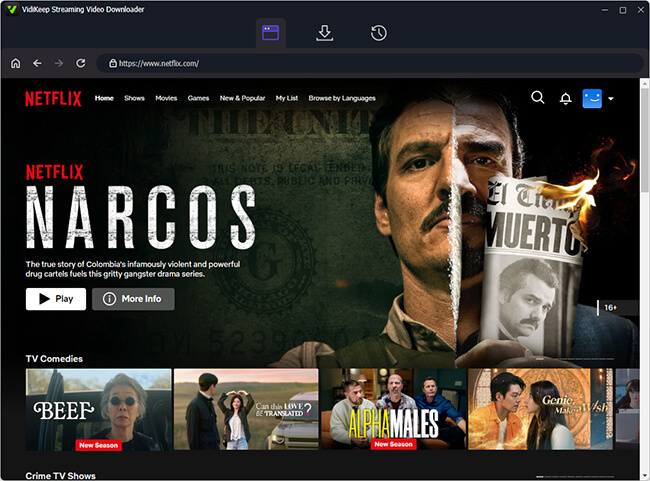
Step 2 Select Your Netflix Movie or TV Show to Download
Once logged in, use the built-in interface to locate your desired Netflix content either by browsing directly, searching by keyword, or pasting a specific Netflix URL. You can click the "Download" icon to load them.
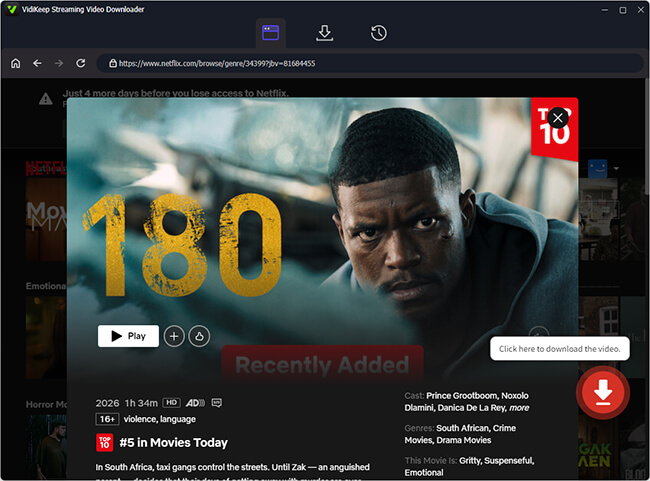
Step 3 Configure Netflix Output Settings and Download Them
Before downloading, you can configure your output settings for added Netflix files, making sure to select MP4 format for maximum compatibility alongside your preferred 1080p video quality, audio languages, and subtitle types. Next, click the "Download" button to download and save the Netflix video as a standard, unencrypted file on your computer
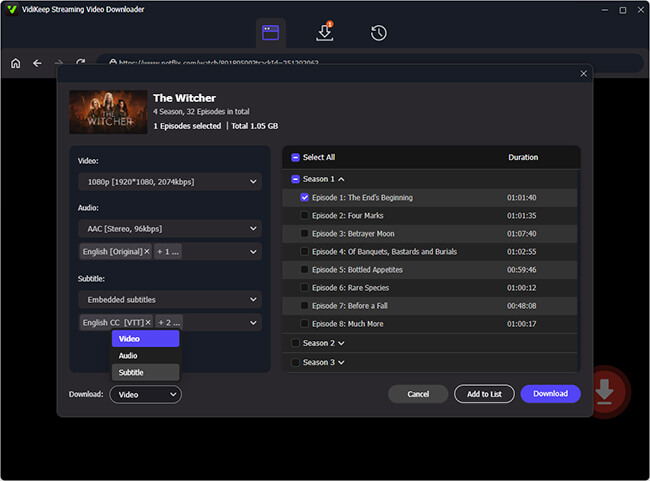
Step 4 Copy Netflix Movies to an External HDD or SSD
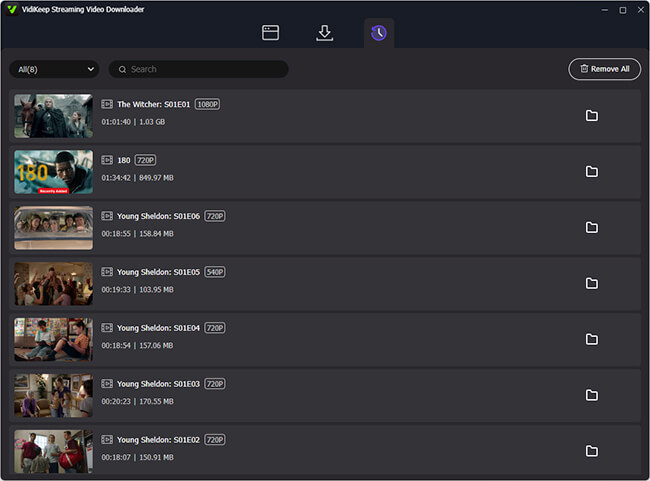
Finally, connect your external hard drive or SSD via USB cable, locate the downloaded files in the output folder, and simply copy and paste them onto your drive for a permanent, offline backup. Wait for the transfer to finish. The Netflix file can now be stored alongside your other videos.
 Tips:
Tips:
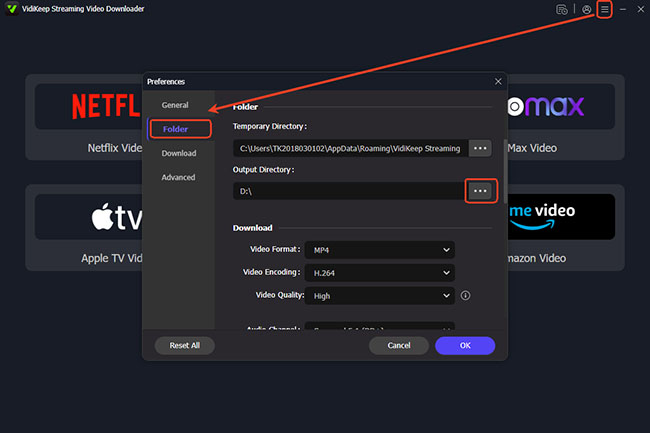
You can also connect your external hard drive to your computer in advance. Then, you can change the output directory within VidiKeep to your connected external hard drive. By doing this, Netflix downloads will be saved on it directly.
 Disclaimer:
Bypassing DRM and using third-party downloaders violates Netflix's Terms of Service. VidiKeep should only be used to create personal backups of content you legally have access to, and you should never distribute the downloaded files.
Part 3. The Official Way to Store Netflix Downloads on an SD Card (For Android and Amazon Fire Devices)
If you want to stick to officially supported methods, you will need to use a mobile device. Netflix still fully supports offline downloads on iOS, Android, and Amazon Fire tablets. However, Apple devices do not allow the app to natively route files to external storage.
Android and Amazon Fire devices are the exceptions. If your device has a MicroSD card slot, or if it supports mounting a USB-C external flash drive via an OTG (On-The-Go) connection, you can force the app to save Netflix movies directly to that external storage.
Step 1. Connect your external drive or insert your SD card into the Android or Amazon Fire device.
Step 2. Open the Netflix app, click the My Netflix option, tap the three-dots icon in the top right corner, and select "App Settings" from the menu.
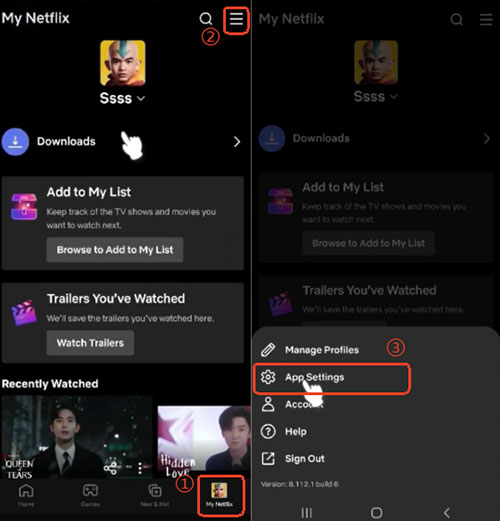
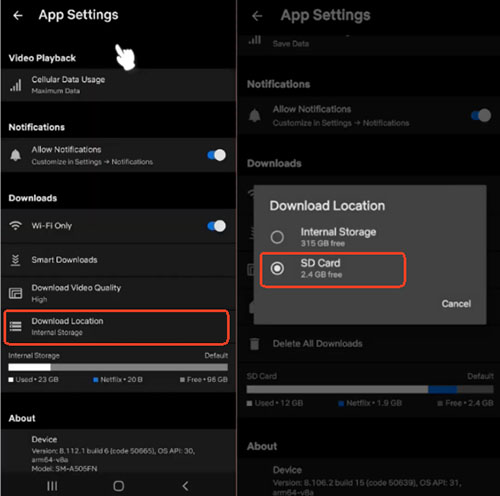
Step 3. Scroll down to the Downloads section and tap on "Download Location."
Step 4. Click the "SD Card" option to switch the location from Internal Storage to your newly connected SD Card or external USB drive.
 Limitations of This Method:
- Netflix downloads remain DRM-protected.
- Files cannot be copied as MP4 videos.
- Downloads can expire.
- Files only work inside the Netflix app on the specific device that downloaded them.
For users who want permanent Netflix video files on an external hard drive, a different approach is required.
Part 4. External HDD vs SSD: Which Is Better for Netflix Movies?
When choosing a storage drive for your downloaded Netflix media library, both options are viable, but they excel in different areas. Here is a direct breakdown to help you choose the right drive for your needs:
| Feature | External HDD (Hard Disk Drive) | External SSD (Solid State Drive) |
|---|---|---|
| Cost per GB | Lower (Budget-friendly) | Higher (Premium pricing) |
| Capacity | Larger (Easily find 4TB–8TB+) | Moderate to Large (Typically 1TB–4TB) |
| Transfer Speed | Slower (Around 100–160 MB/s) | Faster (500–2000+ MB/s) |
| Durability | Fragile (Moving parts can damage if dropped) | Highly Durable (No moving parts, shock-resistant) |
| Portability & Travel | Good (Bulkier and heavier) | Excellent (Pocket-sized and lightweight) |
| Acoustic Noise | Slightly audible (Whirring/clicking) | Completely Silent |
Editor's Verdict:
- Choose an External SSD if you frequently travel, watch movies on the go, or want to transfer large 1080p movie files from your computer in seconds. Its drop resistance and high speed make it the ultimate playback drive.
- Choose an External HDD if you are building a massive, long-term media archive at home. Since video playback doesn't require extreme speeds, an HDD offers the best value for hoarding hundreds of movies and entire TV series box sets without breaking the bank.
Part 5. FAQs About Downloading Netflix Shows to External Hard Drive
Do official Netflix downloads expire?
Yes. When you download a movie officially via an Android or Fire device, the title usually expires 48 hours after you first hit play. Even if you don't watch it, most downloads require your device to connect to the internet at least once every 30 days to verify your active subscription.
Can I plug my external drive into a smart TV to watch downloaded Netflix movies?
If you used the official Android method, no. Those files are heavily encrypted and can only be decoded by the Netflix app on the device that downloaded them. If you used VidiKeep to create standard MP4 files, you can plug that external drive directly into your TV's USB port and play the movies using the television's built-in media player.
Does Netflix allow 4K downloads to external drives?
Officially, the platform caps offline downloads at 1080p (Full HD) to save bandwidth and storage space, even if you pay for the Premium 4K tier. If you want 4K files, you would need to rely on high-end desktop capture software that specifically supports 4K resolution recording.
Part 6. In Conclusion
If you're trying to download Netflix movies to an external hard drive, it's important to understand that Netflix does not officially support direct HDD or SSD downloads. Its offline viewing feature is designed for temporary use within the Netflix app, and downloaded files remain protected by DRM.
For users who simply need extra storage on a mobile device, Netflix's SD card download option can help. However, if your goal is to store videos on an external hard drive for long-term offline access, you'll need VidiKeep that saves Netflix movies as standard video files before transferring them to external storage.
Understanding these limitations upfront can save time and help you choose the method that best fits your offline viewing needs.

Jordan Rhodes is a Chief Technical Editor and Media Specialist at VidiKeep, specializing in creating diverse tech content, including streaming tutorials, software reviews, and video encoding tips.
Leave a Comment