How to Download Netflix Movies on Windows Computer
Netflix offline viewing on a Windows PC has changed significantly over time. Many people open the Netflix app for Windows to download Netflix movies or TV shows directly on their Windows computer, only to find the familiar Netflix download icon completely missing.
It is incredibly frustrating when a basic feature vanishes without warning, especially when you are paying for a premium streaming service. The truth is, Netflix quietly changed how their Windows app operates, leaving millions of desktop users confused. This guide explains what is actually possible, why the download feature no longer works on Windows, and what alternative solutions you can use for Netflix offline access on Windows 11 and Windows 10 PC.
Part 1. What Happened to Netflix App for Windows: Download Feature Has Been Removed!
Can I download Netflix movies on Windows officially? The short answer is no. You can no longer download Netflix videos directly on a Windows PC using official methods.
The Netflix Windows application has gradually shifted from a traditional desktop app into a web-based streaming environment. Instead of a fully native program, it now runs using a browser-like framework powered by Microsoft Edge technologies.
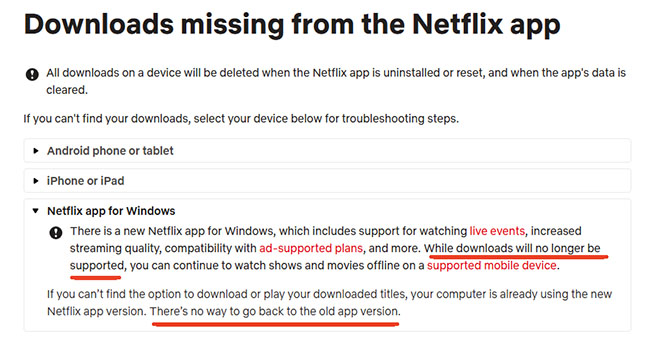
If you open Netflix on Windows today, whether through the Microsoft Store app or a browser, you will only see streaming options. The download button and offline library section that once existed in older versions are no longer available.
This change applies to both Windows 10 and Windows 11 devices. Even if you reinstall older versions of the app, they no longer function properly due to backend updates and platform changes. So if you're looking for a simple "download button for Netflix on laptop" experience, that option is no longer part of the Windows Netflix experience.
Part 2. How to Download Netflix Movies on Windows 11/10 (Best for MP4/MKV)
Since the official Netflix Windows app no longer supports local storage, dedicated third-party video downloaders, like VidiKeep Netflix Video Downloader have become the go-to solution for PC users. It function by utilizing an embedded web browser to securely log into your Netflix account. It read the video stream directly and save the content to your hard drive as high-quality, unprotected MP4 or MKV files.
After that, you can use any media player installed on your Windows computer to watch Netflix videos offline. These downloaded Netflix files will not expire after 48 hours, unlike the old official downloads.
Step 1. Download and install VidiKeep on your computer and tap the Netflix icon from the supported streaming music services.
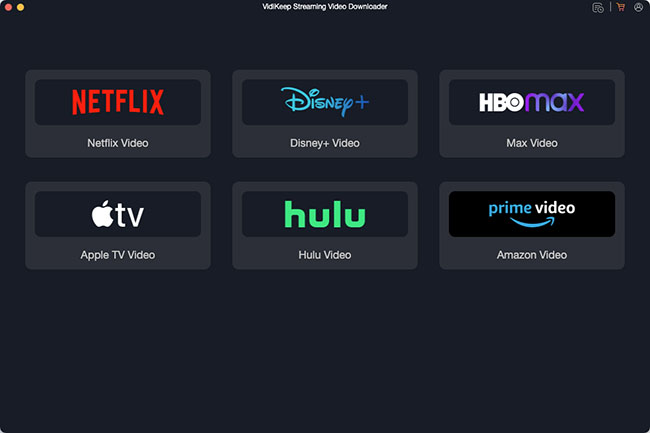
Step 2. Log into your Netflix account using the software's built-in web browser. This ensures the software can access the specific catalog available to your geographical region and current subscription tier.
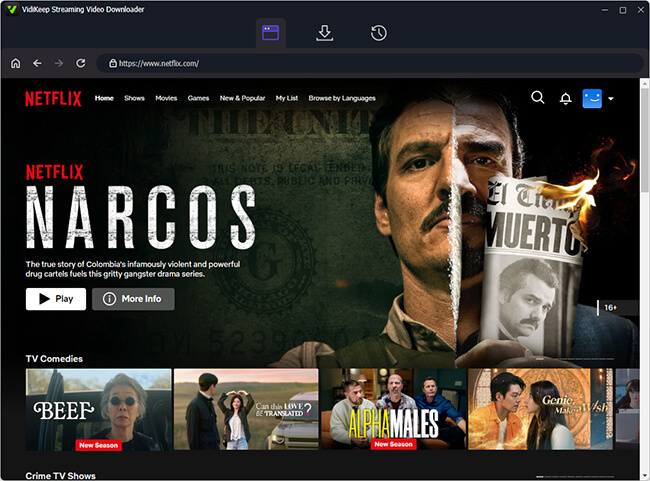
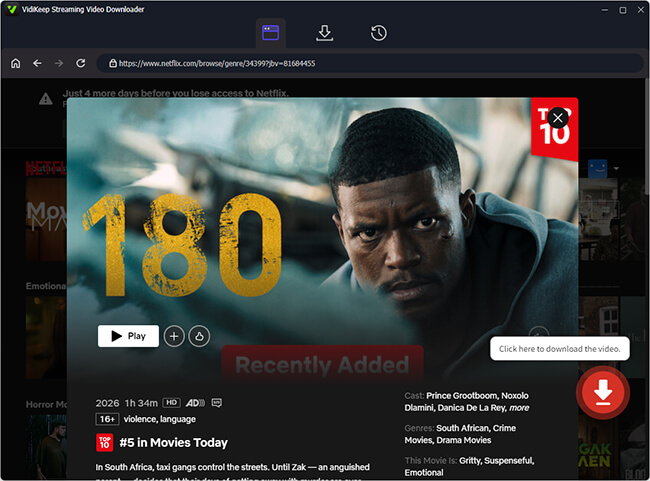
Step 3. Browse your Netflix library and open the favorite item within VidiKeep. Now, click the Download icon to load them to the download queue.
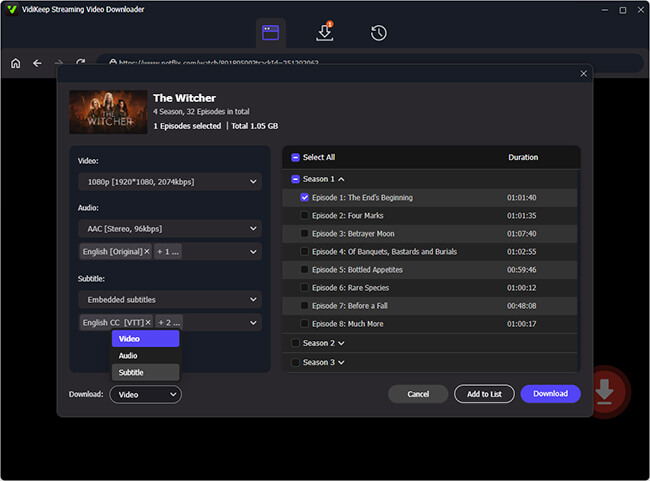
Step 4. Here, you can select your preferred audio languages and subtitle tracks for Netflix downloads. You can usually configure the default output settings to ensure every episode downloads in 1080p resolution with 5.1 surround sound. Click the Download button to save the Netflix file locally.
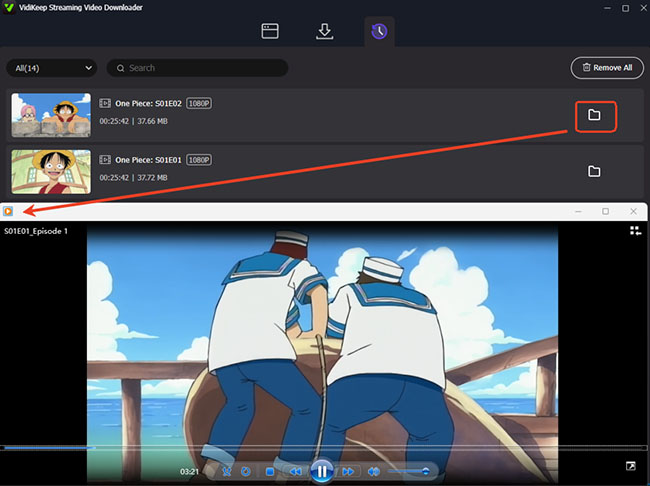
Step 5. Once finished, you can go to the History section and click the Folder icon to locate them. Now, you can play these MP4 or MKV files offline on your Windows PC using any standard media player like Windows Media Player or VLC, completely free from the Netflix app ecosystem.
 Legal & Safety Reminder (Please Read):
VidiKeep is designed strictly for personal use. To remain compliant with copyright regulations and terms of service, please delete any downloaded files promptly after viewing. Distributing downloaded materials is strictly prohibited.
Part 3. Alternative Way to Download and Watch Netflix Offline on Windows PC
If your goal is Netflix offline viewing on your Windows PC, you can still download content using the official Netflix mobile app and mirror your screen to your computer. Here are the supported devices for official Netflix downloads:
- iOS: iPhones and iPads
- Android: Mobile phones and tablets
- Amazon: Fire tablets
Step 1. Launch the Netflix app on your supported mobile device.
Step 2. Search for the Netflix movie or TV show episode you want to watch offline.
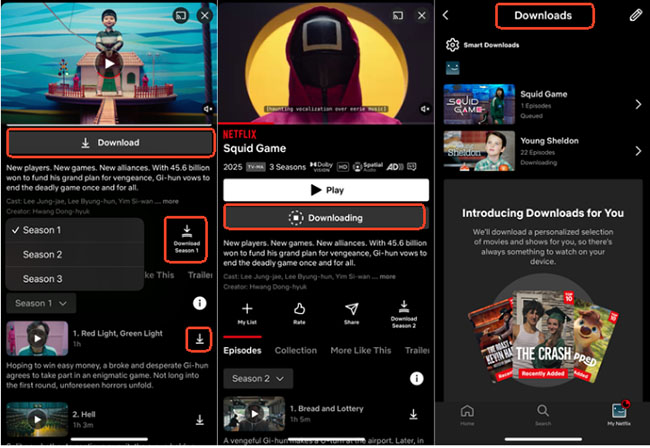
Step 3. Tap the Download icon next to the title to download Netflix videos.
 Note:
Note:
If the icon is missing, that specific title is unavailable for offline viewing due to licensing restrictions.
Step 4. You can play a downloaded Netflix movie on your mobile device and mirror or cast the screen to your Windows PC. This doesn't create a local file on your computer, but it allows offline playback through another device.
Note:
Downloaded videos are stored inside the app and cannot be accessed as normal video files. They also expire after a certain period and may require renewal if you don't connect to the internet regularly.
 Tips For Android Users:
Android emulators like BlueStacks allow you to run the mobile version of the Netflix app directly on your Windows desktop. You can install BlueStacks and sign in to the Google Play Store. Download the Netflix for Android app from the store, log in, navigate to the show, and download it for offline listening on your Windows PC.
Part 4. FAQ About Netflix Downloads on Windows PC
Why Netflix removed download feature on Windows?
Netflix retired the Windows download feature to streamline its app ecosystem into a unified, web-based experience and reduce the complex digital rights management (DRM) overhead required for desktop files. Additionally, user data showed that offline viewing overwhelmingly occurs on mobile devices during travel, leading Netflix to deprioritized Windows laptops, which are typically used near stable Wi-Fi.
What you can still do on Netflix app for Windows PC?
The updated Windows Netflix app functions strictly as an online streaming player. You can still watch the full content catalog, adjust streaming quality, toggle subtitles or audio tracks, and sync your viewing history across devices, but the app requires a continuous internet connection to work at all.
Can I download Netflix movies on Windows 11?
No, direct native downloading is no longer possible on Windows 11 or Windows 10. The official Netflix desktop app has completely removed offline functionality, meaning you cannot save videos to your computer's hard drive using official methods.
Can Netflix downloads be converted to MP4?
Officially, no, because standard Netflix downloads are heavily encrypted and hidden within the app's proprietary cache files. However, you can easily bypass this limitation by using a dedicated program like VidiKeep, which downloads Netflix movies and TV shows directly into MP4 files on your PC.
Part 5. In Conclusion
Downloading Netflix movies and TV shows on a Windows PC is no longer possible through official methods. The platform has shifted entirely toward streaming on desktop while reserving offline downloads for mobile devices.
If your goal is convenience, the most reliable approach today is to use mobile downloads for offline viewing and Windows for streaming when you're online. However, if you want true, compromise-free offline viewing on your computer, VidiKeep bridges the gap. It bypasses these desktop restrictions, allowing you to download Netflix movies and TV shows directly to your Windows hard drive for permanent offline playback anytime, anywhere.

Jordan Rhodes is a Chief Technical Editor and Media Specialist at VidiKeep, specializing in creating diverse tech content, including streaming tutorials, software reviews, and video encoding tips.
Leave a Comment