How to Download Stranger Things Series (S1-S5)
A decade on, Stranger Things remains a Netflix staple, pulling in over 1.2 billion views across Seasons 1–4 before wrapping up with a massive Season 5 finale. With the prequel Other Worlds: A Stranger Things Adventure officially slated for 2028, a lot of us are diving back in for a full 42-episode rewatch. Here's the easiest way I've found to batch-save Seasons 1–5 as MP4s for an offline binge.
Stranger Things Series Overview
Before downloading the complete Stranger Things series, it's worth checking how much storage space you'll need. Across five seasons and 42 episodes, the show has a combined runtime of approximately 45 hours and 18 minutes. That's a considerable amount of video to keep on a phone, tablet, or laptop, especially if you plan to download everything for offline viewing. Here's a breakdown of each season's episode count and total runtime:
| Feature | Season 1 | Season 2 | Season 3 | Season 4 | Season 5 | Total |
|---|---|---|---|---|---|---|
| Year | 2016 | 2017 | 2019 | 2022 | 2025 | — |
| Episodes | 8 | 9 | 8 | 9 | 8 | 42 |
| Total Runtime | 6h 46m | 7h 51m | 7h 31m | 13h 02m | 10h 08m | 45h 18m |
How Much Storage Space Do You Need for Stranger Things TV Series?
All 42 episodes of Stranger Things clock in at around 45 hours, so the amount of space or data you'll burn through depends heavily on how sharp you want the picture to look and how tightly the files are compressed. Here’s what that looks like in practice:
- Netflix Save Data (Streaming): ~7.6 GB
- Netflix Automatic (Streaming): ~11.3 GB
- Compressed 1080p Files (2–4 Mbps): ~41–82 GB
Is There a Stranger Things Season 6?
No. Season 5 is the fifth and final season of the original Stranger Things series. Its eight episodes conclude the main Hawkins storyline, bringing the flagship show to a total of 42 episodes. However, that doesn't mean the Stranger Things universe is disappearing. Netflix has expanded the franchise with the animated spin-off Stranger Things: Tales From '85, and another live-action prequel, Other Worlds: A Stranger Things Adventure, is planned for 2028.
Method 1: Download Stranger Things Officially via the Netflix App
If you need a handful of episodes of Stranger Things to survive a flight or a weekend away from Wi-Fi, the official Netflix app is still the quickest route. It works right out of the box whether you need to download Netflix on an iPhone, Android, an Amazon Fire tablet, or a Google Chromebook.
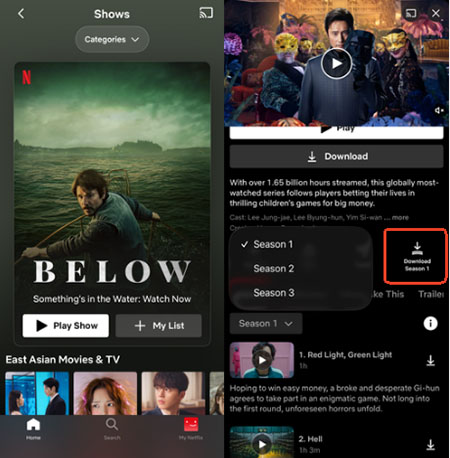
Step 1. Open the Netflix app on your supported device and sign in to your account. Then search for Stranger Things, open the main series page, and pick the season you want to save.
Step 3. Tap the Download arrow next to each episode or hit the Download Season batch button. Everything you save lands under the My Netflix > Downloads tab, ready to play without a signal.
 Official Netflix Download Limitations You Should Know
If you prefer downloading the Stranger Things series through Netflix's official app, there are a few restrictions to consider before saving all five seasons for offline viewing.
- No PC or Mac Support: Netflix does not support offline downloads on Mac, and its updated Windows app removed the download feature.
- Expiration Timers & DRM: Downloads are encrypted, playable only in-app, and cannot be moved to a USB or TV. They typically expire in 7–30 days, or 48 hours after playback starts.
- Ad-Tier Monthly Caps: The Standard with Ads plan limits you to 15 downloads per device each month. With 42 episodes, saving the full series takes at least three months.

Method 2: Batch Download Stranger Things Seasons 1–5 to MP4 on PC/Mac
Netflix's official download restrictions can make it difficult to keep all five seasons available for offline viewing, especially if you prefer watching on a computer or storing episodes on an external drive. Another option is to use a desktop video downloader. VidiKeep Netflix Video Downloader is one good option. It supports saving selected Netflix episodes in MP4 or MKV format, with options to choose an output folder on your PC or Mac. This makes it easier to organize downloaded Stranger Things episodes by season and manage your video files on an external hard drive rather than relying solely on your phone's storage. Unlike downloads kept inside the Netflix app, locally saved files do not follow Netflix's in-app expiration timers.
| Feature | Official Netflix App | VidiKeep Netflix Video Downloader |
|---|---|---|
| Supported Devices | iOS, Android, Fire Tablets, Chromebooks | Windows & macOS |
| Output Formats | DRM-locked Files | MP4, MKV |
| Expiration Date | Usually 7–30 days (or 48 hours once played) | No Expiration |
| Transfer to USB / Smart TV | Not supported | Fully supported |
| Batch Download Speed | Standard in-app download speed | Up to 7X accelerated batch mode |
| Ad-Tier Compatibility | Capped at 15 downloads/month per device | No monthly episode caps |
Step-by-Step Guide to Save Stranger Things Series as MP4
Step 1 Set Up the Download Preferences For Stranger Things
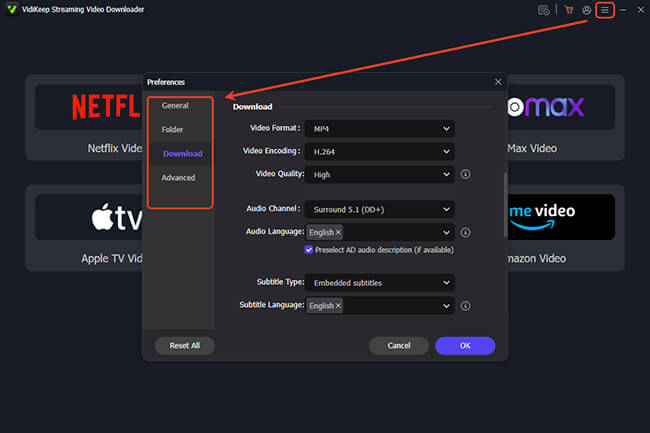
Download and launch VidiKeep Netflix Video Downloader on your PC or Mac. For downloading the Netflix shows as MP4 files, just open Menu > Preferences > Download and select the output format. You can also choose the video quality (up to 1080p), preferred audio languages, and subtitle options, including embedding subtitles into the video or saving them separately as SRT files.
Step 2 Sign In to Netflix
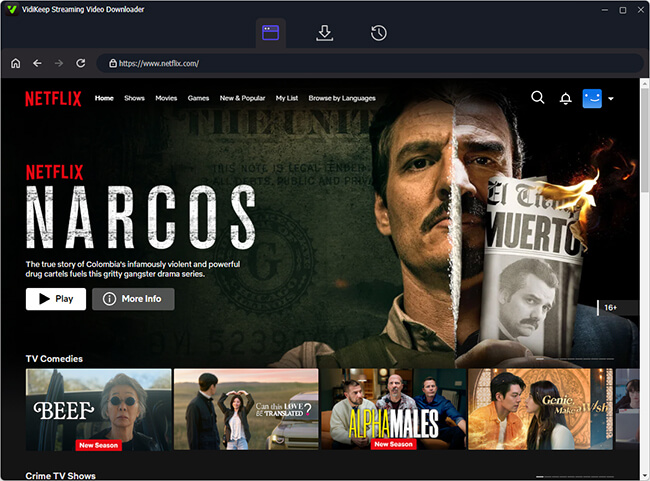
Click the Netflix icon to open VidiKeep's built-in Netflix Web Player. Select Sign In and log in with your Netflix account to access the available titles. Enter Stranger Things in the search bar or paste the series URL to locate the show.
Step 3 Find Stranger Things and Select Entire Seasons
Click the Download icon to load its available episodes. Choose a season, then check Select All to add every episode from that season to the download list. Repeat this process for Seasons 1–5 if you want to save the complete series.
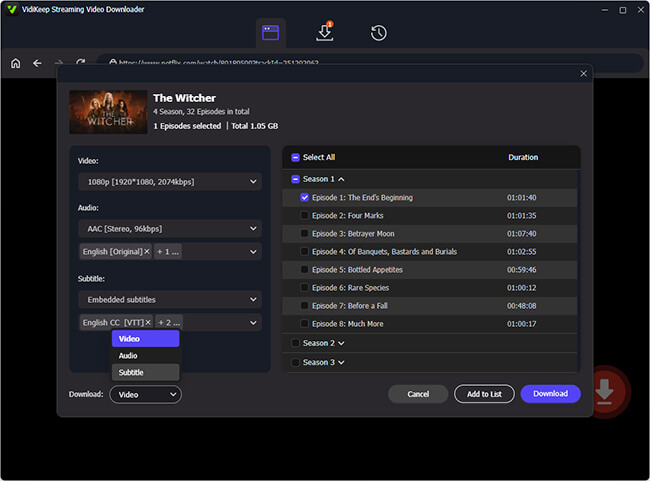
Step 4 Download Stranger Things Episodes as MP4 Files
Click Download to start saving the selected episodes to your computer. The downloader supports accelerated downloads of up to 7X. Once finished, open your output folder to organize the five seasons and transfer the Netflix MP4 files to an external drive for convenient local playback.
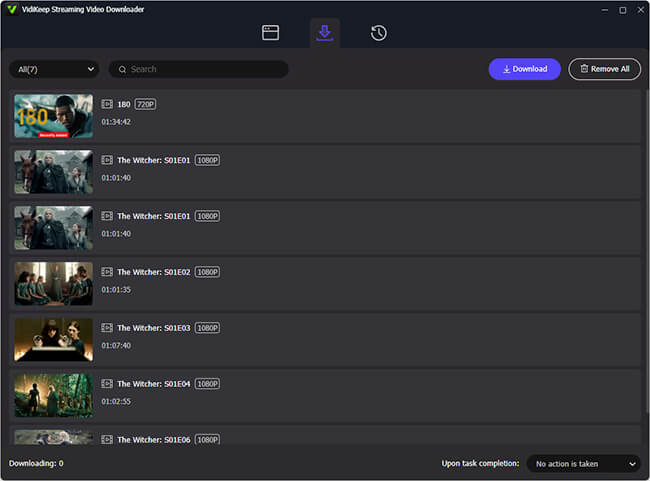
- TV & Tablet Transfers: Format your USB to exFAT so large 2GB+ Season 4/5 episodes copy cleanly, then plug it into your TV. For wireless home streaming, you can use Plex or AirDrop episodes straight from Mac to iPad.
- Subtitle Tip: Pick external SRT for VLC, Plex, or laptops to toggle captions freely. For older TVs via USB, go hardcoded—I learned the hard way that older players often ignore SRT files.
FAQs About Downloading Stranger Things
Is it legal to convert Stranger Things to MP4?
It mostly comes down to your local copyright laws and what you do with the files. Saving episodes from a Netflix plan you pay for, just so you can watch them offline yourself, is meant for personal use. Uploading, sharing, or selling those MP4s crosses the line into piracy and breaks Netflix’s Terms of Service, so just keep the files on your own devices.
Can I keep Stranger Things series downloads after canceling Netflix?
If you saved them inside the Netflix app, they’ll lock up and vanish as soon as your billing cycle ends. Local MP4s downloaded through VidiKeep sit right on your hard drive, so they stay playable offline even if you pause or cancel your subscription later.
Which Stranger Things episodes are best to rewatch or save as highlights?
If you don't want to spare 60+ GB for the entire run, these six episodes cover the biggest moments worth keeping:
- S1E3 (Holly, Jolly): Joyce communicating with Will through the Christmas lights.
- S2E9 (The Gate): Eleven sealing the gate, followed by the Snow Ball dance.
- S3E8 (The Battle of Starcourt): The mall fight and Hopper’s letter.
- S4E4 (Dear Billy): Max’s escape from Vecna to "Running Up That Hill."
- S4E9 (The Piggyback): Eddie Munson’s guitar solo in the Upside Down.
- S5E8 (The Rightside Up): The movie-length series finale.
Final Verdict
For a short trip where you only need a couple of episodes on your phone or tablet, the official Netflix app is already right there and takes two minutes to set up. But if you want all searies of Stranger Things downloaded as MP4s on Windows or Mac without worrying about expiration dates, VidiKeep Netflix Video Downloader saves you a ton of hassle.

Jordan Rhodes is a Chief Technical Editor and Media Specialist at VidiKeep, specializing in creating diverse tech content, including streaming tutorials, software reviews, and video encoding tips.
Leave a Comment