How Long Do Netflix Downloads Last? Expirations, Limits, and Tips
You have downloaded dozens of Netflix movies before a long trip, only to discover that some of them have expired before you even get a chance to watch them. One Netflix user preparing for a military deployment asked a question on community that many travelers, remote workers, and commuters have wondered about:
I'm going on deployment soon and would like to download a lot of movies and shows from Netflix to my phone. I will not have any internet where I'm going to be working. How long do Netflix downloads last?"
Netflix promotes offline downloads as a convenient way to watch movies and TV shows without an internet connection. However, many users don't realize that downloaded Netflix titles aren't permanent. Depending on the movie or show, downloads may expire after a certain period, require renewal, or even become unavailable if licensing agreements change.
In this guide, we'll explain exactly how Netflix download expiration works, why some downloads disappear sooner than others, how to renew expired downloads, and what options are available if you want to keep Netflix movies for permanent offline viewing.
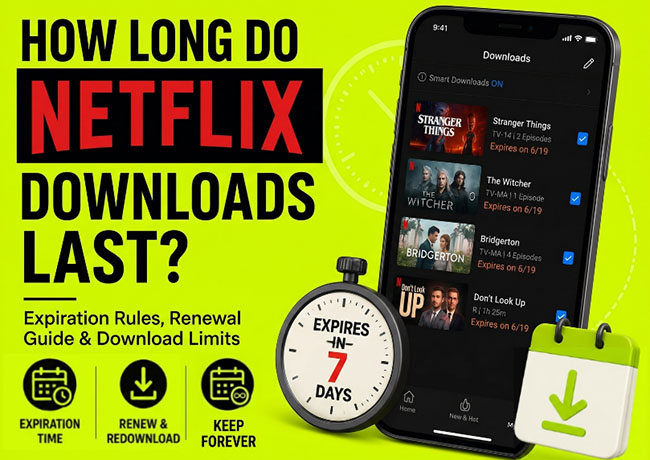
Part 1. How Long Do Netflix Downloads Last? Depend on Your Watch Status!
An unwatched download does not last forever on your device. When you download a title, Netflix stores an encrypted version of the content on your device. The file remains linked to your Netflix subscription and licensing agreements between Netflix and content owners.
Netflix does not publish a universal expiration date because each title may have different licensing conditions. If you want to know how long a download on Netflix last, you first have to look at whether you have started watching the video yet.
You Haven't Started Watching Yet:
Most downloaded titles remain available for a certain period before playback begins. Depending on the content, this could range from 7 to 30 days.
The exact timeline depends entirely on the specific contract Netflix has with the studio that owns the show. Netflix Originals tend to hang around much longer, while third-party blockbuster movies might have shorter shelf lives
 Tips:
Tips:
You do not have to guess when your time is up. If a Netflix title is going to expire within a week, the app will automatically display a exact due date directly on your Downloads page.
You Hit Play for Netflix Downloads:
Things change dramatically the moment you actually start watching a downloaded title. Let's say you hit play on a movie during a flight, watch thirty minutes, and then pause it to take a nap. The clock starts the second that video loads.
For the vast majority of titles, you now have exactly 48 hours to finish watching the content. Once that 48-hour window closes, the download officially expires, even if the original 30-day untouched window hasn't passed yet. A red "48 Hours" timer will replace the standard description on your downloads page to let you know time is running out.
Part 2. Netflix Download Expiration: How to Check, Renew, and Fix Expired Downloads
If you're relying on Netflix downloads for travel or long-term offline viewing, knowing how to manage expiration is essential. Learn how to identify expiring downloads, restore access to expired titles, and understand why some downloads can't be renewed.
How to Check When a Netflix Download Expires
Netflix makes it relatively easy to see whether a download is approaching expiration. To check expiration dates:
Step 1. Open the Netflix app, log into your account, and tap My Netflix.
Step 2. Select Downloads. Locate the downloaded movie or TV show and look for any expiration date or countdown indicator.
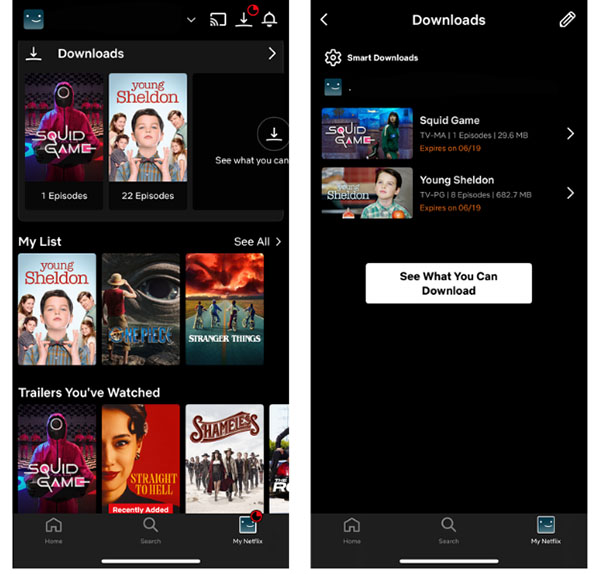
If a title is nearing expiration, Netflix displays a warning directly beneath the download. If you don't see an expiration message, the download is usually still valid.
What Happens When Netflix Downloads Expire?
When a Netflix download reaches its expiration date, several things can happen depending on the title.
- The Download Becomes Unplayable: In most situations, Netflix blocks playback until the download is renewed or downloaded again.
- An Expiration Warning Appears: Netflix often notifies users before a title expires, allowing time to renew or re-download it.
- The Download May Be Removed: In some cases, expired downloads may eventually disappear from the device automatically.
How to Renew Expired Netflix Downloads
Fortunately, expiration does not necessarily mean the title is gone forever. If the content remains available on Netflix, you can often renew or download it again.
Method 1: Re-download the Title
Step 1. Connect your device to the internet, open Netflix app on your device, and log in to your account.
Step 2. Delete the expired download if necessary and then find the title again.
Step 3. Open the item and click the "Download" button to download it once more.
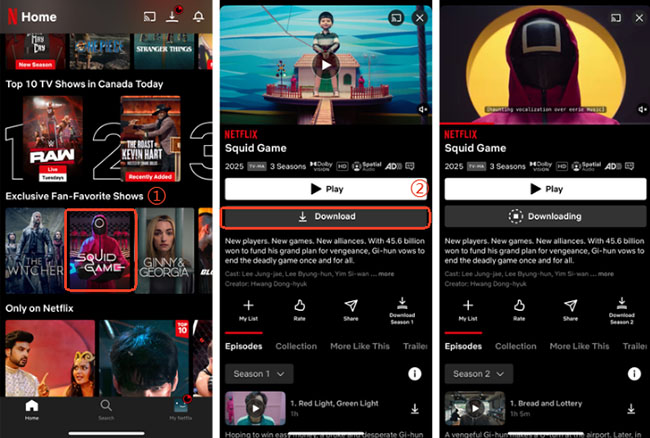
Method 2: Refresh the Netflix Download
For certain titles, Netflix may display a renewal option directly within the Downloads section. Simply tap the renewal icon if available. Follow these steps to quickly refresh your expired content:
Step 1. Navigate to your Downloads tab at the bottom of the app screen.
Step 2. Tap the exclamation point icon next to the grayed-out title and select the "Renew Download" option from the pop-up window.
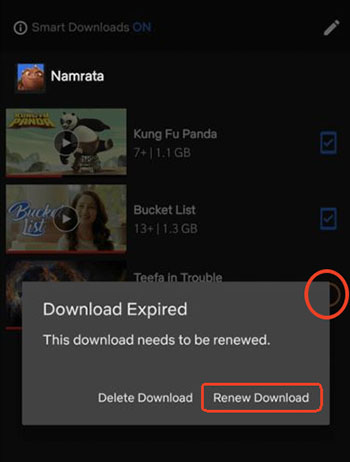
 Note:
Note:
Keep in mind that renewal only works if the title is still licensed and available on Netflix.
Why Can't I Renew My Netflix Download?
If Netflix refuses to renew a download, several factors may be responsible.
- The Netflix Title Is Not Available on Netflix: Content regularly rotates in and out of the Netflix catalog. If a movie or show has been removed, it can no longer be downloaded again.
- Download Limits Have Been Reached: Some licensed titles have annual download restrictions. If you renew or redownload the exact same movie too many times in a single calendar year, you will get a "Yearly Download Limit Reached" error. There is no way to bypass this restriction; you simply have to wait until the next year or stream the content over Wi-Fi.
- Account or Subscription Issues: Expired subscriptions, billing problems, or account access issues can also interfere with downloads.
- Device Restrictions: Outdated app versions or unsupported devices may occasionally cause download-related errors.
Supported Devices for Netflix Downloads
Currently, Netflix downloads are primarily supported on:
- Android phones
- Android tablets
- iPhones
- iPads
- Amazon Fire tablets
- Supported Chromebooks
Part 3. Why Did My Netflix Download Expire Early?
Sometimes you meticulously plan your downloads, only to find them unplayable well before the 30-day or 48-hour marks. Several factors can affect how long Netflix downloads remain available:
You Are Traveling Internationally
Netflix content libraries are heavily region-locked due to complex global broadcasting rights. If you download a show in the United States and land in a country where a local network holds the exclusive rights to that specific program, your download will instantly lock. The app periodically pings your IP address when you connect to Wi-Fi. Once it detects the region change, it disables the unauthorized titles.
Tips: To prevent this from happening on a long international trip, it is often best to keep your device in airplane mode until you have finished watching your downloaded library.
You Are on the Standard with Ads Plan
Your subscription tier plays a massive role in how much content you can hoard for offline viewing. Many users upgrade their devices for more storage space, only to hit a hard limit enforced by their account type. Here is how the active download limits break down across the current subscription tiers:
- Premium and Standard Plans: You can hold up to 100 active downloads per device at any given time.
- Standard with Ads: You are strictly limited to 15 downloads per device, per calendar month.
If you recently switched to the cheaper ad-supported tier to save money, the download limits for Netflix are changed. Once you hit that 15-download monthly cap, you cannot just delete old episodes to make room for new ones. You are completely locked out of saving new content until the next calendar month begins.
The Title Has Left Netflix
Another less common reason for an early expiration is that the title simply left the streaming platform altogether. If Netflix's contract to host a specific movie ends on the first of the month, your offline copy will expire on that exact date, regardless of when you downloaded it.
Part 4. Tips for Managing Your Offline Library
To avoid expiration anxiety, let the app do the heavy lifting for you. Turning on the "Smart Downloads" feature in your app settings is a great way to manage your offline TV shows. When you finish an episode, the app will automatically delete it and download the next one the moment you connect to Wi-Fi.
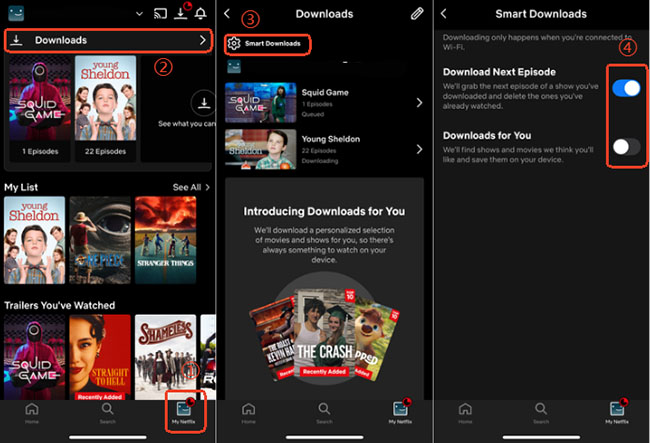
Always clear out your watched content manually if you have Smart Downloads turned off. Getting into the habit of deleting old files prevents you from unexpectedly hitting the 100-title limit right before a big trip.
Part 5. How to Keep Netflix Downloads Forever
It's well-known that you can't keep Netflix downloads forever officially. Netflix downloads are designed for temporary offline viewing and remain protected by Netflix's digital rights management system. Even though the files are stored on your device, they cannot be freely transferred, copied, or played outside the Netflix app. Once a download expires, loses its license, or becomes unavailable on Netflix, the file will no longer function.
However, there is a professional tool, namely VidiKeep Netflix Video Downloader, which can save Netflix content as standard MP4 or MKV files for personal offline viewing. It helps you want Netflix movies during long trips, archive favorite content, or play videos on devices that don't support the Netflix app. Unlike official Netflix downloads, local video files do not depend on Netflix's expiration system once they have been properly saved.
Note:
Before choosing any solution, make sure you understand local copyright laws and Netflix's terms of service. Any downloaded content is used solely for personal, private, and non-commercial viewing.
How to Download Netflix Movies and TV Shows to Keep Forever
Step 1. Install and launch VidiKeep Video Downloader on your Windows or Mac computer.
Step 2. Select "Netflix" from the supported streaming services and sign in to your Netflix account through the built-in browser.
Step 3. Search for the movie or TV show you want to download, or paste its Netflix URL into the search bar.
Step 4. Click the "Download" button and choose your preferred video format, resolution, audio language, and subtitle settings.
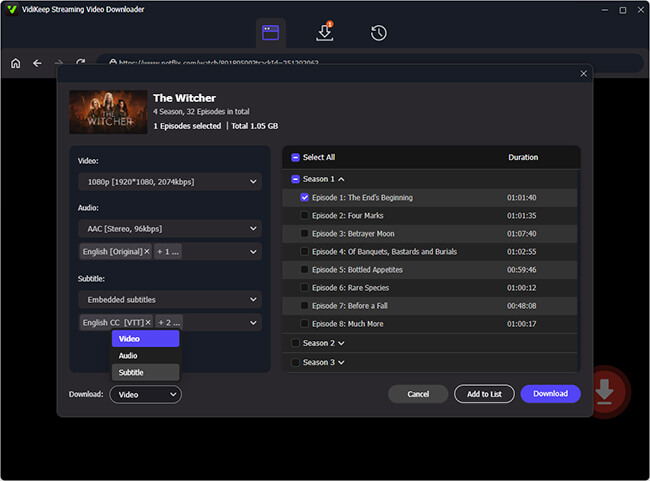
Step 5. Start the download process and wait for VidiKeep to save the video to your computer.
Step 6. Once completed, locate the downloaded MP4 or MKV file in the output folder and transfer it to your phone, tablet, USB drive, or other compatible devices for offline viewing.
Part 6. FAQs About How Long Does a Download on Netflix Last?
Why Do Netflix Downloads Expire?
The primary reason Netflix downloads expire is content licensing. Unlike locally owned video files, Netflix content is licensed rather than sold. Netflix must follow agreements established with movie studios, TV networks, and production companies. These agreements often include restrictions on:
- Offline viewing periods
- Number of downloads allowed
- Geographic availability
- Viewing windows
As a result, Netflix cannot simply allow every downloaded title to remain available indefinitely. Some content owners permit longer download periods, while others impose stricter limits.
Do Netflix downloads expire if I never watch them?
Yes. Even if you never start playback, downloaded titles still have expiration periods determined by licensing agreements.
Why did my Netflix download expire after I started watching it?
Some titles enter a shorter viewing window after playback begins. The exact timeframe depends on the content owner's licensing rules.
Can I watch expired Netflix downloads offline?
No. Once a download expires, Netflix typically blocks playback until the title is renewed or downloaded again.
How many times can I re-download a Netflix movie?
It depends on the title. Some content can be downloaded repeatedly, while others have annual download limits imposed by licensing agreements.
Do Netflix downloads expire when my subscription ends?
Yes. Downloaded titles require an active Netflix subscription. If your membership ends, offline downloads will no longer be accessible.
Part 7. Conclusion
Netflix downloads are extremely convenient for offline viewing, but they aren't permanent. Depending on the title, a download may remain available for days or weeks, and some content enters a shorter expiration window once playback begins.
If a download expires, you can often renew or re-download it as long as the title remains available on Netflix. Understanding how expiration dates, download limits, and licensing restrictions work can help you avoid surprises before your next trip or offline viewing session.
For users who need long-term offline access, it's important to understand that official Netflix downloads differ significantly from standard video files because they remain tied to Netflix's licensing and DRM protections.

Jordan Rhodes is a Chief Technical Editor and Media Specialist at VidiKeep, specializing in creating diverse tech content, including streaming tutorials, software reviews, and video encoding tips.
Leave a Comment