2026's Best Netflix Video Downloaders: Tested Review
Finding a reliable Netflix downloader in 2026 is harder than ever. Many tools that once worked have disappeared, while others now face compatibility issues after recent streaming protection technology changes. However, many tools under various brand names in this market look different but share similar technical foundations, making it difficult for users to understand the real differences.
To identify which options are worth considering, we tested popular Netflix video downloaders based on real-world factors, including usability, output quality, download stability, subtitle handling, long-term reliability, and overall value.
 Key Takeaways:
- Most Netflix downloaders today fall into five technical categories.
- Software ecosystems matter more than brand names.
- 1080p remains the most realistic output target for many tools.
- Recording-based solutions trade speed for broader compatibility.
Quick Recommendation: Best Netflix Downloaders in 2026
Before exploring the details, here are the top picks based on different user needs.
| Category | Recommended Tool | Pricing | Best For | Main Strength |
|---|---|---|---|---|
| Best Overall Netflix Downloader | VidiKeep | $44.95/month, $89.95/year, $149.95/lifetime | Users with multiple streaming subscriptions | Feature-rich interface and broad platform support |
| Best Multi-Service Downloader | StreamFab | $54.95/month, $99.99/lifetime | Users who want a mature workflow | Supports several streaming platforms in one application |
| Best Value Option | KeepStreams | $34.95/month, $99.99/lifetime | Users comparing price and features | Balanced performance and pricing |
| Best Media Library Solution | MovPilot | $99.99/lifetime | Users organizing personal video collections | Metadata and library management features |
| Best Recording Alternative | Audials | $44.90/lifetime | Users who prefer broader compatibility | Works differently from module-based downloaders |
| Safest Free Option | Netflix Official Downloads | No extra fee | Users who only need basic offline viewing | Official support and account safety |
The best choice depends less on the brand name and more on your priorities. Some users need batch processing for TV series, while others care more about stability, subtitles, or managing content from multiple streaming platforms.
How We Tested Netflix Video Downloaders
In this evaluation, we did not simply install different software and compare download results in a superficial way. Instead, we followed a longer, more realistic testing framework designed to reflect actual user behavior. The goal was to ensure that all results are stable, reproducible, and meaningful under real-world conditions rather than idealized benchmarks.
1. My Real Test Environment:
The testing environment was built to simulate a high-performance but realistic consumer setup, ensuring that system limitations would not distort the results.
- Device: Windows 11 Pro (Version 24H2), Intel Core i7-14700K, 32GB DDR5 RAM, NVIDIA GeForce RTX 4070 Ti, 2TB NVMe Gen4 SSD. Hardware acceleration is enabled for decoding and rendering performance evaluation.
- Network: 310 Mbps symmetrical fiber-optic broadband (stable latency 6–12ms). No VPN, proxy, or traffic shaping used during testing.
- Browser Environment: Microsoft Edge (latest stable version) and Google Chrome for Netflix web-player module compatibility testing.
- System Configuration: Windows Performance Mode enabled, GPU acceleration activated, background processes minimized to ensure consistent benchmark conditions.
- Region: United States (California). Native Netflix catalog access without any region spoofing or DNS modification.
2. Testing Duration & Coverage Scope
Unlike short-term benchmark articles, this evaluation was conducted over a multi-session testing cycle to simulate real user behavior. Each tool was evaluated using the same basic test scenarios:
- Total testing period: 7 consecutive days
- Netflix titles tested: 1 full-length movie + 2 multi-episode TV series
- Total episodes processed: 18 episodes
- Download modes tested: single file + batch mode
- Subtitle tracks tested: English / Spanish / Japanese
- Audio tracks tested: AAC stereo + multi-channel (when available)
- Playback tested: Multi-device playback verification
- DRM update resilience testing: Stability during Netflix DRM updates
- Output files analyzed: Output quality and file consistency
The focus was not on marketing claims, but on how each tool behaves under normal usage conditions. This helps separate stable tools from those that struggle during platform updates.
Best Netflix Downloaders: How Different Tools Compare (Tested Classification)
After analyzing interface design, workflow behavior, and feature consistency across multiple tools, the market can be grouped into five clear ecosystems. This structure is more accurate than treating each tool as fully independent.
 Disclaimer:
This article is for informational purposes only. Any Netflix videos downloaded using the software mentioned in this review should be used exclusively for personal offline viewing. Users are responsible for complying with applicable copyright laws and Netflix's Terms of Use. Redistribution, sharing, or commercial use of copyrighted content is not recommended and may violate local laws or platform policies.
Lightweight Multi-Platform Module-Based Downloader
Representative Tools:
- Vidikeep
Within the Netflix video downloader landscape, Vidikeep is better categorized as a lightweight multi-platform module-based downloader. Rather than focusing exclusively on Netflix, it provides a module-based environment that supports multiple streaming services through a unified interface. Supported platforms include:
- Netflix
- Disney+
- Amazon Prime Video
- Hulu
- Max
- Apple TV+
Instead of relying on recording technology, Vidikeep uses built-in service modules that allow users to access and manage content from various streaming platforms within a single application. This multi-platform approach makes it attractive for users who subscribe to several streaming services and prefer managing downloads through one centralized tool rather than multiple dedicated applications.
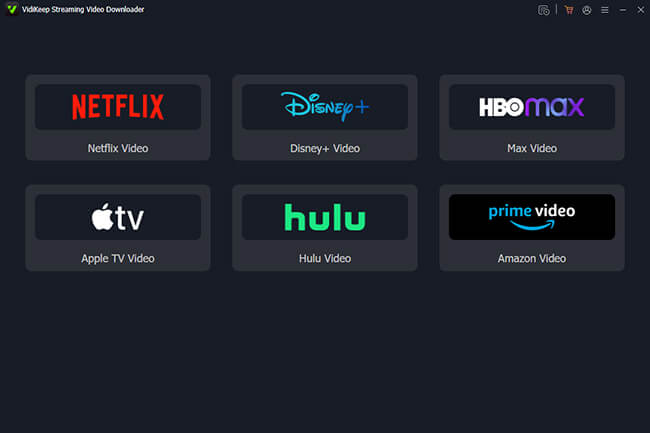
✨Best For: Users who want to download entire seasons, build large offline libraries across different platforms, or require advanced control over output settings.
DVDFab-Style Netflix Downloader Ecosystem
Representative Tools:
- StreamFab Netflix Downloader
- KeepStreams for Netflix
- Y2Mate Netflix Downloader
The DVDFab ecosystem, including KeepStreams, StreamFab, and Y2Mate Downloader, represents one of the most feature-rich groups in the Netflix downloader market. They share a similar architecture centered around DRM parsing and module-based streaming support. Common characteristics include:
- Built-in browser login workflow
- MP4 and MKV output formats
- Batch downloading for TV series
- Multi-language audio track support
- Subtitle export and embedding options
- Frequent platform compatibility updates
During testing, tools in this ecosystem generally delivered a mature downloading experience. Batch processing was reliable, subtitle management was flexible, and updates were often released quickly when streaming services changed their Widevine DRM systems.
However, performance is not unlimited. Even in this group, 1080p output remains the practical ceiling for most content. Claims of higher resolution are not consistently reproducible across different titles.
The differences between these three come down almost entirely to pricing structures. StreamFab pushes a rather expensive lifetime model where newly added streaming modules often require additional purchases. KeepStreams and Y2Mate offer slightly more flexible and inclusive pricing tiers, making them arguably the better value for the exact same underlying technology.
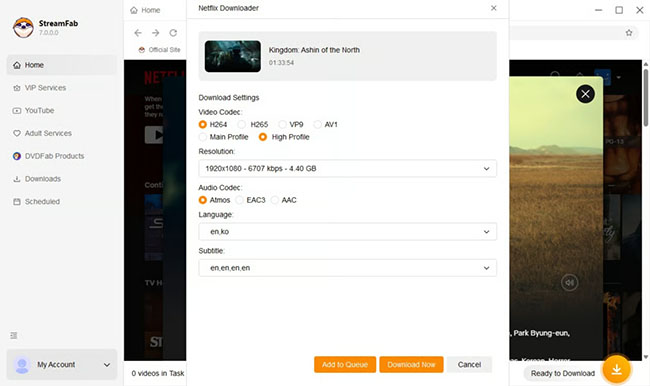
✨Best For: Users who prioritize feature depth and automation.
OEM White-Label Netflix Downloader Ecosystem
Representative Tools:
- NoteBurner Netflix Video Downloader
- FlixiCam Netflix Downloader
- Kigo Netflix Downloader
- SameMovie Netflix Downloader
- VidiCable Video Recorder
This ecosystem contains the largest number of brands in the market. Although these products are marketed independently, many share remarkably similar interfaces, workflows, feature structures, error codes, and update release cycles. The similarities include:
- Nearly identical navigation layouts
- Similar Netflix login and download processes
- MP4 and MKV output support
- Comparable subtitle handling methods
- Similar download quality limitations
- Consistent user experience across brands
In real-world usage, switching between tools in this group requires very little learning. Once users understand one product, they can operate the others with minimal adjustment.
A notable exception is Vidicable, which leans more toward a recording-based approach rather than direct DRM parsing. This often affects output efficiency and file size compared to others in the same category. But its overall interface and positioning still align closely with the broader OEM ecosystem.
While they are functional and often more affordable upfront, they have struggled significantly more with the recent DRM updates. Users frequently report being capped at 720p or even 480p for extended periods while waiting for the developers to push a fix. If you prioritize pristine 1080p quality, this category might cause some frustration during major encryption shifts.
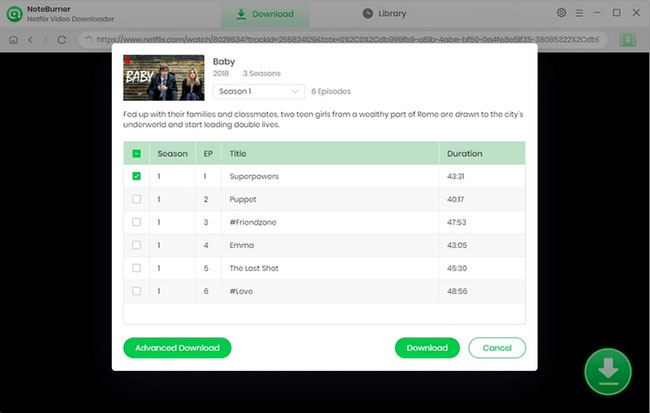
✨Best For: Users who want a familiar experience and straightforward downloading functionality without requiring extensive advanced features.
Independent Netflix Downloader Tools (Mixed Architecture Group)
Representative Tools:
- MovPilot Netflix Video Downloader
- CleverGet Netflix Downloader
- TunesBank Netflix Video Downloader
- Keeprix Netflix Downloader
- TuneFab Netflix Video Downloader
Unlike the previous ecosystems, these tools maintain more distinct identities and development directions. While they share the common goal of downloading Netflix content, their approaches differ significantly in interface design, workflow efficiency, and feature priorities.
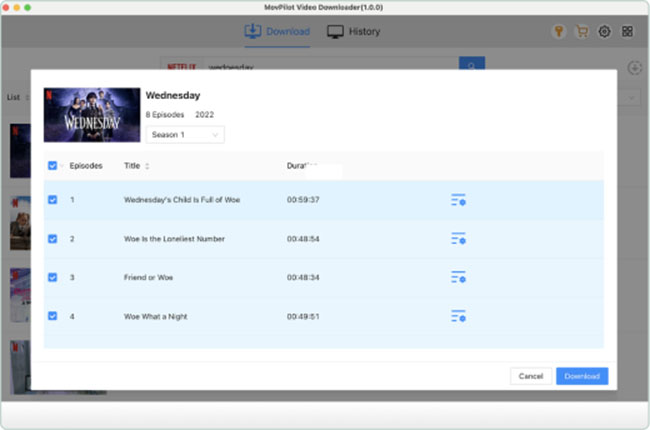
MovPilot is highly targeted at users managing local media servers like Plex. It excels at handling specific metadata and extracting perfectly timed hardcoded subtitles, making it a favorite for data hoarders who want a perfectly organized library.
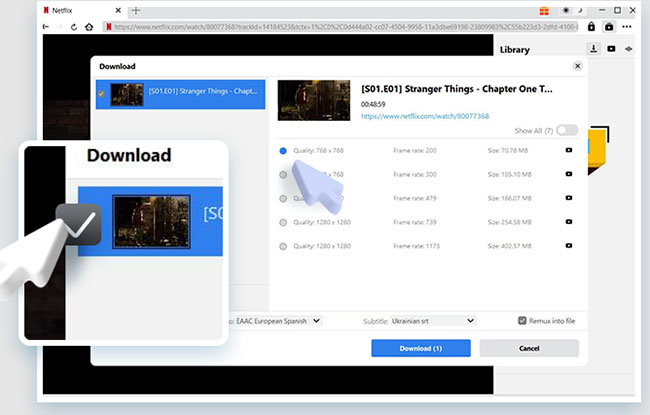
CleverGet and Keeprix, both developed by Leawo, utilizes a built-in browser sniffer approach rather than traditional backend extraction. You navigate to the video within the software's browser, and it intercepts the media stream directly.
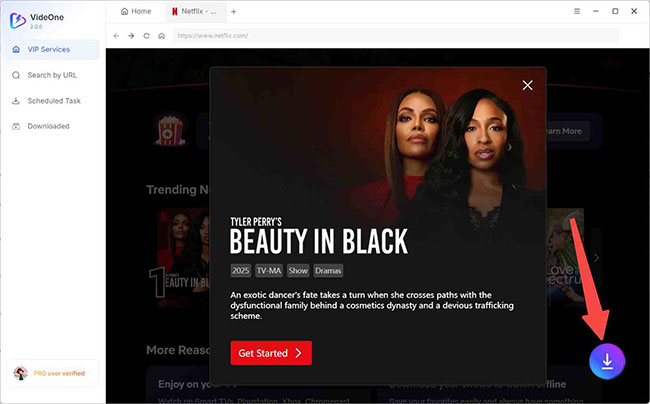
TunesBank combines downloading and conversion-oriented workflows, while TuneFab, integrates broader multimedia downloading capabilities beyond Netflix.
Testing revealed greater variation within this category than in the OEM ecosystem. Some tools excelled in user-friendliness, while others offered stronger customization or platform support.
✨Best For: Users who prioritize simplicity or occasional downloads rather than heavy batch processing.
Recording-Based Netflix Movie Download Tool
Representative Tools:
- Audials
- PlayOn
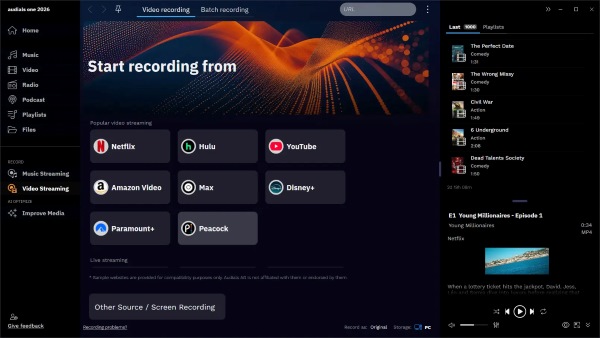
Recording-based tools operate differently from downloader ecosystems that rely on built-in streaming modules. Instead of processing content through platform-specific download workflows, these applications capture Netflix video during playback and save it as a new file. Key characteristics include:
- Real-time recording process
- Broad streaming service compatibility
- Less dependence on downloader-specific platform modules
- Greater resilience to some DRM-related changes
- Larger file sizes due to re-encoding
- Longer processing times compared to direct download workflows
Because content must be played and recorded, these tools are slower than module-based downloaders. However, they can sometimes remain functional when downloader-based solutions are temporarily affected by DRM updates.
✨Best For: Users who prioritize compatibility and reliability over download speed and efficiency.
Free Netflix Downloader Online Not Working [Don't Use]
Many users search for a free Netflix downloader online because they don't want to install desktop software. During testing, we evaluated several web-based Netflix download services that claim to convert Netflix videos directly from a URL. Unfortunately, the results were disappointing.
PasteDownload Netflix Video Downloader
The service claims that users can simply paste a Netflix video URL and download the content online. However, our testing showed that it was unable to complete the download process successfully.
After pasting a valid Netflix URL and clicking the Download button, the website repeatedly displayed the following error message:
The downloading process was not completed yet. Please reload the page! OK.
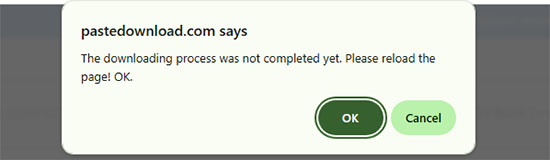
Reloading the page multiple times did not resolve the issue. We tested several Netflix movie and TV show URLs, but the same error appeared consistently. Based on our experience, the service was unable to generate a downloadable file during testing.
FreeGrabApp Netflix Downloader
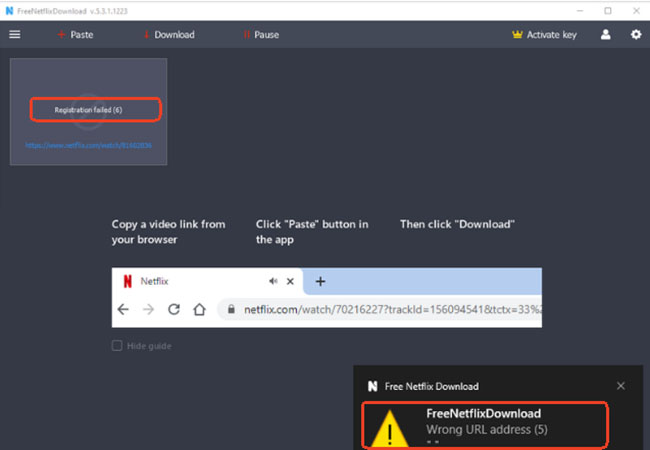
FreeGrabApp presented a different problem. The service required users to sign in or register with a Netflix account before attempting any download. However, even when using valid Netflix account credentials, the registration process repeatedly failed.
In addition, when we pasted Netflix URLs into the downloader interface, the software frequently returned the following error: "Wrong URL address". This occurred even when using official Netflix URLs copied directly from the Netflix website. As a result, we were unable to successfully proceed to the download stage.
 Editor'S Verdict:
Based on our testing, we do not recommend relying on free online Netflix downloaders. Both PasteDownload and FreeGrabApp failed to provide a working download experience during evaluation. Users looking for a more reliable solution are generally better served by dedicated desktop Netflix downloaders that include built-in Netflix login support, DRM handling, and active software updates.
FAQs About Netflix Video Downloaders
Are Netflix video downloaders still working in 2026?
Some Netflix downloader applications continue to operate, but reliability varies significantly. Streaming platforms regularly update their technology, so long-term performance depends on how actively each software developer maintains compatibility.
What is the best Netflix downloader?
The best Netflix downloader depends on your needs. StreamFab is better suited for users who want advanced features, KeepStreams offers strong overall value, VidiKeep works well for multi-service users, and Audials is an alternative for those prioritizing compatibility.
Can I download Netflix movies without the Netflix app?
Netflix officially supports offline viewing through its own application on supported devices. Third-party tools provide different workflows, but users should understand that they may not follow Netflix's intended offline viewing method.
Why do Netflix downloaders stop working?
Netflix and other streaming platforms regularly update their technology. Third-party applications may require updates to remain compatible with these changes.
Are free Netflix downloader websites safe?
Many free online Netflix downloader websites do not provide reliable results. Users should be cautious with services that request unnecessary account information, require unknown software installation, or make unrealistic promises.
Final Verdict
One of the most important findings from our testing is that most differences between Netflix downloaders are not determined by marketing claims, but by the ecosystem each tool belongs to.
Understanding these five categories provides a more accurate framework for evaluating downloaders than simply comparing feature lists. In many cases, products within the same ecosystem behave more similarly to one another than to tools in other categories, regardless of branding.

Jordan Rhodes is a Chief Technical Editor and Media Specialist at VidiKeep, specializing in creating diverse tech content, including streaming tutorials, software reviews, and video encoding tips.
Leave a Comment