Netflix Error Code NW-2-5: How to Fix It Fast
"I have been getting error NW-2-5 on my LG TV. Everything else seems to work fine, just Netflix is not working. When I tried diagnosing on Netflix, it says 'Couldn't Connect to Netflix Server 2' with the same error NW-2-5." —Reddit
Netflix Error Code NW-2-5 is a frustrating one because your internet connection may appear perfectly normal. Other devices can browse the web or stream videos without interruption, while Netflix on your TV refuses to load. The problem isn't necessarily your internet speed or TV hardware. In most cases, NW-2-5 indicates that your streaming device is having trouble connecting to Netflix due to a network connectivity issue. This guide explains what triggers the error and walks you through practical ways to get Netflix working again.
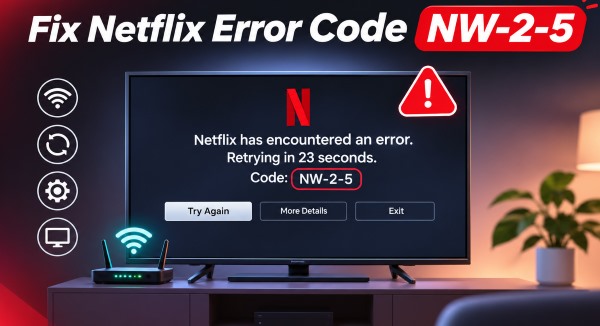
What Does Netflix Error Code NW-2-5 Actually Mean?
Netflix Error Code NW-2-5 means your device took too long to reach Netflix servers. It signals a local connectivity roadblock on your streaming device or home network rather than a billing issue or an account problem.
Before you start unplugging cables behind your TV stand, check what the app is actually seeing. On the error screen, select More Details and pick Check your network. If you spot a red X next to any of the Netflix server checks, your device is failing to complete the connection handshake.
Before You Touch the Router: Match Your Situation
Rebooting every box in your house at random rarely saves time. Match what is happening in your room to the table below so you can jump straight to the fix that fits.
| What You Are Seeing | Most Likely Cause | Where to Start |
|---|---|---|
| Other apps work fine, but Netflix fails | Stuck app cache, VPN interference, or DNS conflict | Jump to Scenario 1 |
| Only one Smart TV or console cannot connect | Standby memory glitch or local device network settings | Jump to Scenario 2 |
| Every device in your home fails to load Netflix | Router routing stall or an ISP level block | Jump to Scenario 3 |
| You are on hotel, dorm, or public WiFi | Captive portal login wall or strict firewall rules | Jump to Scenario 4 |
Scenario 1. When Your Internet Is Fine, But Netflix Still Throws NW-2-5
This is the scenario that confuses people the most. Your internet pipe is clearly working because YouTube or Prime Video plays without a hitch, yet Netflix refuses to load. That tells you something specific is getting in the way of Netflix traffic.
Turn Off VPNs, Proxies, and Custom DNS
Active VPNs, proxy servers, and router level ad blockers like Pi hole frequently trigger NW-2-5. They either add too much latency or accidentally block the background domains Netflix checks during startup. Turn your VPN off for a minute and try launching the app again.
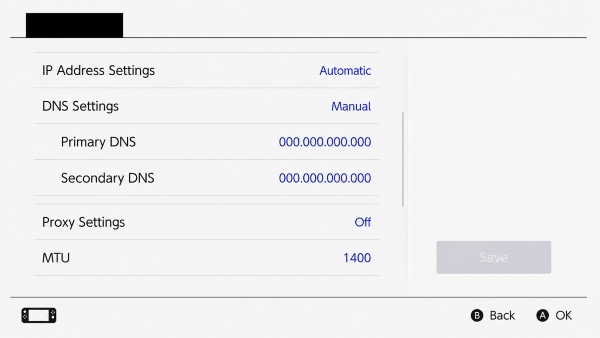
A lot of older forum posts tell you to type in Google DNS manually to fix streaming errors. In practice, I have seen custom DNS settings cause NW-2-5 on modern TVs far more often than they fix it. Switching your DNS back to Automatic lets your router resolve Netflix addresses cleanly and clears the timeout more often than you might expect.
Try the Mobile Hotspot Isolation Trick
If turning off your VPN did not help, connect your TV or streaming stick to your phone's mobile hotspot for thirty seconds. If Netflix opens right away over cellular data, you just proved your TV is fine and the problem lives on your home router or ISP.

On my experience, loading the Netflix home screen over a phone hotspot and then switching back to home WiFi was enough to break the loop and get normal streaming working again.
Kick Out a Stuck Session With Your Remote
When NW-2-5 traps you on the error screen and you cannot even get to the settings gear, Netflix actually has a classic video game style cheat code built into the app. Grab your remote and tap this pattern: Up, Up, Down, Down, Left, Right, Left, Right, Up, Up, Up, Up. It looks silly, yet it immediately pulls up a backdoor menu where you can hit Reset or Sign out. Logging back in forces your TV to request a clean connection from Netflix.
Scenario 2. Fixing Netflix Error Code NW-2-5 on Smart TVs
Smart TVs run into NW-2-5 more than almost any other device, and the culprit is usually how modern televisions go to sleep. Hitting the power button on your remote does not actually turn a modern Samsung or LG TV off. Features like Fast Boot or Quick Start keep the system in shallow standby so it wakes up instantly, which also leaves corrupted network data sitting in memory.
In fact, this standby glitch is one of the most common reasons behind Netflix not working on LG TV or Samsung TV screens.
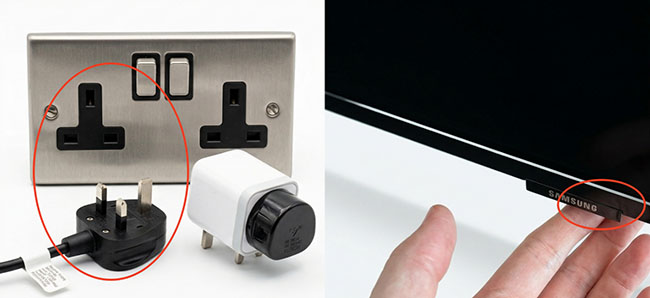
Step 1. Turn off your Smart TV and pull the power cord straight out of the wall outlet.
Step 2. Wait at least 15 seconds. If you are watching through a cable box, leave it unplugged for a full 3 minutes.
Step 3. Plug the cord back in, power the TV on, and open Netflix.
 Tips:
While the TV is unplugged, press and hold the physical power button on the TV frame itself (not the remote) for about 5 seconds. This drains any leftover charge in the capacitors and ensures a true hardware reset.
Resetting Network Settings on a Samsung Smart TV
If a cold boot does not clear Netflix error code NW-2-5 on a Samsung TV, refreshing the network profile or Smart Hub is the next best move. Menu names shift slightly depending on the model year, though recent Tizen TVs follow this path.

Step 1. Press the Home button on your Samsung remote and open Settings.
Step 2. Head to Connection or General on older sets, select Network, and choose Reset Network.
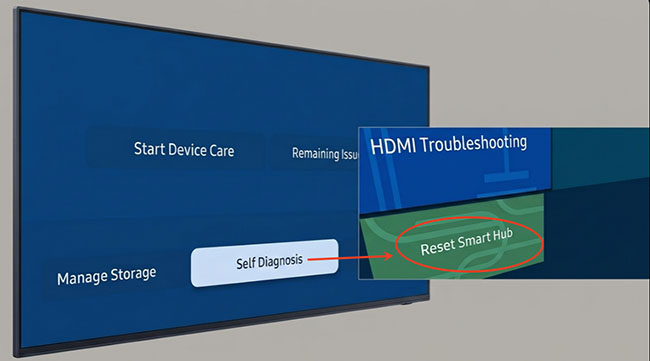
Step 3. Rejoin your WiFi and test Netflix. If it still times out, go to Settings > Support > Device Care > Self Diagnosis > Reset Smart Hub to rebuild the app environment.
 Note:
Check your TV's date and time settings under General > System Manager. If your TV clock drifted after a power outage, Netflix's security certificate check will fail and throw NW-2-5 even with a strong WiFi signal.
I keep getting Netflix error NW-2-5 on my Xfinity X1 box, even though other apps work fine and Netflix runs smoothly on my TV's built-in app. Power cycling did not help. What should I do?—Via Xfinity Community Forum
Press the A button on your X1 remote to run a System Refresh or reset Netflix directly. If that fails, switch to your TV's native Netflix app for now. X1 integrations occasionally hit silent backend glitches that clear up on Xfinity's end without needing a router reset.
Scenario 3. Fixing Netflix Error NW-2-5 on Xbox and PlayStation
Gaming consoles often carry manual network tweaks left over from multiplayer troubleshooting, and those custom settings do not always play nicely with streaming apps. Since custom DNS is a frequent trigger for NW-2-5, the quickest fix here is putting your console back on Automatic network settings:
- Xbox (One and Series X/S): Press the Xbox button, go to Profile & system > Settings > General > Network settings > Advanced settings > DNS settings, switch it to Automatic, and restart your console.
- PlayStation (PS4 and PS5): Open Settings > Network > Set Up Internet Connection, select your active network, and open Advanced Settings (or choose Custom on PS4). Set IP Address, DNS, and MTU to Automatic, and make sure Proxy Server is set to Do Not Use.
After restoring those defaults, run a quick connection test. If your console reports a Strict NAT type, plugging in an Ethernet cable or restarting your router usually steadies the connection so you can watch Netflix on Xbox or PS5 smoothly.
Scenario 4. Dealing with NW-2-5 on Hotel TVs and Public WiFi
Getting hit with NW-2-5 in a hotel room or college dorm is a completely separate issue. Public networks almost always sit behind a captive portal, which is the browser page that asks for your room number or an agreement click before letting traffic through.
Most Smart TVs cannot pop up that login screen, so Netflix times out with NW-2-5. If you brought your own streaming stick, look for a hotel or dorm connect mode in its WiFi settings, which lets you finish the login on your phone. If you are trying to watch Netflix on hotel TV hardware without your own stick, your best bet is calling the front desk to have IT whitelist the TV's MAC address, or connecting the TV to your phone's hotspot. Frequent travelers also get a lot of mileage out of a cheap pocket travel router, which handles the hotel login once and shares a clean private WiFi signal with all your devices.
Still Stuck? Resetting Your Home Network and Calling ISP
When every TV, console, and tablet in your house shows NW-2-5 at the same time, the bottleneck is sitting in your router or upstream with your internet provider.
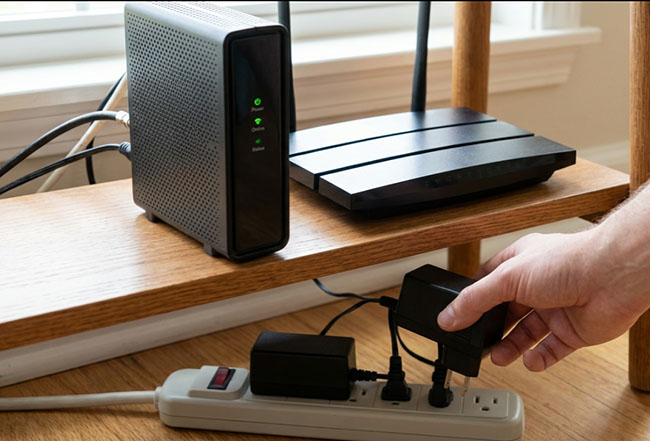
Step 1. Turn off or unplug your TV or streaming box first. Then unplug both your modem and your wireless router and leave them off for at least 30 seconds.
Step 2. Plug the modem and router back in and wait a full minute until the status lights settle before turning your TV back on.
While you are standing by the router, glance at where it sits. Tucking a router on the floor, inside a closed wooden cabinet, or right beside a microwave can chew up your signal strength enough to cause random timeouts in the next room.
If restarting your home network still does not clear the error, grab your phone or laptop on the same WiFi and run a quick check on fast.com. Because Netflix operates this test directly, it shows whether your connection can actually reach their servers. When you call your ISP, share your fast.com result and ask the technician to check DNS resolution and routing to core Netflix hostnames. Giving them concrete details like this usually gets you past the standard reboot script much faster.
How to Avoid NW-2-5 Interruptions on Unreliable or Travel Networks
Since Netflix Error NW-2-5 is a network-related issue, it can be difficult to avoid playback interruptions when you're using an unstable connection. One practical way to prepare is to download your favorite shows in advance while connected to reliable Wi-Fi. If you're watching on a phone or tablet, Netflix's built-in download feature is convenient for short trips. However, downloaded titles remain within the Netflix app and are subject to expiration limits.
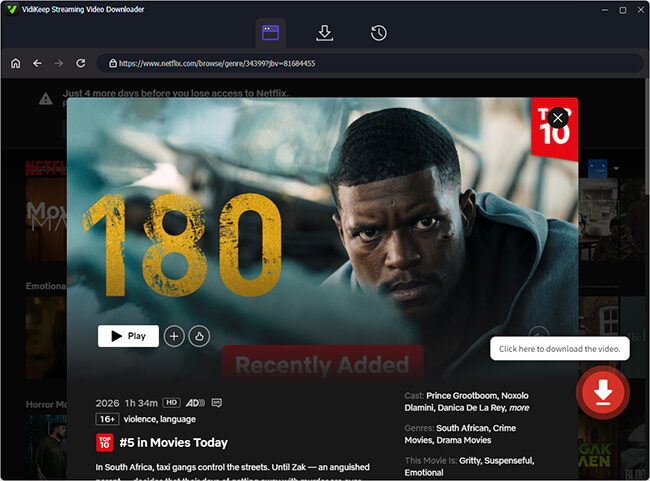
If you'd rather watch downloaded videos on a laptop or transfer them to a compatible TV for offline playback, VidiKeep Streaming Video Downloader is another option worth considering. Available for Windows and macOS, it lets you save Netflix movies and episodes as MP4 or MKV files in up to 1080p, with multilingual audio tracks and subtitles preserved.
Keep in mind that VidiKeep is a preparation tool, not a fix for NW-2-5 itself. You'll need to download your Netflix shows on your Windows or Mac beforehand over a stable internet connection so they're ready to watch when your network isn't cooperating.
Seeing a Different Netflix Error Code?
If you hop over to a laptop to test your account and run into a different code, the issue is likely tied to your browser or local cache rather than a TV network timeout. Here is how NW-2-5 stacks up against other common Netflix codes:
| Netflix Error Code | Primary Device | Core Cause |
|---|---|---|
| NW-2-5 | Smart TVs, Consoles, Streaming Sticks | Device connection timeout to Netflix servers |
| UI3012 | Computers and Web Browsers | Local network connectivity issue preventing a computer from reaching Netflix |
| E109 | Web Browsers | Browser version is outdated or no longer supported by Netflix |
| M7361 | Google Chrome (PC, Mac, Chromebook) | Chrome requires an update or stored device data needs a refresh |
FAQs About Error Code NW-2-5 on Netflix
What does Netflix error code NW-2-5-1 mean?
NW-2-5-1 is simply a subvariant of the standard NW-2-5 error. It points to the exact same connection timeout, so you can follow the same steps above, starting with a cold boot and an automatic DNS check.
Can deleting and reinstalling the Netflix app fix NW-2-5?
It can help on streaming sticks like Roku, Fire TV, or Apple TV if corrupted app files are blocking the handshake. Many Smart TVs come with Netflix preinstalled and will not let you uninstall it completely. On those sets, checking for an app update or running a Smart Hub refresh does the same job.
Does switching between 2.4GHz and 5GHz WiFi help stop NW-2-5?
Yes, especially if your TV sits in a bedroom or basement far from the router. While 5GHz WiFi delivers higher peak speeds, its signal drops off quickly through thick walls and floors, which can trigger timeouts. Moving a distant TV onto your router's 2.4GHz band often gives Netflix a much steadier connection.

Jordan Rhodes is a Chief Technical Editor and Media Specialist at VidiKeep, specializing in creating diverse tech content, including streaming tutorials, software reviews, and video encoding tips.
Leave a Comment