How to Download Movies and Shows on HBO Max to Watch Offline
Want to watch HBO Max shows on a plane, during a road trip, or somewhere without a reliable internet connection? HBO Max (formerly Max) lets eligible subscribers download selected movies and TV episodes to their phones and tablets for offline viewing. However, downloads come with some restrictions: no official laptop downloads, not every subscription includes this feature, not every title is downloadable, and downloaded videos eventually expire.
During my recent tests preparing for a long trip, I tested both the official HBO Max offline downloads and a dedicated desktop tool called VidiKeep to see how to get the smoothest offline experience on any device. Here is my complete guide on how to download HBO Max movies and TV episodes to your phone, PC, and Mac for offline viewing without running into unexpected errors mid-flight.

Can You Officially Download Shows and Movies on HBO Max on Your Device?
Here’s the quick answer: Yes, but only on phones and tablets. When I tested this across my gear, the HBO Max app on iOS, Android, and my Amazon Fire Tablet handled downloads smoothly. However, if you’re hoping to save a movie directly to your MacBook, Windows laptop, or Smart TV, you’re out of luck. HBO Max’s official offline feature simply doesn’t exist for desktop browsers or TV apps.
You also need to check your tier, as download limits are tied directly to your HBO Max plan:
- Basic with Ads: 0 downloads (offline viewing isn't supported).
- Standard Plan: Up to 30 downloads at one time.
- Premium Plan: Up to 100 downloads at one time.
A Quick Heads-up From My Experience:
These limits apply across all mobile devices tied to your account combined. When I was setting up my phone, I kept getting an error message saying I had hit my download quota, only to realize my iPad on the nightstand still had a dozen episodes saved from a trip three months ago!
How to Download HBO Max Shows/Movies on Phone & Tablet
If you just want to watch movies on your iPhone, Android, or Amazon Fire Tablet, the official HBO Max app does the trick. The download process itself is pretty straightforward once you know where to look:
Download Shows on HBO Max on iPhone/iPad/Android/Amazon Fire Tablet
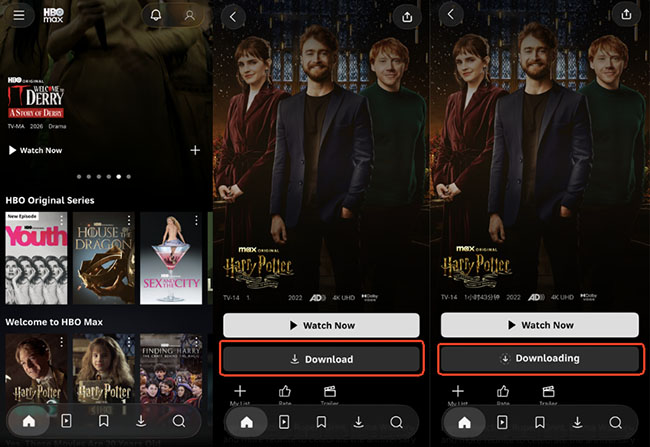
- Fire up the HBO Max app on your phone or tablet. Search for the movie or show you want to grab.
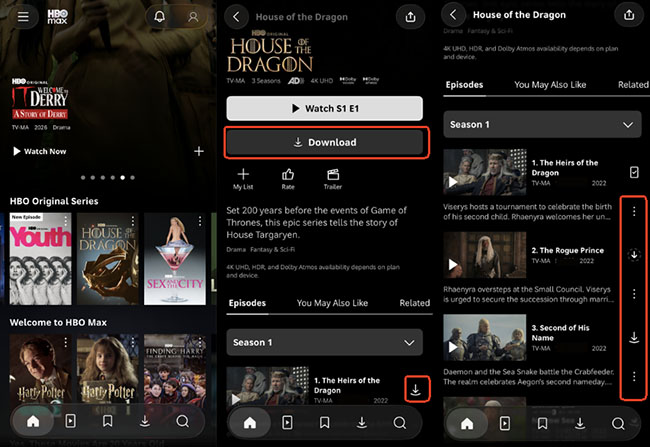
- On a video page, you’ll see a clear downward-arrow Download icon. For TV series, scroll down to the episode list, there's a download arrow right next to each individual episode.
- Tap the arrow, and you'll see a progress ring fill up. Keep the app open until it finishes, switching to heavy apps or dropping Wi-Fi mid-way can pause or fail the download.
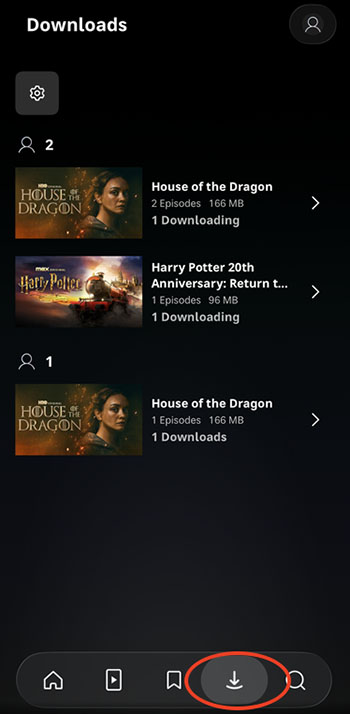
- Go to the Downloads tab at the bottom of the screen to start watching HBO Max content offline.
Here's a Trick I Learned the Hard Way:
If you want a specific audio track or non-English subtitles, start playing the video for a few seconds, set your audio/subtitle preferences in the player, and then hit download. HBO Max generally saves your last-used language preference along with standard closed captions.
The Official Mobile Limits You Should Know:
This is where most people get tripped up. HBO Max downloads aren't permanent MP4 files; they come with two ticking clocks:
- The 30-Day Window: Unwatched downloads stay on your device for up to 30 days. If you download a batch of movies a month before your vacation, they might expire right when you step onto the plane.
- The 48-Hour Playback Trap: The moment you hit "Play" on a downloaded title, a 48-hour timer starts. Once those 48 hours are up, the download expires, even if you only watched the intro credits.
 Pro-Tip for Traveling:
If a download expires while you're away, don't panic. As long as you can hop onto hotel or airport Wi-Fi for just a few seconds, you can go to your Downloads tab, tap the expired icon, and select Renew Download.
How to Download HBO Max Movies/Episodes on MacBook and Windows Laptop
Here’s the biggest drawback of HBO Max: there is no official desktop app or web feature to download movies to a Windows PC or Mac. If you prefer watching on a larger laptop screen while traveling, or if you want to keep permanent copies without expiration timers, the official mobile app falls short.
To solve this, I tested VidiKeep HBO Max Video Downloader on my computer. It bypasses desktop restrictions by downloading movies and TV series directly as DRM-free MP4 or MKV files in up to 1080p HD quality.
- No Expiration Timers: Once downloaded, the videos are yours permanently. They won't disappear after 48 hours or leave your library if titles leave HBO Max.
- Bypasses Plan & Quantity Limits: Works regardless of your account download quota, and you aren't capped at 30 or 100 titles.
- Multi-Language Audio & Subtitles: In my tests, VidiKeep preserved full original audio tracks and multilingual subtitles (you can save them as soft subtitles, hardcoded, or external SRT files).
- Flexible Storage: You can save files directly to external hard drives or USB flash drives to free up space on your laptop.
How I Download HBO Max Stuff on PC/Mac with VidiKeep
Step 1. Install VidiKeep HBO Max Video Downloader on your Windows PC or Mac and launch the software. Log in to your HBO Max account using the built-in browser interface inside VidiKeep.
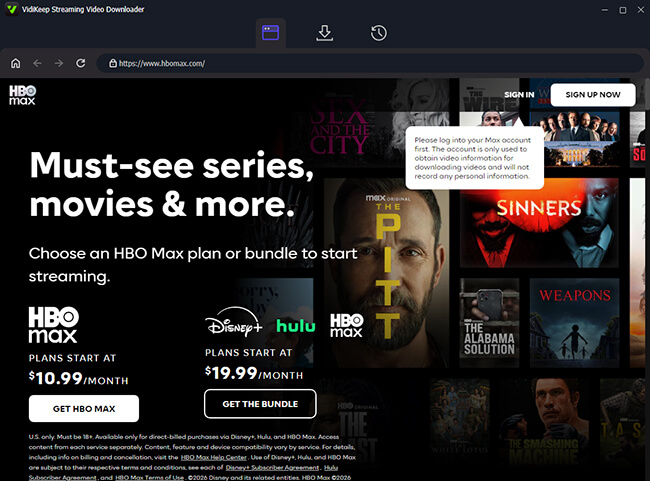
Step 2. Type the movie title or paste the video URL directly into VidiKeep's search bar to add them to the download queue. In the same window, you can customize video quality (up to 1080p), audio language, and subtitle preference.
Step 3. Click the Download button. For TV shows, you can select specific episodes or batch-download an entire season at once.

When testing a full-length 1080p movie, the GPU hardware acceleration speed was noticeably fast, saving a clean MP4 file that played flawlessly on both QuickTime and VLC media players without needing an internet connection.
Compare Your Options to Watch HBO Max Offline: Mobile App vs. VidiKeep
| Feature | Official HBO Max App | VidiKeep HBO Max Downloader |
|---|---|---|
| Supported Devices | iOS, Android, Fire Tablet | Windows PC, Mac |
| Output Video Format | Encrypted App Files | MP4 / MKV |
| Video Quality | Up to 1080p (Mobile) | HD 1080p |
| Download Expiration | 30 days (or 48h after play) | Never Expires |
| Device Transfer | Restricted to app | USB, External Drive, TV, iPad |
| Download Limits | 0 to 100 (Plan dependent) | Unlimited |
How to Manage Your HBO Max Video Downloads
During my testing, I realized that default download settings aren't always ideal. High-definition video files are massive, and a few hours of television can quickly eat up your phone's available storage. Managing your data and quality settings is essential for a smooth viewing experience.
Adjust Video Quality to Save Device Storage
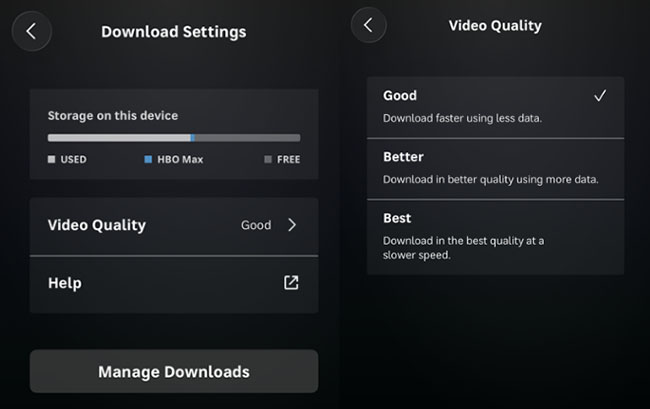
By default, Max downloads content in "Good" quality, which uses approximately 1 to 2 GB of storage per hour of video. If you want sharper visuals or need to aggressively compress file sizes, you can change this setting.
- Tap your profile icon in the Max app.
- Navigate to App Settings, and then tap Download Settings.
- Select Video Quality and choose between Good, Better, or Best.
Download HBO Max Over Wi-Fi Only to Protect Your Cellular Data
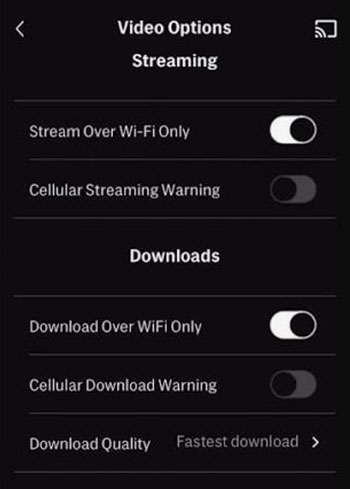
Downloading a single movie over your cellular network can quickly burn through your monthly data cap. It is highly recommended to restrict the app so it only downloads content when connected to a Wi-Fi network. You can enforce this by navigating to Profile > App Settings > Download Settings and toggling on the Download Over Wi-Fi Only option.
Troubleshoot Common Problems (And My Secret "Flight Prep" Routine)
Nothing is more frustrating than settling into your plane seat, turning on Airplane Mode, and having the app throw an error. In my testing, I found a few quirks that are easy to fix:
App Demands an Internet Connection?
Sometimes HBO Max gets confused when transitioning offline. My foolproof pre-flight routine: While still connected to home Wi-Fi, I open the HBO Max app, go to the Downloads tab, and play 5 seconds of every video I plan to watch. Once I verify they play smoothly, I manually switch my phone to Airplane Mode to test them offline before stepping out the door.
Downloads Fail Repeatedly?
Android users, in particular, can run into cache bloat. Go to your phone's Settings > Apps > HBO Max > Storage, and tap Clear Cache (be careful not to click "Clear Data", or you'll have to log back in).
Out of Space?
HBO Max downloads save strictly to internal storage, it won't let you target an external SD card. You'll need to clear out old podcasts, photos, or previously watched episodes inside the app to free up room.
Download Limit Reached?
If you see a "Download Limit Reached" error, deleting local photos will not help. This means your Max account has hit its 30 or 100 title cap. You must open the Max app on the other devices sharing your account and delete the downloaded shows sitting on those specific tablets or phones.
FAQs About Download on HBO Max to Watch Offline
Why can't I download anything on HBO Max?
The HBO Max download button missing is usually caused by one of four things:
- You are on the "Basic with Ads" tier (which doesn't support downloads);
- You are using an unsupported device (like a laptop browser or smart TV);
- Your account has hit its maximum download limit (30 or 100 titles);
- That specific movie/show is restricted from offline viewing due to licensing agreements.
Can you transfer HBO Max downloads to a USB drive?
No. Official downloaded files can only be played inside the official Max app. They cannot be exported, copied, or moved to external storage. However, HBO Max downloads via VidiKeep can be transferred to USB drive.
How long do HBO Max downloads last?
Unwatched downloads remain on your device for up to 30 days. However, once you press play, you have exactly 48 hours to finish watching. Expired downloads can be renewed inside the app if you connect to the internet.
Can you download HBO Max movies without Wi-Fi?
Yes. Open the Max app, navigate to Settings > Downloads, and turn off the "Download Over Wi-Fi Only" toggle to use your cellular data instead.
Can you watch HBO Max downloads in Airplane Mode?
Yes. While your device is in Airplane Mode, simply open the Max app and tap the "Downloads" icon to access and play your saved offline library.
Final Thoughts
If you're heading out on a trip and only need a couple of episodes on your phone, the official HBO Max app is quick and simple. However, if you want to watch shows on a laptop screen, build a permanent media library without 48-hour expiration clocks, or bypass subscription download quotas, VidiKeep HBO Max Video Downloader is by far the most versatile tool for the job.
Pick your method, grab your downloads over home Wi-Fi the night before you leave, and enjoy uninterrupted binge-watching wherever you go!

Jordan Rhodes is a Chief Technical Editor and Media Specialist at VidiKeep, specializing in creating diverse tech content, including streaming tutorials, software reviews, and video encoding tips.
Leave a Comment