Get Netflix Unblocked at School/Anywhere [Verified Ways]
My school's WiFi blocks Netflix. I have a long lunch break and a couple of study halls where I actually finish my work early, and I just want to watch a show on Netflix to pass the time. Any reliable workarounds to get around these blocks on campus network?
Netflix is one of the most commonly blocked streaming websites on school, workplace, and public WiFi networks. Many users discover that Netflix works perfectly on mobile data at home, but suddenly refuses to load on a school Chromebook, library computer, or campus WiFi connection.
Network administrators often has restricted Netflix access to preserve bandwidth, eliminate distractions, or enforce school internet policies. Fortunately, there are still several legitimate ways to unblock Netflix on restricted networks depending on your device and the type of block being used. In this guide, we will explains why Netflix gets blocked, show you exactly how to get Netflix unblocked at school, work, or anywhere else, common troubleshooting steps, and what to expect when using VPNs, hotspots, or other streaming workarounds.
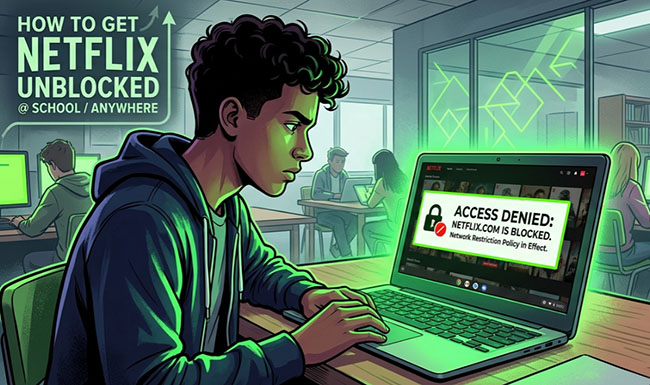

Part 1. Why Is Netflix Blocked at School or on Public WiFi?
To bypass an enterprise-grade network restriction, you must first understand the defensive framework used by system administrators. Institutional Wi-Fi systems are not merely blocking web URLs; they use a multi-tiered array of perimeter security measures to filter incoming and outgoing packets.
Network Restrictions:
Enterprise networks use policy enforcement nodes that parse individual device metrics. When you connect a smartphone, tablet, or laptop to a campus network, your hardware is assigned a localized IP address subject to specific network access profiles. These profiles dictate what external network gateways your device can reach, checking every request against rigid compliance engines before routing data to the wider web.
Firewalls and DNS Filtering:
Firewalls form the frontline boundary of network security. Modern school systems heavily rely on DNS (Domain Name System) Filtering. When your browser requests access to netflix.com, your device asks a local DNS server to translate that text address into an IP route. A DNS filter intercepts this request, checks it against an institutional blocklist, and intentionally fails the lookup, serving a generic error or loopback page instead.
Bandwidth Management:
High-definition (HD) video streams require roughly B_HD = 3 GB/hr of concurrent downstream data transfer, while Ultra-HD 4K demands upwards of B_4K = 7 GB/hr. Network engineers calculate the total infrastructure load using the formula: W_total = N_students * B_stream. Because a high W_total easily cripples educational platforms, administrators use automated packet queuing to block streaming platforms to preserve network performance.
 Why Streaming Sites Are Commonly Blocked:
While productivity management and distraction mitigation remain core cultural reasons, the baseline driver for blocking Netflix remains network capacity and acceptable-use compliance. Under institutional regulations, administrators are legally and structurally incentivized to prioritize educational software distributions, standard communication portals, and research databases over commercial content delivery networks (CDNs).
Part 2. Quick Method Comparison of Netflix Unblocked at School/Anywhere
Before deploying a specific workaround, use this matrix to match the best solution to your current network restrictions and device permissions.
| Unblocking Method | Success Rate | Setup Complexity | Best For | Main Limitation |
|---|---|---|---|---|
| Premium Obfuscated VPN | High | Medium | Personal Laptops & Smartphones | Can be blocked if obfuscation is disabled |
| Mobile Hotspot | Max | Low | Bypassing school network entirely | Consumes mobile data plans |
| Offline Downloads | Max | Low (Pre-planned) | 100% foolproof, zero-data viewing | Requires downloading at home in advance |
| Smart DNS | Medium | High | Bypassing basic geo/DNS blocks | Fails against advanced DPI firewalls |
| Browser Extensions | Low | Low | Unlocked personal browsers | Easily tracked and blacklisted by IT |
Tips:
While official Netflix apps allow offline downloading, they enforce rigid limits: Your downloads will automatically expire after 48 hours to 30 days, cannot be transferred to unapproved hardware (like school Chromebooks or certain MP4 players), and are restricted by your specific plan type.
To get rid of these restrictions, you can use VidiKeep Netflix Video Downloader to convert Netflix videos to MP4 or MKV for offline viewing without any limit.
Part 3. Fast Way to Unblock Netflix at School/Anywhere with VPN
If you are just looking for the fastest way to bypass the network blocks and start watching immediately, a premium Virtual Private Network (VPN) with stealth capabilities is your best Netflix unblocker. A VPN encrypts your internet traffic and routes it through an external server, hiding your online activity from the local network administrators. Follow these simple steps to get connected right now:
How to Use VPN to Access Netflix
Step 1. Sign up for a reputable, premium VPN that explicitly offers "obfuscation" or stealth servers.
Step 2. Download and install the VPN application on your phone, laptop, or tablet.
Step 3. Open the application and navigate to the settings menu to enable the stealth or obfuscation feature.
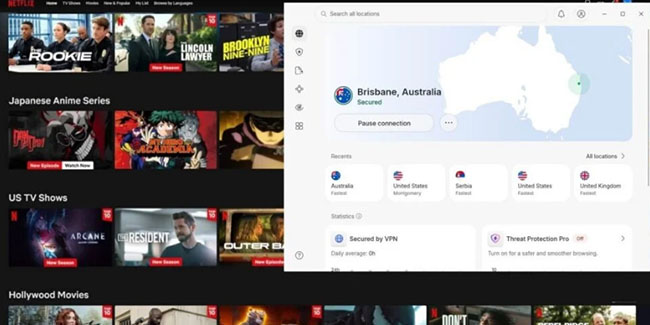
Step 4. Connect to a server located in your home country to ensure you access your standard Netflix library.
Step 5. Verify your secure tunnel connection, then launch your browser or native Netflix app to begin streaming.
 Important Subscription & Live Event Limitations
- Ad-Supported Plans: Watching Netflix while connected to a VPN is explicitly not supported on Netflix's ad-supported subscription tiers.
- Live Events: Netflix restricts the streaming of live broadcast events entirely while a VPN connection is active.
 Editor's Test Result:
To cut through the noise, we ran rigorous stress tests on popular VPNs within a campus network protected by Deep Packet Inspection (DPI) firewalls. Unsurprisingly, relying on free tools to stream for zero dollars is a dead end.
| VPN & Version | Campus Connection Success Rate | Average Buffering Time | Core Test Conclusion |
|---|---|---|---|
| NordVPN (Paid + Obfuscation On) | 90% | ~3 seconds | Highly Recommended. Once Obfuscated Servers are enabled, it perfectly disguises your traffic. Netflix detection rates are extremely low, and 4K streaming is completely lag-free. |
| Proton VPN (Free Version) | 0% | Fails to load | Completely Ineffective. Free node IPs were blacklisted by Netflix a long time ago. Plus, the free tier doesn't include anti-blocking obfuscation protocols, meaning it can't even get past the campus firewall. |
Why Are Many Free VPNs Not Working with Netflix?
Modern network firewalls are much smarter than they used to be. Schools and enterprise workplaces now use a technology called Deep Packet Inspection (DPI). While a basic firewall only looks at where your internet traffic is going, DPI actually looks inside the data packets to see what kind of traffic it is.
If the network detects the unique signature of a standard VPN protocol or a streaming service, it immediately drops the connection. This is exactly why most free proxy websites and cheap VPNs fail instantly on a school network.
Top 3 VPNs to Bypass Netflix Blocks
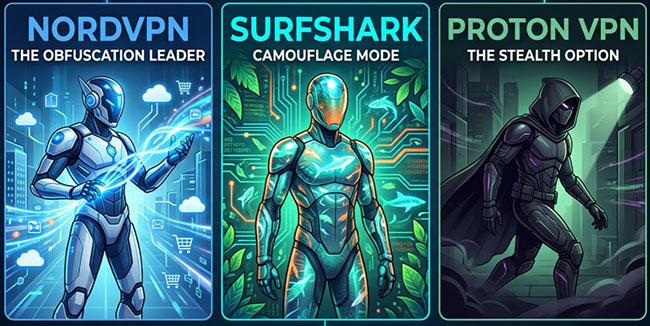
To reliably get Netflix unblocked anywhere, you need a provider that specifically invests in anti-censorship and obfuscation technologies. Based on current network restrictions, these three services stand out.
- NordVPN: The Obfuscation Leader
- Surfshark: Camouflage Mode
- Proton VPN: The Stealth Option
| Feature | NordVPN | Surfshark | Proton VPN |
|---|---|---|---|
| Performance | ⭐⭐⭐⭐ | ⭐⭐⭐⭐ | ⭐⭐⭐ |
| Reliability | ⭐⭐⭐⭐ | ⭐⭐⭐⭐ | ⭐⭐⭐ |
| Unblocks Netflix | Yes (Bypasses proxy errors effortlessly) | Yes (Thrives on restricted school Wi-Fi) | Paid Plan Only (Free tier explicitly blocks streaming) |
| Total Servers | 6,400+ Global Servers | 3,200+ Global Servers | 8,500+ Global Servers |
| Device Limit | 10 Devices Simultaneously | Unlimited Devices Simultaneously | 10 Devices (Paid) / 1 Device (Free) |
| Free Trial / Tier | No (30-Day Money-Back Guarantee) | No (30-Day Money-Back Guarantee) | Yes (Permanent Free Tier with limited servers) |
| Pricing | $11.99/month | $15.45/month | $9.99/month |
| Supported Platforms | Windows, macOS, iOS, Android, Linux, Routers | Windows, macOS, iOS, Android, Linux, Routers | Windows, macOS, iOS, Android, Linux, Routers |
| Payment Options | Credit Cards, PayPal, Amazon Pay, Cryptocurrencies | Credit Cards, PayPal, Google Pay, Cryptocurrencies | Credit Cards, PayPal, Bitcoin, Cash |
Tips: How to Fix Netflix Proxy Error (M7111-5059) When Using VPN
- Clear Browser Data: Netflix tracks your location via cache. Press F12, go to Application, and clear both Local Storage and Cookies. Then, reopen Netflix in an Incognito window.
- Switch to Obfuscated Servers: Standard VPN traffic is easily flagged by strict networks. In your VPN settings, switch the protocol to OpenVPN (TCP) and select an Obfuscated Server to disguise your VPN traffic as regular web browsing.
- Change to Port 443: Networks often block custom VPN ports. Go to your VPN's advanced settings and manually set the connection port to 443. This is the standard port for all secure web traffic (HTTPS), making it much harder for firewalls to block without shutting down internet access entirely.
Part 4. Other Ways to Get Netflix Unblocked for School/Anywhere With No VPN
Sometimes, installing a system-level VPN just is not possible, especially if you are using a locked-down school Chromebook or a heavily restricted library computer. In these cases, you have a few alternative workarounds to access Netflix unblocked website.
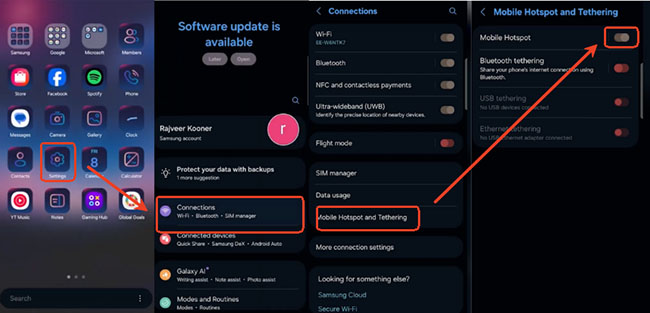
2. Try a Mobile Hotspot
If your device is locked but you have a good cellular data plan, the absolute easiest bypass is to remove the school's Wi-Fi from the equation entirely. Turn on the mobile hotspot feature on your smartphone and connect your laptop or tablet directly to your cellular network. Just keep a close eye on your data limits. Streaming high-definition Netflix video can burn through a data cap very quickly.
3. Watch Downloaded Netflix Videos Offline
The most reliable workaround avoids using the school's network infrastructure during the school day entirely. By planning your viewing schedule ahead of time, you can log into the Netflix app on your personal device while connected to your home Wi-Fi network and download your selected content to local storage.
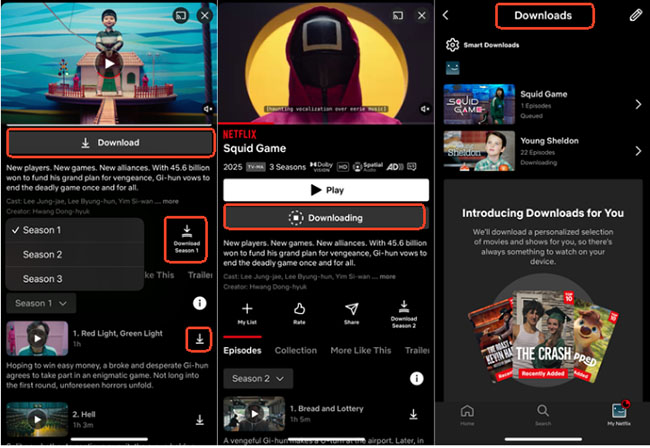
| Storage Profile | Expiration Rules | Network Access Required |
|---|---|---|
| Standard Offline Saving | 7 to 30 Days (Varies by Licensing) | None (Zero Data Loop) |
| Active Playback Window | 48 Hours (Post-Initiation) | None (Zero Data Loop) |
Bonus Tips: Bypass Expiration and Device Limits with VidiKeep
To remove these download and playback limitations completely, you can utilize a third-party Netflix downloader, like VidiKeep. By processing and downloading Netflix movies and TV shows to local MP4 or MKV video files, you bypass licensing expiration timers entirely. This allows you to permanently keep your Netflix files offline and transfer your favorite shows to watch on absolutely any device without needing active internet verification or triggering network monitoring tools.
Once saved to your storage drive, these assets play natively without demanding an active internet connection. This completely eliminates data plan consumption and clears any risk of triggering campus network alerts.
4. Use a Smart DNS Service
Unlike a VPN, a Smart DNS service does not route your whole data payload through an intermediary node or encrypt your online activity. Instead, it selectively intercepts and alters only the specific destination-identifying DNS requests sent by your device.
Step 1. Sign up for a Smart DNS provider.
Step 2. Find the network settings on your device and locate the DNS configuration options.
Step 3. Replace the default DNS addresses with the specific numbers provided by your Smart DNS service.
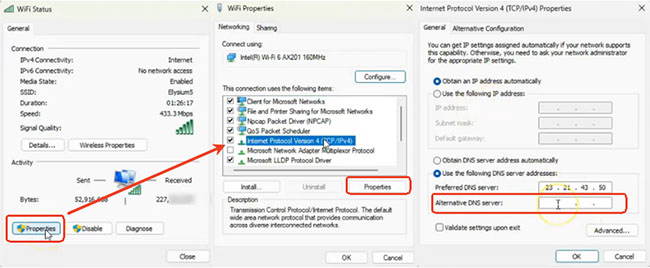
Because it does not use encryption, Smart DNS is generally faster than a VPN, making it great for high-quality streaming. However, if the school's network forces all traffic through its own DNS servers, this method might still get blocked.
5. Use Browser Extensions
For devices with limited user privileges, lightweight browser proxy extensions can bypass localized domain blocks. These tools run exclusively inside the web browser layer, proxying requests for web page assets through alternative web paths. While simple to deploy from the Chrome Web Store, these extensions are highly susceptible to signature tracking, meaning campus security appliances can quickly identify and block them over time.
Part 5. FAQs About Unblocked Netflix
Can schools legally block Netflix?
Yes. Educational institutions own and operate their local network infrastructure. They maintain complete legal and operational authority to manage network traffic, set acceptable-use guidelines, and restrict access to any external domains or services they choose.
Why does Netflix work on mobile data but not school WiFi?
Mobile data routes traffic directly through your cellular carrier's independent cell towers, completely bypassing the school's local routers, firewalls, DNS servers, and network-level blocklists.
What is Netflix Unblocked 66 and does it actually work?
Netflix Unblocked 66 is a search term used by students looking for Netflix mirrors via "Unblocked Games 66", a Google Sites directory made for lightweight school browser games. Because Netflix requires advanced Widevine DRM decryption and WebSockets to stream, basic web proxies and gaming clones cannot process the video.
Does Netflix block all VPNs?
No. While Netflix targets commercial data center networks, high-end premium VPN services successfully bypass these blocks by constantly routing traffic through fresh, private residential IP addresses that look exactly like normal household internet connections.
Why does Netflix say I'm using a VPN when I'm not?
This alert triggers when Netflix's automated security systems identify your current IP address as belonging to a commercial VPN provider, data center, or routing proxy. It can also happen on non-VPN connections if your ISP uses a shared IP pool or if background privacy tools like Apple Private Relay are active.
What should I do if I get the Netflix streaming error?
If Netflix detects that you are using a proxy or VPN, it will display a streaming error and block the video. To fix this, simply disconnect your VPN, choose a different server location within the same country, clear your browser cache, and reload the page.
Can I unblock Netflix on a school Chromebook?
Only by utilizing external workarounds, you can watch Netflix on school Chromebook. Because institutional Google Workspace policies completely lock down system settings, extension installations, and application permissions, direct software modifications are impossible. Bypassing restrictions requires routing via an external mobile hotspot, VidiKeep, or a portable hardware travel router.
Is it legal to unblock Netflix at school?
Yes, using a VPN to bypass network restrictions is perfectly legal in most countries, including the United States and Europe. However, circumventing firewalls usually violates your school or workplace's Acceptable Use Policy, which could result in disciplinary action if you are caught.
Part 6. In Conclusion
Getting Netflix unblocked at school or on restricted networks depends largely on the type of network restrictions and device limitations involved. While premium VPN services with built-in obfuscation easily slice through standard firewall restrictions on personal devices, more restrictive setups, like school-issued Chromebooks, require smart workarounds like mobile hotspots or pre-downloading your shows via VidiKeep for offline viewing.
Always weigh these technical workarounds against your institution's acceptable-use guidelines, and opt for reliable, secure methods to ensure your Netflix streaming breaks remain entirely private, safe, and uninterrupted.

Jordan Rhodes is a Chief Technical Editor and Media Specialist at VidiKeep, specializing in creating diverse tech content, including streaming tutorials, software reviews, and video encoding tips.
Leave a Comment