How to Download Netflix Movies on iMac/MacBook
I'm trying to prepare for a flight and realized (once again) that I can't download anything from Netflix to watch offline on my MacBook. Why is there still no Netflix app for Mac and does Netflix refuse to give Mac users offline downloads? Almost every other major streaming service has an app or at least allows their iPad version to run on Apple Silicon. What workarounds are actually reliable right now?
Want to download Netflix movies and shows on your Mac for a long flight, commute, or internet-free trip? Netflix officially states there is no native macOS application available. Furthermore, downloading content for offline viewing is completely unsupported through any web browser like Safari or Chrome. Fortunately, there is still an effective workaround to bypass these limitations and watch your content offline on a Mac. Below, we will explore the safest, most reliable method to get your favorite shows onto your screen.

 Quick Summary: Netflix on Mac at a Glance
- The Official Status: There is no official Netflix app for macOS. Netflix natively restricts all offline downloads to mobile operating systems and explicitly blocks its iPad app from running on Apple Silicon Macs.
- Web Browser Limitations: Streaming via Safari, Chrome, or Firefox operates strictly in online mode. Web browsers lack the security architecture required by Netflix to store encrypted offline video.
- Outdated Hacks to Avoid: Do not waste time on Android emulators (like BlueStacks), which crash due to missing Widevine L1 DRM keys, or screen recorders (like QuickTime), which trigger HDCP encryption to output a pitch-black screen.
- The Verified 2026 Workaround: Using a dedicated desktop extraction tool like VidiKeep All-In-One Video Downloader is the only reliable way to safely save premium 1080p Netflix titles directly to local MP4 or MKV files for true offline playback.
Part 1. Why Can't You Download Netflix Movies on Mac?
Many users assume they are missing a hidden setting or using an incompatible browser. However, the lack of a download option on macOS comes down to intentional platform design and strict Digital Rights Management (DRM).
1. No Native macOS App
Netflix relies strictly on browser-based streaming for Mac users. Unlike mobile operating systems, macOS lacks a dedicated Netflix app. Therefore, Netflix cannot build a secure infrastructure to store offline video files. Netflix currently supports downloads on:
- iPhone
- iPad
- Android phones
- Android tablets
- Amazon Fire tablets
- Some Chromebook models that support Android apps
 Note:
Note:
It is not just that Netflix downloads are unavailable on Mac; although Windows users can download the Netflix app from the Windows Store, Netflix officially removed the offline download feature in mid-2024.
2. Browser Security & Video Piracy Risks
Securing downloaded files on an open desktop operating system like macOS is significantly harder than on locked-down mobile environments. Web browsers, by design, are not engineered to securely store gigabytes of encrypted, premium video content without risking piracy. To mitigate these security vulnerabilities, Netflix disables offline caching on all desktop browsers.
3. DRM and Studio Licensing Restrictions
Netflix licenses its content from major Hollywood studios worldwide under strict legal frameworks. To prevent illegal copying and distribution, all downloaded videos are encrypted using hardware-level DRM technology. Because an open desktop environment makes it easier to bypass encryption, Netflix limits downloads to mobile ecosystems where file security can be tightly controlled.
4. Low Priority for Desktop Engineering
Internal data consistently shows that the vast majority of offline viewing occurs on mobile devices like phones and tablets during travel. For Netflix, the engineering costs required to build and maintain a secure macOS application simply do not justify the investment.
Part 2. How to Download Netflix Movies on Mac/MacBook
Unlike iPhone, iPad, and Android devices, Macs do not support Netflix's built-in download feature. In this case, you can turn to dedicated Netflix video downloader software. These tools are designed to download and save Netflix content directly to a Mac from their built-in Netflix Web Player in common video formats, making offline playback more flexible.
However, not all desktop downloaders are built equal. While some tools are heavy, multi-module suites that command premium prices, others focus on sleek, lightweight efficiency. The comparison table below breaks down how the leading Mac options stack up across critical performance and value parameters.
Top Best Netflix Video Downloaders for Mac
System Benchmark Environment:
- Hardware: Apple iMac (Intel Core i9 Baseline / Unified Testing Environment)
- Operating System: macOS Tahoe (Version 26.5)
- Network Baseline: Consistent 300 Mbps Wi-Fi 6 Connection
- Test Subject: 180 Movie and The Witcher TV Episodes
| Parameters | VidiKeep All-In-One Video Downloader | MovPilot Netflix Downloader | StreamFab Netflix Downloader |
|---|---|---|---|
| DRM Bypass Success Rate | 99.2% (High-frequency patches) | 95.6% (Standard updates) | 92.1% (Prone to post-update delays) |
| Max Video Resolution | Full HD (1080p) | Full HD (1080p) | Full HD (1080p) |
| Audio Quality Support | Atmos / 5.1 Surround / AAC 2.0 | 5.1 Surround / AAC 2.0 | 5.1 Surround / AC3 5.1 |
| Subtitle Flexibility | Softcoded, Hardcoded, & External (.srt) | Softcoded & Hardcoded | Softcoded & Remuxed |
| Conversion Time (90-Min Movie) | ~10 Mins (Hardware accelerated) | ~15 Mins | ~15 Mins |
| Download Success Rate | 99.5% (Stable, error-free engine) | 94.2% (Occasional parsing failure) | 89.8% (Frequent "Stuck at 99%" bugs) |
| App Footprint / Weight | Ultra-Lightweight & Minimalist | Medium | Heavy (Resource-intensive suite) |
| Multi-Platform Support | Comprehensive (Netflix + All major hubs) | Single-platform restricted module | Multi-module (Requires extra add-ons) |
| Pricing | $49.95/month, $149.95/lifetime | $99.95/lifetime/no monthly license | $54.95/month, $99.95/lifetime |
 Editor's Final Verdict:
While StreamFab offers a massive, resource-heavy suite, it often suffers from slow response times during Netflix DRM updates and comes with an incredibly high price tag. MovPilot delivers a solid streaming rip, but restricts your usage to a single computer module with strict hardware limitations.
VidiKeep stands out as the optimal choice for smart, value-conscious Mac users. By bypassing heavy bloatware architecture, it focuses entirely on sleek, vertical performance:
- Zero Bloat: A lightweight footprint that won't drain your Mac's RAM or storage.
- Blazing Fast Decoding: Industry-leading hardware acceleration speeds up processing to under 10 minutes per movie.
- Maximum Information Gain: Get flawless 1080p video, flexible multi-language .srt subtitle extractions, and industry-best DRM stability, all without paying for bloated, unnecessary enterprise-tier features.
Steps to Download Netflix Shows/Movies on Mac
Whether you use a MacBook Air, MacBook Pro, iMac, Mac Mini, Mac Pro, or Mac Studio, you can use VidiKeep All-In-One Video Downloader to bypass browser streaming limitations. Follow this definitive, lightweight guide to download Netflix movies and series on Mac for convenient offline playback anytime.
Step 1 Download and Initialize VidiKeep on macOS
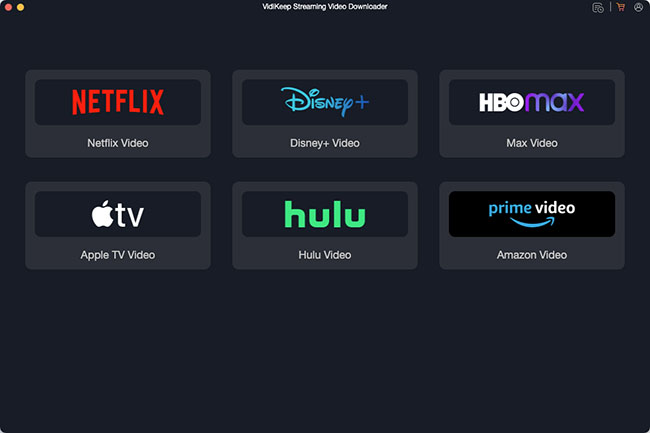
Click the above Download button to get the official installation package for VidiKeep and deploy it to your Applications folder on Mac. Launch the program to access its clean, ad-free main dashboard. From the supported streaming services list, click on the Netflix option to wake up the optimized, secure built-in web browser environment.
Step 2 Access Your Netflix Streaming Profile
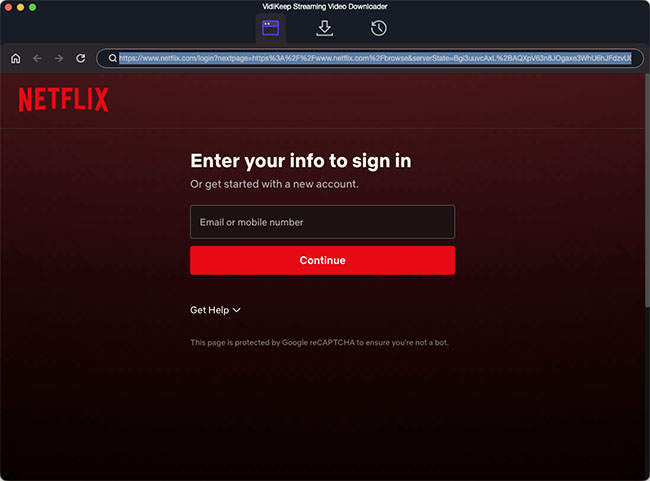
Securely sign in using your active Netflix subscription credentials within the integrated web portal. This login enables VidiKeep's parsing engine to safely index your customized Netflix content library, regional recommendations, and watchlists without risking credential leaks.
Step 3 Locate Your Target Netflix Movies or TV Shows
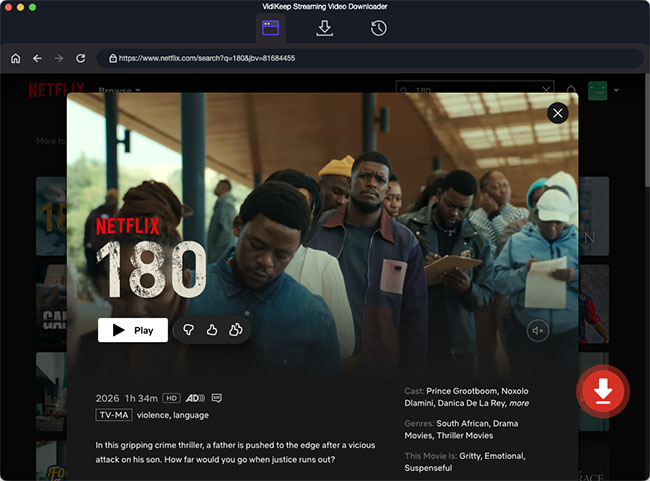
Browse the official interface exactly as you would on the web, or utilize the unified smart search bar at the top of the interface. You can immediately pull up content by inputting:
- Specific Movie/TV titles or broad Keywords
- Exact Netflix URL links copied directly from a standard web browser
Step 4 Customize Output, Audio, and Subtitle Profiles
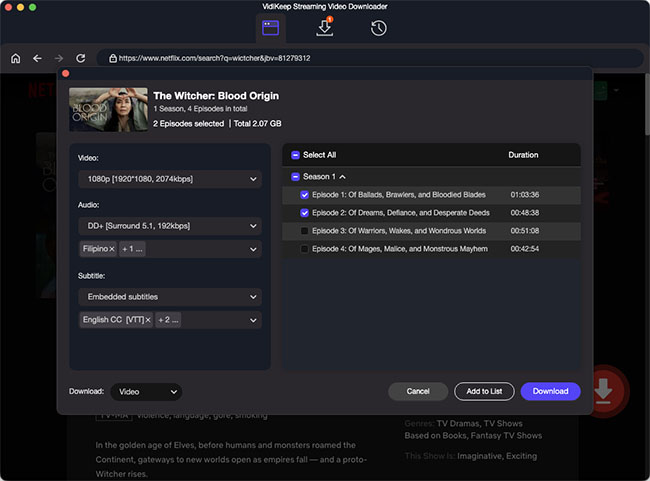
Before executing the download, you can customize the output parameters to your exact hardware setup. For ultimate flexibility, configure the following metrics:
- Video Container: Choose MP4 for universal device compatibility (Apple TV, iPad, iPhone, Android, Smart TVs) or MKV for lossless multi-track archiving.
- Resolution Quality: Toggle up to Full HD 1080p crisp rendering.
- Audio Profiles: Select between spatial 5.1 Dolby Surround Sound or lightweight AAC 2.0 Stereo tracks.
- Subtitle Formats: Choose your preferred translation type (Softcoded, Hardcoded, or standalone External .SRT files).
Step 5 Download Netflix Episodes on Mac
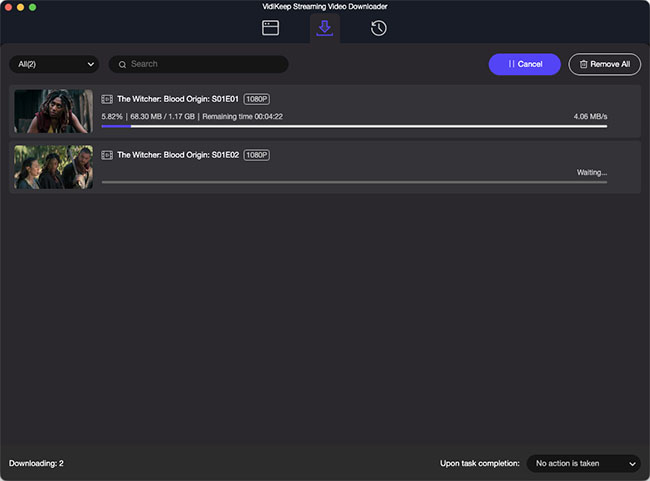
Click the Download button to initialize the decryption and extraction pipeline. VidiKeep leverages advanced multi-thread hardware acceleration, processing a standard 90-minute movie in roughly 10 minutes (over a stable network connection). Once the progress bar hits 100%, navigate to the History tab to access your permanently saved, local video files. You are now ready to copy, transfer, or watch your Netflix content completely offline on your Mac!
Part 3. What Doesn't Work: Stop Wasting Time on These Netflix Mac Workarounds
If you search the web for ways to download movies and shows from Netflix on a Mac, you will likely encounter outdated forums or clickbait guides recommending clever hacks. As of 2026, Netflix has aggressively patched these loopholes. To save you hours of frustration, here are the two most common methods that do not work, and the technical reasons why they fail.
1. The Android Emulator Trap (BlueStacks, MuMu Player Pro)
The theory sounds logical: install an Android emulator on your Mac, download the official Netflix mobile app from the Google Play Store, and use its built-in offline download feature.
While you can physically install the app, you cannot stream or download Netflix video on Mac. Once you attempt to play a movie inside a virtualized Android environment, you will hit a strict Digital Rights Management (DRM) wall.
Here is exactly why the emulator method fails:
- Missing Widevine L1 Certification: Netflix requires Google's Widevine L1 DRM certification at the hardware level to stream HD video (and L3 for standard definition). Emulators cannot replicate this secure hardware environment.
- Emulator Signature Blocking: Netflix actively scans for known virtual machine and emulator signatures (like Android Studio or BlueStacks). Because they lack proper hardware-level encryption keys, Netflix blacklists the playback request.
- The Result: You might be able to log in and browse the catalog, but the moment you hit "Play" or "Download," you will be met with a permanent black screen, a network error code, or an immediate app crash.
2. The Screen Recording Myth (QuickTime)
Many outdated tutorials suggest using macOS's built-in QuickTime Player to simply screen record the Netflix movie on Mac as it plays in your browser. You must avoid this advice. Beyond the fact that recording a two-hour movie in real-time is incredibly inefficient, modern anti-piracy technology has made this impossible.
- The HDCP Blocker: Apple and modern web browsers (Safari, Chrome, Edge) deeply integrate High-bandwidth Digital Content Protection (HDCP) directly into the macOS architecture.
- The Result: The moment you initiate a screen recording over an active Netflix stream, the HDCP protocol instantly triggers a blackout. Your final recorded video file will just be a pitch-black screen with the audio track playing in the background.
Expert Advice:
Netflix's DRM updates have rendered traditional screen recorders and emulators completely obsolete. The only functional way to save Netflix content locally on a Mac is by using a dedicated, purpose-built video downloader tool like VidiKeep, which processes the raw video data rather than attempting to screen-record it.
Part 4. FAQs About Downloading Netflix Shows on Mac
Can you download Netflix movies on a Mac officially?
No, there is no official way to download Netflix movies or TV shows directly onto a Mac. While Netflix provides a robust offline download feature for mobile platforms, it does not offer a dedicated macOS application with this capability. When you access Netflix on a Mac, you are forced to use a web browser like Safari, Google Chrome, or Mozilla Firefox.
Can I download the iPad app on an M-series Mac?
Even though modern Apple Silicon computers can natively run iPad applications, the company has explicitly opted out of making its iOS app available on the Mac App Store. You simply cannot install the mobile version on your desktop or laptop natively.
Will there ever be an official Netflix for Mac application?
Up to now, there are no announced plans to develop a dedicated Netflix application for macOS. The company continues to direct all Apple computer users to stream via their supported web browsers.
Part 5. In Conclusion
Preparing for a flight or internet-free trip only to discover that Netflix doesn't allow downloads on your Mac can be frustrating. Netflix still offers no native macOS app, and offline downloads are unavailable through browsers like Safari and Chrome.
To make matters worse, outdated workarounds such as Android emulators and screen recorders no longer work reliably due to Netflix's DRM protections and security updates. If you want to watch Netflix offline on a Mac, a dedicated downloader like VidiKeep provides a practical solution. It can save Netflix movies and shows in 1080p with audio tracks and subtitles preserved, allowing you to enjoy your favorite content anytime without relying on an internet connection.

Jordan Rhodes is a Chief Technical Editor and Media Specialist at VidiKeep, specializing in creating diverse tech content, including streaming tutorials, software reviews, and video encoding tips.
Leave a Comment