How to Watch Netflix While Traveling Easily
After a tiring day of travel, the last thing you want is to unwind in your hotel room only to find your favorite Netflix show blocked. When logging in on an unfamiliar TV or traveling abroad, Netflix may prompt you to verify your devices or show a completely different content library. In this guide, we'll show you practical ways to watch Netflix while traveling and prepare content for seamless offline viewing before you leave.

Part 1. Can You Watch Netflix While Traveling?
Yes. You can usually continue watching Netflix while traveling. If you're using your own phone, tablet, or laptop, simply sign in to your account, select your profile, and start streaming. Your personal devices may already be associated with your Netflix Household based on your previous activity and connections at home, so watching on them while you're away is often straightforward. However, a new TV or streaming device at a hotel may require additional verification before you can watch.
What Changes When You Travel to Another Country?
Traveling abroad can affect what you see on Netflix even when your account remains the same. Netflix's available movies and shows can vary by country, and you may also notice differences in available audio, subtitles, or downloaded content. So, if you're staying in another country for a trip, it's worth checking what you want to watch before you leave.
- You will gain access to exclusive regional content specific to your destination.
- Shows you were currently watching at home might temporarily disappear.
- Pre-downloaded videos may become unplayable if the licensing does not extend to the country you are visiting.
Part 2. How to Watch Netflix While Traveling
When using Netflix away from home, the best approach depends on how and where you plan to watch. Whether you're using your own device, a hotel TV, or want to watch without an internet connection, there's a convenient option for each situation.
Method 1. Use Netflix When Traveling via the "I'm Traveling" Feature
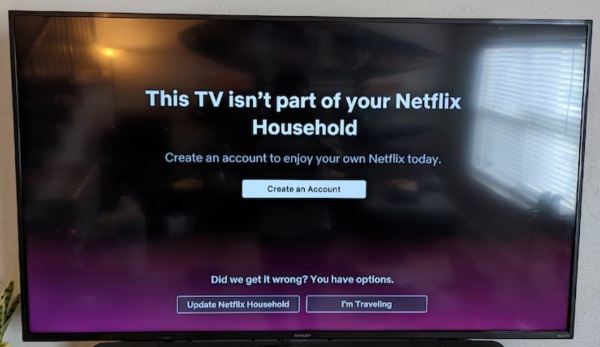
Watching a movie on a smartphone screen is fine for a quick flight, but if you plan to watch Netflix on hotel TVs or smart displays in holiday rentals, you might encounter an error saying the TV is not part of your household. Fortunately, the platform has a built-in Netflix travel mode to handle this exact situation. This is particularly useful when you're signing in on a hotel TV or another TV that Netflix doesn't recognize as part of your Netflix Household.
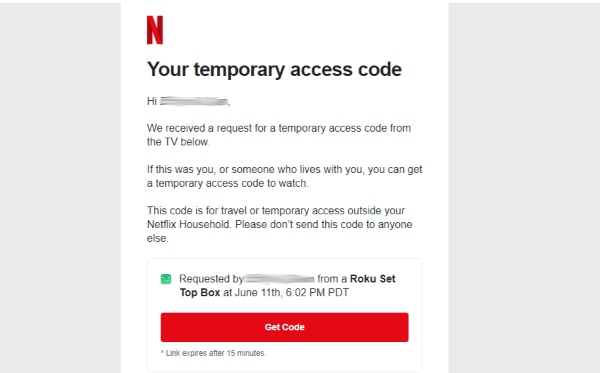
You can easily bypass this block by requesting a temporary access code. This quick process tells the system you are legitimately away from home and usually grants you two weeks of uninterrupted viewing on that specific screen.
Step 1. Open the Netflix app on the TV you're using during your trip and sign in with your Netflix account. If Netflix detects that the TV isn't associated with your Netflix Household, you may see a message asking you to verify the device. Select I'm Traveling or Watch Temporarily when the option appears to request temporary access.
Step 2. Netflix will provide an option to send a temporary access link or verification code to the email address or phone number associated with the account. Check the primary account holder's inbox or text messages and look for the Netflix verification message.
Step 3. Return to the Netflix screen on the television and enter the 4-digit verification code when prompted. Once the code is accepted, the TV should receive temporary access to the account, allowing you to continue watching Netflix during your stay without changing your Netflix Household.
 Editor's note:
If you're using a Netflix account on a shared hotel TV overseas, remember to sign out of Netflix before checking out. It's a small step, but it's easy to forget when you're rushing to catch a flight.
Method 2. Download Your Content Ahead of Time
When you know you will be facing long flights or spotty hotel Wi-Fi, saving your shows directly to your device is the smartest strategy.
You can download supported movies and shows to a compatible mobile device before leaving and watch them later without an active internet connection.
Official Offline Downloads for Netflix Content
The official app lets you download select movies and shows for offline viewing, which can be useful when you're traveling without reliable internet access. However, these downloads aren't the same as permanent video files. They remain inside the Netflix app and can be subject to availability, expiration, and other restrictions.
This becomes more noticeable when you're traveling internationally. A title you downloaded before leaving home may not necessarily remain playable after you arrive in another country because availability can vary by location.

Flexible Offline Viewing for Using Netflix While Travelling
If you want more control over your offline videos, VidiKeep Netflix Video Downloader provides an alternative approach. VidiKeep can save supported Netflix videos as regular local video files on your computer, so you don't have to rely on Netflix's in-app download feature for offline playback. That can be useful for longer trips or situations where you want to organize your downloaded videos separately from the Netflix app.
- No Netflix App Required: By saving Netflix shows as standard MP4/MKV files, you can play them directly through any media player, bypassing the need for the official app.
- Reliable Without Internet: Build and back up your Netflix offline library before leaving home to guarantee uninterrupted entertainment during long flights or travel.
- Zero Download Expirations: These saved videos will never expire, allowing you to enjoy your favorite content on your own schedule.
Step 1 Log in to Your Netflix Account
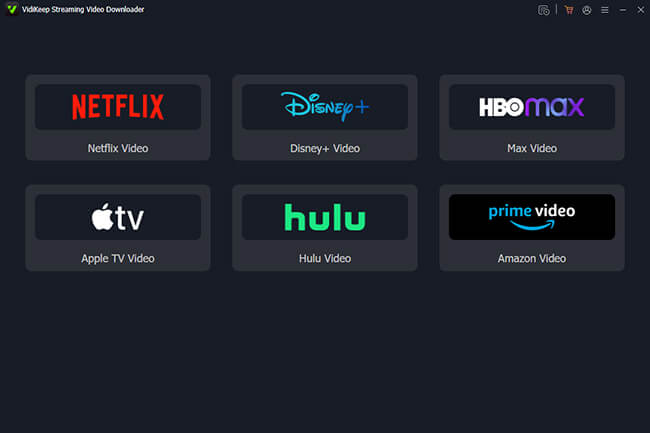
Launch VidiKeep on your computer and select Netflix from the available streaming services. Once the Netflix section opens, sign in to your account and get ready to download the movies or shows you want to have available during your trip.
Step 2 Find the Netflix Movie or Show You Want to Save
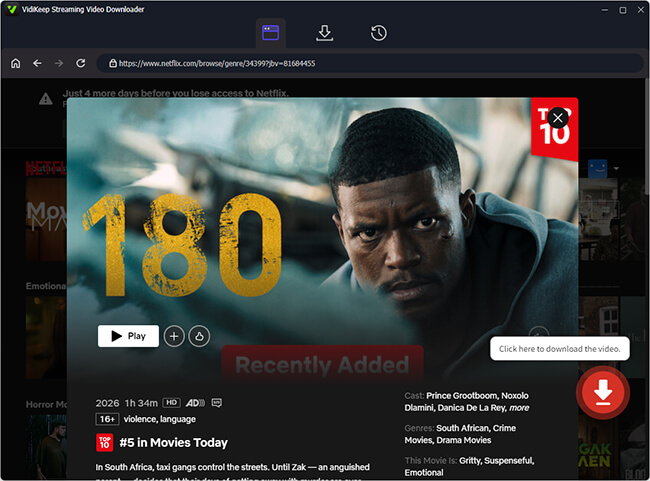
Search for the Netflix movie or episode you want to watch while traveling and open its details page. Choose the specific content you want to save, then adjust the available download settings according to your needs for a long trip.
Step 3 Start the Download for Your Trip Watchlist
Once you've selected your videos and settings, click the "Download" button. VidiKeep can help you prepare multiple episodes or titles in advance, which is useful if you're going to be away from home for several days. This gives you a ready-to-watch library for situations where hotel Wi-Fi is slow or mobile data is limited while traveling.
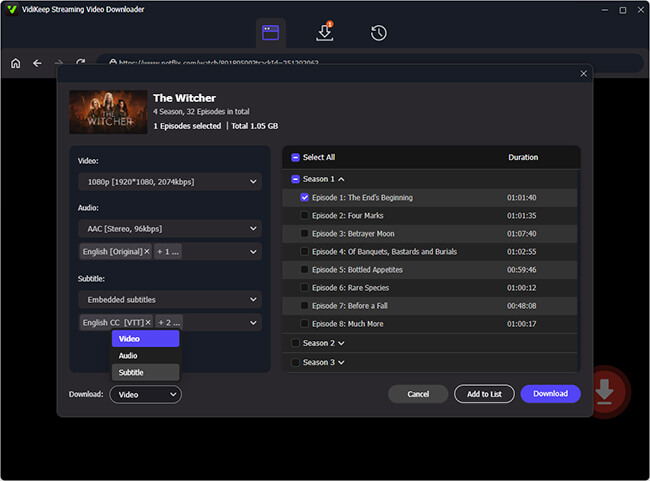
Step 4 Check the Saved Files Before Traveling
After the downloads are complete, you can then organize the files into folders and get Netflix video to a USB flash drive, giving you an easy way to carry your Netflix video library with you when you're traveling abroad. If the hotel TV supports USB media playback, you can plug the USB drive into the TV and watch your saved videos without signing in to Netflix on the hotel TV.
Method 3. Keep Your Netflix Household Connected
If you travel frequently for work or commute between two residences, keeping your devices connected to your Netflix Household can help reduce interruptions.
Step 1. Ensure your mobile phone, laptop, or tablet is connected to your primary home Wi-Fi network.
Step 2. Open the streaming platform on that device and play any video for just a few seconds.
Step 3. Do this at least once a month to keep the device fully recognized and verified by the system.
This doesn't mean you can't use Netflix away from home. Rather, it allows Netflix to associate your devices with the primary Household and can help prevent unnecessary verification problems when you're traveling. For occasional travelers, this is mostly a preventive step.
Part 3. FAQs on Watching Netflix While Traveling
Can you use a VPN to watch Netflix when traveling?
Yes, using a VPN is a common way to try to access your Netflix library from abroad. However, doing so technically violates the platform's terms of service due to regional licensing contracts. If the system detects your proxy server, it will likely display an error message and block your stream, or it may restrict your viewing options exclusively to globally-owned Originals.
How long can you watch Netflix while traveling?
If you use the "I'm Traveling" temporary code on a hotel TV, that access typically lasts for 14 days. If you are using your personal, pre-verified mobile devices like a phone or laptop, you can generally stream without issue for up to a month before you need to connect back to your home Wi-Fi network.
What to do if Netflix isn't working when traveling?
If you find yourself blocked while on vacation, first ensure you aren't unknowingly connected to a VPN or a strange proxy network. Next, try logging out of the app completely, clearing your device's cache, and logging back in. If you are trying to use a smart TV, make sure you use the "I'm Traveling" prompt to request a fresh temporary access code.
How to watch Netflix in another country?
To watch your account abroad, simply connect to the local internet and open the app. The catalog will automatically adjust to display the movies and shows properly licensed for your current location. If you want to watch the library you have back home, you would need to rely on previously downloaded local files or attempt to use a VPN to route your connection.
Part 4. Verdict
Whether you are excited to watch Netflix abroad to discover new regional content, or you simply want to catch up on a familiar sitcom on a hotel TV, Netflix provides built-in tools to make it happen. By verifying your devices for big screens or securing your content offline, you can guarantee a smooth, entertaining journey wherever you go.

Jordan Rhodes is a Chief Technical Editor and Media Specialist at VidiKeep, specializing in creating diverse tech content, including streaming tutorials, software reviews, and video encoding tips.
Leave a Comment