Best Netflix Ad Blocker: Skip Ads Effectively
Netflix's ad-supported plan makes streaming more affordable, but the commercial breaks aren't for everyone. If you're looking for a working Netflix ad blocker. This guide compares the 4 methods that actually help block ads on Netflix and explains why some traditional ad blockers usually fail.
Part 1. Does Netflix Have Ads?
Yes, Netflix has leaned heavily into its ad-supported subscription model, which first launched in late 2022. If you are currently considering the "Standard with Ads" plan, note that prices for this tier increased in the U.S. as of March 2026.
The following table outlines the key differences between the ad-supported and Premium plans, helping you understand exactly how Netflix integrates commercial breaks into your viewing experience.
| Feature | Standard with Ads | Ad-Free Plan |
|---|---|---|
| Monthly Price | $8.99 | $26.99 |
| Ad-Free Viewing | ❌ | ✅ |
| Video Quality | Up to 1080p | Up to 4K UHD + HDR |
| Simultaneous Streams | 2 | 4 |
| Spatial Audio | Not Included | Included |
| Download Supported | Limited titles | Most titles |
Upgrading to a Premium plan remains the only official, guaranteed way to remove ads entirely. However, if you prefer to keep your monthly costs low, there are several third-party workarounds worth considering below.
Part 2. Best Netflix Ad Blocker Extensions That Actually Work
If you usually watch Netflix on your PC or Mac through a web browser, browser extensions offer the most convenient way to reduce ad interruptions on Netflix. Because Netflix frequently updates its code, you need tools specifically designed for video streaming rather than general web browsing.
Streaming Enhanced Netflix Disney Prime Video
Streaming Enhanced is a highly rated, open-source browser extension available for Chrome, Firefox, and Edge. Developed as a 100% open-source project for Chrome, Firefox, and Edge, it goes far beyond basic ad-blocking. Instead of blindly trying to block network requests, it acts as an intelligent media controller that actively customizes your entire Netflix viewing experience. Because it is highly customizable, you can toggle every single feature on or off in the settings menu, allowing you to bypass unskippable commercials while fine-tuning how your player behaves.
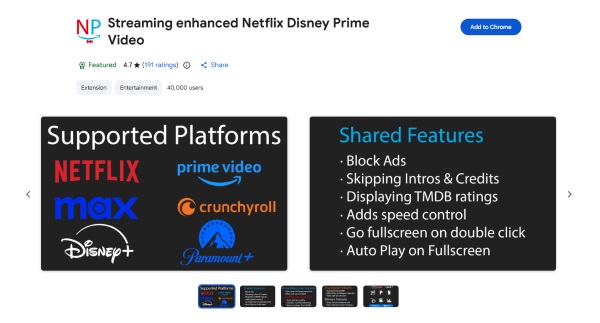
- Ad and Intro Skipping: Automatically bypasses commercial breaks, show intros, and end credits without you needing to touch the mouse.
- Inactivity Bypass: Permanently blocks the annoying "Are you still watching?" pop-up on Netflix so your binge-watching goes uninterrupted.
- Playback Controls: Adds customizable keyboard shortcuts to adjust video speed.
- Quality of Life: Automatically starts your video in full-screen mode and integrates TMDB ratings directly into the Netflix interface.
 Pros:
Pros:
- Supports multiple major streaming services
- Completely open-source and highly customizable
- Removes frustrating inactivity prompts
 Cons:
Cons:
- Only works on desktop web browsers
- Netflix UI updates can temporarily break features
Multi Skipper: Skip ads, intros & recaps [QVI]
Previously known as "Skip Ad," Multi Skipper acts more like an automatic tool for fast-forward than a traditional ad blocker. When an unskippable ad or a "Skip Intro" button appears on the screen, this extension detects the element and instantly clicks it or accelerates through the break for you.
 Tips:
Tips:
For casual Netflix viewing, Multi Skipper noticeably reduced the amount of manual clicking. It isn't a perfect "Netflix ads blocker," but it makes the viewing experience feel smoother.
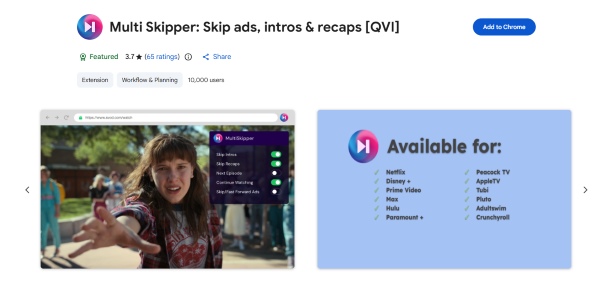
- Universal Skipping: Bypasses ads, intro sequences, and episode recaps automatically.
- Binge-Watching Mode: Immediately plays the next episode without waiting for the standard countdown timer.
- Broad Compatibility: Works across Netflix, Hulu, Max, Peacock, and Pluto TV.
- Zero Configuration: All skipping toggles are turned on by default right out of the box.
Pros:
- Extremely fast and lightweight on system resources
- Setup is entirely hands-off
- Works on almost all major ad-supported services
Cons:
- Requires the English version of Netflix to work properly
- Collects anonymous viewing data by default (can be opted out)
- Does not stop the ad file from initially downloading
Part 3. How to Download Netflix Videos to Watch Without Ads
If browser extensions feel too volatile, changing how you access the media is a foolproof alternative. Because Netflix injects its commercials directly into the live web player, taking the content completely offline neutralizes their ad-delivery system. Tools like the VidKeep Streaming Video Downloader allow you downloading the movie or episode, stripping away the Netflix's ability to serve you live commercials.
 User Experience:
This approach is especially useful for travel, Since playback comes from your local storage rather than Netflix's streaming servers, you never have to worry about buffering, Wi-Fi dropouts, or sudden commercial breaks, offering a flawless, ad-free movie experience even on an airplane.
Step 1 Set Up Your Video Preferences
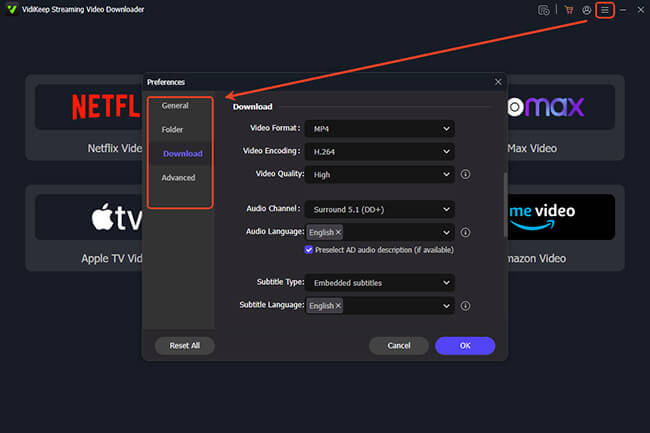
Launch the VidiKeep app on your computer. Before jumping into Netflix, click the "Menu" icon and head to "Preferences" > "Download". You can choose converting Netflix movies as MP4 or MKV, lock in your preferred 1080p video quality. Once your preferences are dialed in, click the built-in "Netflix" icon on the main dashboard and log securely into your account.
Step 2 Locate Your Movie or Show on Netflix
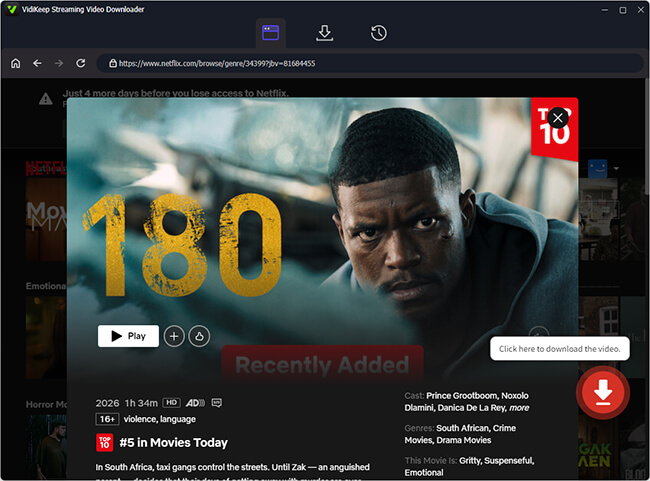
Using VidiKeep's integrated web player, browse for the show, search by keyword, or paste a specific Netflix URL into the search bar. When you find the title, click the "Download" icon on the right corner.
Step 3 Finalize Output Settings and Download
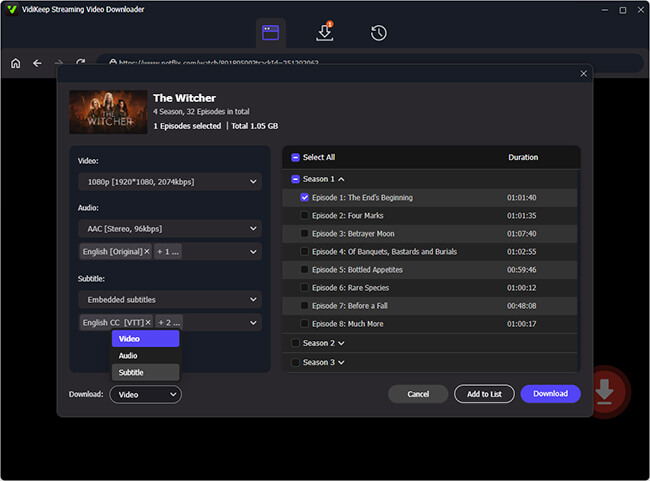
A final configuration window will appear. This is your chance to confirm your audio languages and subtitle choices for this specific file. Once everything looks good, hit the final "Download" button. For batch TV series downloading, just tap the "Select All" checkbox. The software will process the video and save it to your computer as a unencrypted Netflix video file with ads removed.
Step 4 Enjoy an Uninterrupted Screen for Netflix
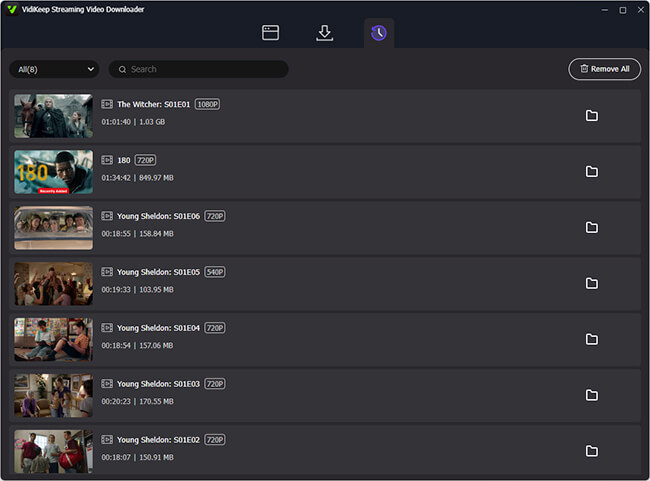
You now own a clean, high-definition video file from Netflix by checking on the "History" tab. And you can transfer the file to your tablet for a flight, cast it to your living room TV for guaranteed ad-free viewing anytime.
Part 4. Record Netflix Videos and Remove Ads Automatically
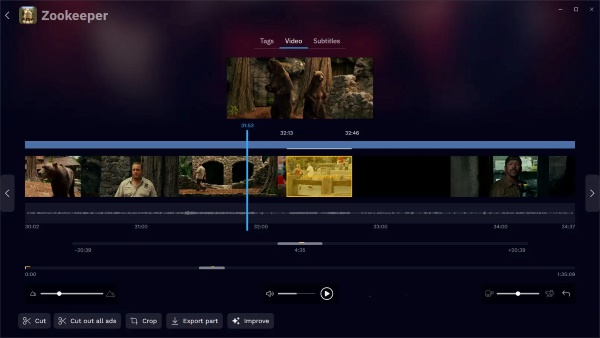
Another robust alternative for building a permanent, ad-free library is using specialized recording software. Audials One is a premium streaming recorder that captures Netflix broadcasts at exceptionally high speeds. Unlike basic screen recording tools with commercials in real-time, Audials One features an intelligent ad filter. It automatically detects advertising segments as they happen, marks them in the timeline, and precision-cuts them from the final saved video.
Pros:
- Automatically detects and deletes ad segments
- Automatically saves subtitles and cover art
- Includes a built-in editor for manual tweaks
Cons:
- Premium software requires a paid license
- More time-consuming than direct video downloaders
- High-quality video files consume local storage
Part 5. Why Regular Ad Blockers Don't Work on Netflix
Unlike websites that display banner ads or pop-ups, Netflix uses a completely different advertising system. That's why most traditional ad blockers fail, even if they work perfectly on other sites.
Does AdBlock Block Netflix Ads?
No. Popular browser ad blockers such as AdBlock Plus, Total Adblock, and similar tools are mainly ineffective on Netflix. The reason lies in a technology called Server-Side Ad Insertion (SSAI). Instead of loading ads as separate webpage elements, Netflix inserts commercials directly into the video stream before it reaches your device. To a traditional ad blocker, the advertisement is indistinguishable from the movie or TV show itself, making it nearly impossible to remove without affecting the entire stream.
Can a VPN Block Netflix Ads?
Sometimes, but it's not a reliable solution. A VPN like NordVPN may route your connection through a region with different advertising policies, which can occasionally result in fewer or no ads. However, this isn't guaranteed. Netflix actively detects and blocks many VPN servers, especially for users on the ad-supported plan, and you may encounter proxy errors or lose access altogether.
Part 6. Final Verdict
Bypassing Netflix ads depends on how you watch. If you prefer the official approach, upgrading to Netflix Premium is the only way to remove ads while streaming directly from the Netflix app across all supported devices. If you stream in a desktop browser, ad-skipping browser extensions are the easiest way to reduce or automatically skip many commercial breaks.
For an offline solution, VidKeep and Audials One let you save Netflix videos for interruption-free playback on a smart TV or other compatible device for ad-free viewing.
| Method | Removes Ads | Best For |
|---|---|---|
| Upgrade to Netflix Premium | ✅ Completely | Official ad-free experience |
| Streaming Enhanced | ⚠️ Skips many ads | Browser users |
| Multi Skipper | ⚠️ Skips many ads | Multi-platform streaming |
| VidKeep Streaming Video Downloader | ✅ Offline playback without streaming ads | Watching downloaded content |
| Audials One | ✅ Automatically removes ads during recording | Building a personal offline library |
| AdBlock Plus/NordVPN | ❌ Usually ineffective | Not recommended for Netflix |

Jordan Rhodes is a Chief Technical Editor and Media Specialist at VidiKeep, specializing in creating diverse tech content, including streaming tutorials, software reviews, and video encoding tips.
Leave a Comment