How Long Do Amazon Prime Downloads Last? Limits Explained!
Understanding how long your downloaded videos remain available can help you avoid interruptions during flights, road trips, or other offline viewing situations. For many travelers, downloading shows on Amazon Prime is a convenient way to enjoy entertainment without relying on Wi-Fi. However, these downloaded files do not stay on your device forever. If you are planning a trip and wondering how long do downloads last on Amazon Prime, this guide will walk you through Amazon Prime Video's official expiration rules, playback limits, and the best workarounds for permanent offline viewing.

Part 1. How Long Do Amazon Prime Downloads Last?
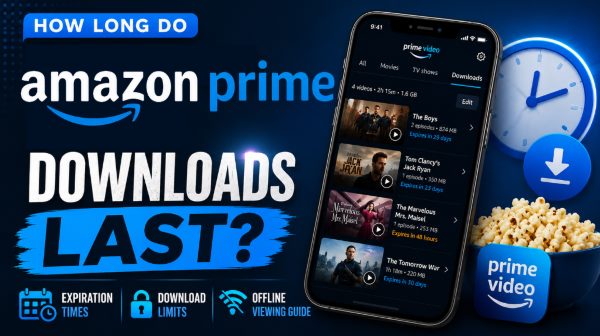
Amazon Prime Video applies different expiration rules depending on whether the title is included with Prime, rented, or purchased. For most titles included with your Prime membership, downloaded videos typically remain available for up to 30 days if they are not played. However, once you start watching a downloaded movie or episode, the viewing window shortens dramatically. In most cases, you'll have only 48 hours to finish watching before the download expires automatically. The same playback rule usually applies to rented Prime Video titles as well.
Purchased content works differently. Downloaded movies and shows you buy through Prime Video generally remain accessible indefinitely, as long as your Amazon account retains the digital license for that purchase.
| Video Category | Retention Window (Unwatched) |
Viewing Window (After Pressing Play) |
Device Storage & Limits |
|---|---|---|---|
| Prime/Premium Downloaded | 30 days on the device | 48 hours to finish watching | Up to 4 devices per account (up to 2 devices at once) |
| Rented Videos | 30 days from the rental date | 48 hours to finish watching | Single device at a time |
| Purchased Videos | Permanent | Unlimited | Can be downloaded to multiple compatible devices |
 Why Do Prime Video Downloads Expire Early?
These abrupt disappearances are rarely glitches; rather, they usually happens when hidden system triggers override the standard offline timers. Identifying these common pitfalls can help you protect your saved files.
- Regional Copyright Shifts: Traveling to a different country often prompts the system to instantly revoke your access due to localized licensing restrictions.
- Catalog Removals: The platform regularly cycles out content as studio distribution contracts expire. If a title leaves the official streaming library, any downloaded copies will be automatically disabled.
- Prolonged Disconnection: The application requires periodic server check-ins to verify your active subscription status. Keeping your device entirely offline for too long prevents this digital handshake, though a connection to the internet will usually restore your viewing permissions.
Part 2. Why Does Amazon Set These Strict Download Limits?
If you wonder why your Amazon Prime downloads expire, it ultimately comes down to complex licensing agreements and DRM. Since Amazon rarely owns the actual films or television series, they must strictly follow the rules imposed by outside studios. The specific limits placed on your offline library exist for three key reasons:
- Temporary Licensing: Streaming rights are highly region-specific and finite. Timers ensure you cannot retain files on your device past the legally authorized viewing period.
- Anti-Piracy Measures: Expiration dates actively prevent permanent copying and unauthorized sharing. Once the viewing window closes, the encrypted file locks instantly.
- Industry Standards: The common "30 days to keep, 48 hours to finish" rule is not unique to Amazon; it is a standardized digital rental practice used by competitors like Netflix and Disney+.
Part 3. Methods for Watching Prime Video Permanently
Dealing with sudden access loss is not something you simply have to accept while traveling. There are effective strategies to take permanent ownership of your favorite shows and movies. By choosing the right method, you can bypass the stressful 48-hour countdown for Prime Video downloads.
Direct Digital Purchase from Amazon Prime Video
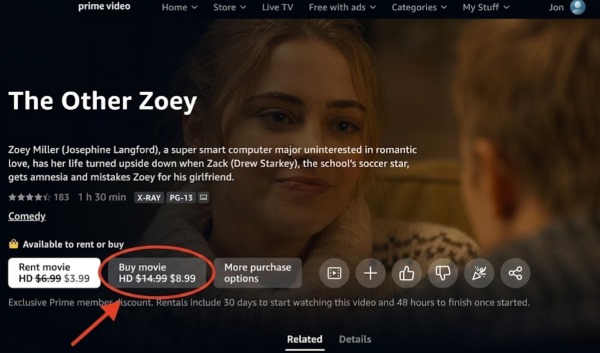
The most secure and officially supported route is to buy the desired content through the Amazon storefront. Purchasing a digital copy grants you a permanent license that exists independently of your monthly subscription status. It effectively removes all viewing windows, allowing you to keep the Prime Video file on compatible devices forever.
Utilizing VidiKeep for Local Prime Video Downloads Backups
For travelers without stable internet connection might prefer the absolute certainty of DRM-free local files. Third-party software like VidiKeep Streaming Video Downloader allows you to extract the media stream securely. This grants you complete ownership over how and where you view your downloads from Prime Video.
With local files, you never have to worry about strict 48-hour or 30-day expiration warnings suddenly locking your content. They also completely bypass geographical copyright blocks, granting you zero regional restrictions. This allows you to travel anywhere in the world and enjoy your entire Prime Video watchlist offline.

Download your favorite Amazon Prime Video content to MP4 or MKV in lossless quality without expiration.
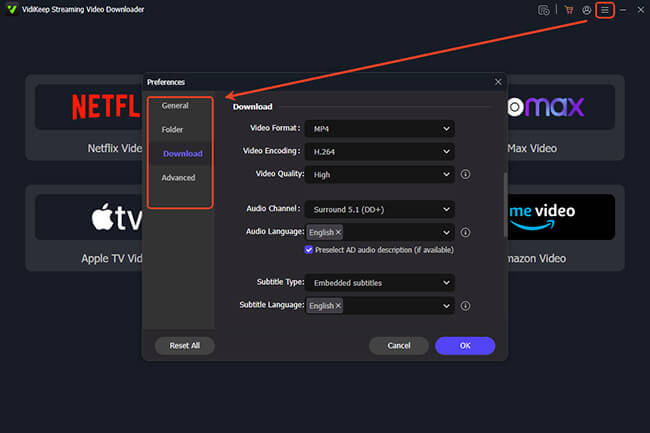
Step 1. Open the VidiKeep application on your desktop. Before proceeding, customize your output settings by navigating to "Menu> Preference", and selecting "Download". Choose either MP4 or MKV as your format to guarantee that your Amazon Prime maximum downloads will be compatible with almost any media player.
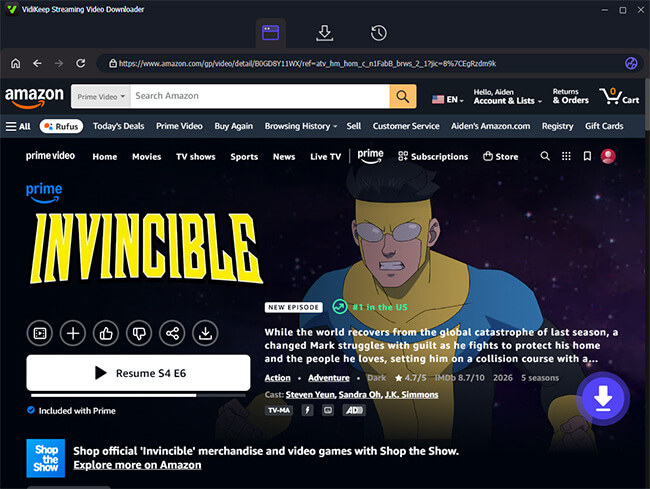
Step 2. On the main interface, click the Amazon Prime Video icon to launch the integrated browser. Log in with your Amazon credentials to sync your library. Find the specific movie or series you want to save, open its main page, and click the floating purple "Download" icon located in the bottom-right corner.
Step 3. A new window will appear for final adjustments. Here, you can select your preferred resolution, audio language, and subtitle options. If you are backing up a multi-episode series, use the "Add to List" function to queue the entire season before clicking the final "Download" button to start the process.
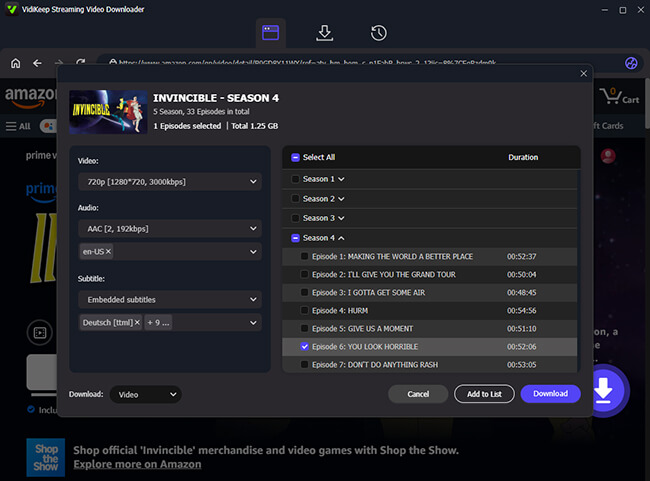
Step 4. When the process finishes, go to the "History" tab to find your newly saved media. These files are now permanently stored locally, so you never have to worry about Amazon Prime downloads expires.
Part 4. FAQs about Amazon Prime Downloads
How do I know when my downloads will expire?
Keeping track of your remaining viewing window is highly intuitive within the mobile app. You simply need to open the "Downloads" section located at the bottom navigation bar. The system conveniently displays a real-time countdown timer right next to each saved video.
Can I watch downloaded Amazon Prime movies after subscription ends?
Your access to offline media is intrinsically linked to your current billing cycle. The moment your standard membership expires, all free catalog titles saved on your device will immediately lock up. However, any content you paid for individually will remain fully accessible in your permanent digital library.
Can I watch downloaded Amazon Prime movies offline without Wi-Fi?
Yes. As long as the file finishes processing while you have internet access, you are good to go. The app handles the playback entirely locally from your device's hard drive. You will not need any cellular data or Wi-Fi to press play while on an airplane.
Part 5. Conlusion
Understanding exactly how long Amazon Prime downloads last is the secret to uninterrupted offline viewing. While strict 48-hour timers and 30-day expirations can disrupt travel plans, you have solid solutions. By officially purchasing titles or using local backup tools like VidiKeep for permanent DRM-free files, you can easily bypass these limits.

Jordan Rhodes is a Chief Technical Editor and Media Specialist at VidiKeep, specializing in creating diverse tech content, including streaming tutorials, software reviews, and video encoding tips.
Leave a Comment