Where Are Amazon Prime Video Downloads Stored on Any Device
When you download a movie on Prime Video, it isn't saved as a standard MP4 file in your device's Downloads folder. Instead, offline titles are securely kept in protected storage. This guide explains where to find your Amazon Prime Video downloads on any device and tips for storing your video files anywhere.
Quick Answer: Where Does Amazon Prime Store Downloaded Videos?
Prime Video currently supports offline downloads through its apps for Windows 10/11, macOS, Android, iOS, and Fire tablets. Windows and Android users can choose where downloads are saved.
| Device | Where to Find Downloads | Can You Access the Video File? |
|---|---|---|
| Windows 10/11 | Hidden app-data folder or selected drive | Not as a normal playable video |
| Mac | Protected application storage | No standard MP4 in Finder |
| Android | Internal storage or SD card | Usually protected app data |
| iPhone/iPad | Prime Video app sandbox | Not normally visible in Files |
| Smart TV | No offline Downloads section | Streaming only on most TV devices |
Part 1. Where Are Amazon Prime Video Downloads Stored on PC and Mac?
Prime Video downloads on computers must be created and managed through the Prime Video desktop app. Streaming a movie in Chrome or another browser does not create an offline copy in your browser's Downloads folder.
Where Are Amazon Prime Video Downloads Stored on Windows 11/10?
On Windows 10 or Windows 11, the easiest and most reliable way to find downloaded Amazon videos is to open the Prime Video app and select "Downloads" from the app's menu.
Depending on the Prime Video app version and installation method, some data may appear inside a Windows application-data directory, commonly under a structure similar to:

However, the package name, subfolder, and internal file structure can change after an app update. You may enter the following command in the File Explorer address bar to inspect installed app folders. From there, look for a folder whose name contains Amazon Video or Prime Video. Treat this location as an app-data folder rather than a conventional video library.
 Changing Your Download Location for Prime Video on Windows:
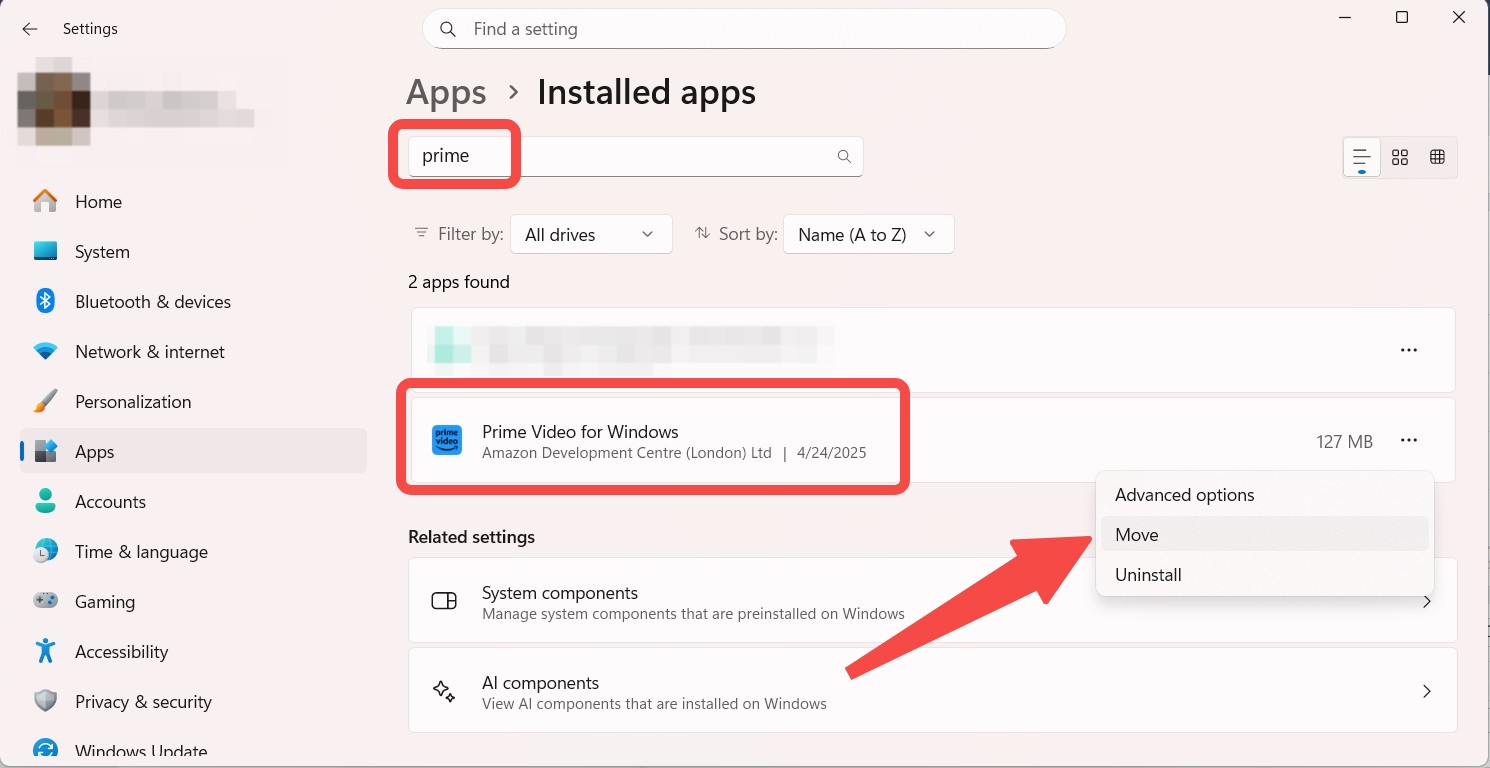
If your main hard drive is running out of space, you might want to redirect where your offline movies and shows are saved. You can attempt to move the entire application to an alternative drive. While the results can be inconsistent depending on your specific system configuration.
Open your system settings and navigate to "Apps". Then click on "Installed apps" and find Amazon Prime Video. Click the "Move" button, and choose your preferred destination drive.
Where Are Prime Video Downloads Stored on Mac?
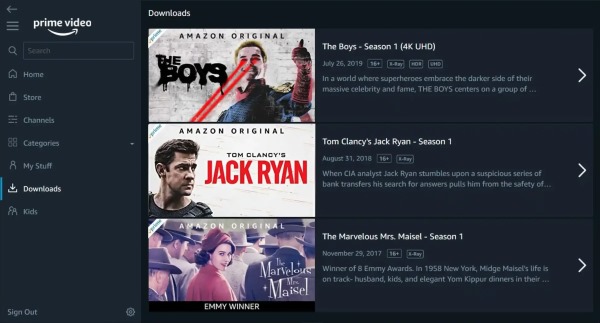
On a Mac, downloaded titles are also found in the official app. Open the Prime Video app for macOS, then go to the "Downloads" section to locate the title you want to watch.
 Can You Open or Move Prime Video Downloaded Files on PC or Mac?
No. Prime Video downloads are stored as protected app data rather than standard MP4 or MKV files. Even if you locate the storage folder, copying its contents will not create a transferable movie from Prime Video that plays in your Mac, PC, or on another device. Offline downloaded titles remain tied to the Prime Video app, your account authorization, and the applicable viewing period.
Part 2. Where Are Amazon Prime Video Downloads Stored on Mobile?
On mobile devices, downloaded Prime Video titles are also stored within application-managed storage. Android may offer a choice between storage volumes, while iPhone and iPad keep the data inside the Prime Video app's private container.
Where Are Amazon Prime Downloads Stored on Android?
To find downloaded Prime Video movies on an Android phone or tablet, the data may be saved to the device's internal storage or an SD card. Prime Video allows users to select where downloaded titles are stored on Android smartphones.
Change Downloads Locations to an SD Card:
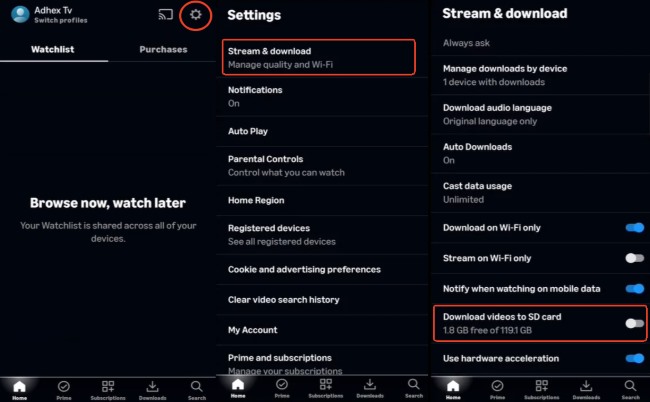
If you are running out of space on your Android phone or tablet, moving your Prime Video offline content to a SD card is an excellent solution. This option is entirely dependent on your specific hardware having a compatible memory card slot. To change where your future offline content is saved, you can easily adjust your preferences.
Step 1. Open the Prime Video app and navigate to the download settings menu.
Step 2. Locate the "Stream & download" destination preferences.
Step 3. Toggle your preferred external memory option "Download videos to SD card".
Where Are Amazon Prime Video Downloads Stored on iPhone and iPad?
Prime Video downloads on an iPhone or iPad are stored inside the Prime Video app's sandbox. Apple operating systems create private container directories for apps, allowing app-specific files and support data to remain separated from other apps. They do not normally appear as regular movies in the Apple Files app. To find them:
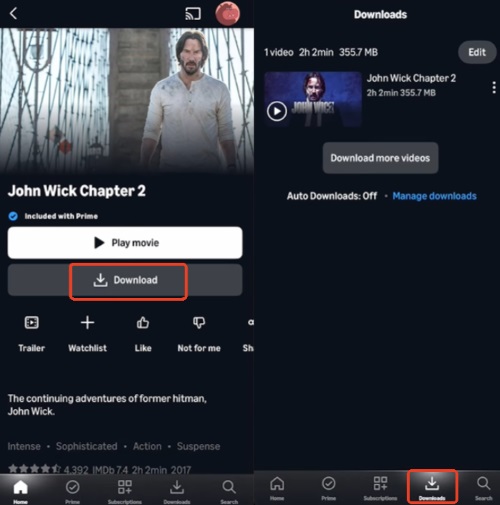
Step 1. Open the Prime Video app and tap "Downloads" at the bottom of the screen.
Step 2. Select the downloaded title to play or use the available download-management options.
Part 3. How to Save Prime Video Downloads as Local Files for Any Device
Even though you find where Amazon Prime Video stores downloads on your PC, Mac, or mobile device, you cannot simply move a movie to a USB drive, transfer it to your phone, or organize it inside a personal media folder.
If you want full control over your media storage, VidiKeep Streaming Video Downloader offers a flexible solution. Running on both Windows and macOS, it supports downloading Prime Video content directly into any local folder you choose. It converts videos into universally playable MP4 or MKV files, allowing you to freely transfer them to a tablet, TV, or an external hard drive without viewing restrictions.
| Feature | Official Prime Video Downloads | VidiKeep Local Files |
|---|---|---|
| Storage location | Protected app-managed storage | User-selected computer folder |
| File format | App-specific data | MP4/MKV |
| Playback | Prime Video app | Compatible media players |
| Move to another device | Generally unavailable | Files can be transferred |
| Offline expiration | May have a viewing period | Saved as a standard local file |
| Supported downloader devices | Windows, Mac, Android, iOS, Fire tablet | Windows and macOS |
| Best suited for | Temporary offline viewing in Prime Video | Flexible personal local playback |
How to Save Prime Video as Local MP4 or MKV Files with VidiKeep
Step 1 Set the Output Format for Amazon Video Downloads
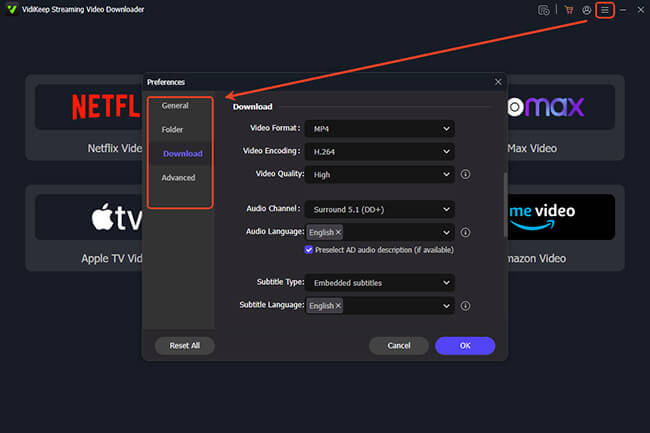
Install and launch VidiKeep on your Windows PC or Mac. Open "Menu > Preferences > Download" to choose MP4 or MKV, set the video quality, and select your preferred audio and subtitle languages. Return to the main screen and click Amazon Video. Sign in to your Amazon account through the built-in browser to access the titles available to you.
Step 2 Find the Movie or Series You Want from Amazon Prime
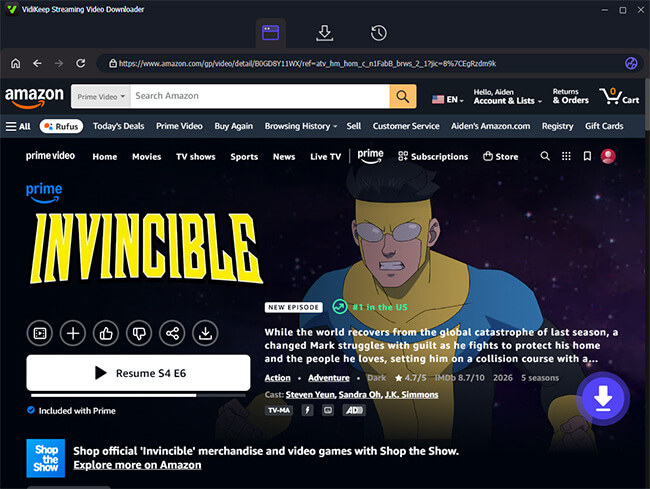
Browse or search the Amazon library, then open the title's detail page. Click the "Download" icon in the lower-right corner, and VidiKeep will analyze the available video, audio, and subtitle options.
Step 3 Choose Episodes and Start Downloading
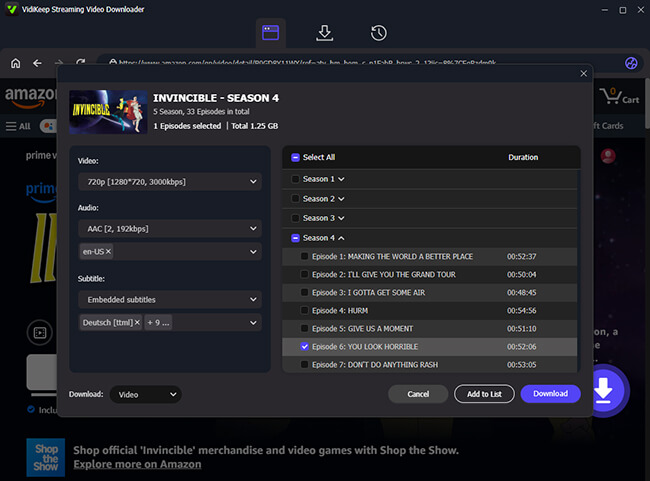
For a TV series, choose multiple episodes and select "Add to List" to queue them together. This batch option is useful when downloading a full season without processing each episode separately. Once confirm your choice, click "Download" to begin the conversion.
Step 4 Get and Transfer the Local Prime Video File for Any Device
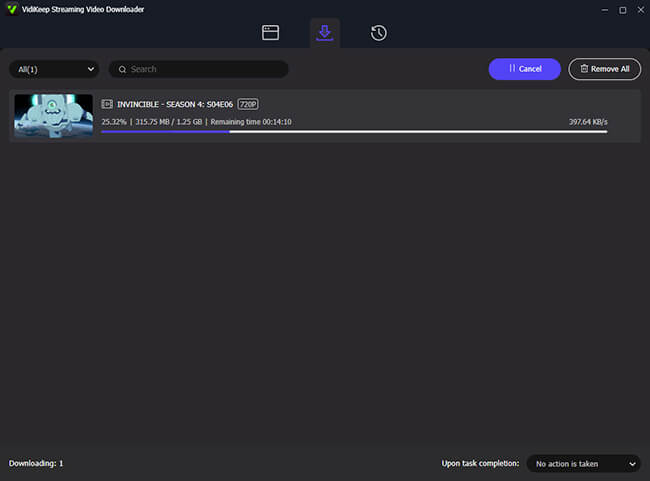
After the download finishes, open History and click the folder icon beside the completed title. The Amazon Prime video is stored in the selected folder as an MP4 or MKV file. From there, compatible files can be opened in a desktop media player or copied to a phone, tablet, storage drive, or personal media server.
Part 4. FAQs About Amazon Prime Video Download Locations
Will Deleting the Prime Video App Delete My Downloads?
Usually, yes. Prime Video downloads are stored as app data, so uninstalling the app or clearing all its data will normally remove them. After reinstalling, you will need to sign in and download the movies or episodes again.
How Long Do Amazon Prime Downloads Last?
An unwatched Prime Video download commonly lasts up to 30 days. Once you start watching, you usually have around 48 hours to finish it. The title may expire sooner if your subscription ends or if you leave Prime Video.
How Do I Find Downloads on Prime Video on a TV?
Most smart TV versions of Prime Video do not support offline downloads. The Downloads section is mainly available on Windows, Mac, Android, iPhone, iPad, and Fire tablets. On a TV, you normally need an internet connection to stream.

Jordan Rhodes is a Chief Technical Editor and Media Specialist at VidiKeep, specializing in creating diverse tech content, including streaming tutorials, software reviews, and video encoding tips.
Leave a Comment