Full Guide to Amazon Prime Video Family Sharing
Want to let everyone in your household binge-watch their favorite movies and series without your personal recommendations turning into a chaotic mess? Learning the Amazon Prime Video family share feature is the ultimate way to maximize your subscription. Through the newly rebranded Amazon Family system, you can easily pool your streaming perks while giving everyone their own private watchlist and profile. Below, we break down how to officially connect your household and look at clever alternatives for sharing Prime Video with long-distance relatives.
Part 1. How to Set Up Amazon Household for Enjoy Prime Video Together
The Amazon Family feature is a centralized sharing hub that lets you link multiple household profiles under a single Prime membership. It allows family members to enjoy Prime Video and other eligible Prime benefits while keeping their own private accounts. Before sending invitations, make sure you meet the eligibility requirements for a smooth sharing setup for Prime Video.
 Can You Share Across Different Addresses for Amazon Prime?
No. Because Amazon Family is designed for people living in the same household. Amazon may verify details such as your primary shipping address and shared payment method to confirm that members reside at the same address.
You may remember the old Prime Invitee program, which let members share free shipping with friends or relatives regardless of where they lived. However, Amazon officially discontinued this legacy feature in October 2025, making Amazon Family feature the only supported way to share Prime benefits.
Requirements for Sharing the Benefit of Prime Video
Before you start sending out invitations to your loved ones, let's make sure your accounts are fully set up and ready to go. To successfully share your Prime Video benefits, you will need to meet a few simple criteria:
- A Full Prime Membership: The primary account sharing the benefits must have a standard, full Amazon Prime subscription. Unfortunately, standalone Prime Video subscriptions or free trial accounts are not eligible for family sharing.
- Matching Marketplaces: Both your account and your family member's account must be registered in the same country's Amazon marketplace. (e.g., both on Amazon.com).
- The Same Residential Address: Amazon's current policy requires that both the primary account holder and the invitee physically reside at the same primary residential address.
- Shared Payment Methods: To verify that you actually live together, both accounts must explicitly authorize the sharing of payment methods within your Amazon Family wallet.
How to Share Amazon Prime Video with Family
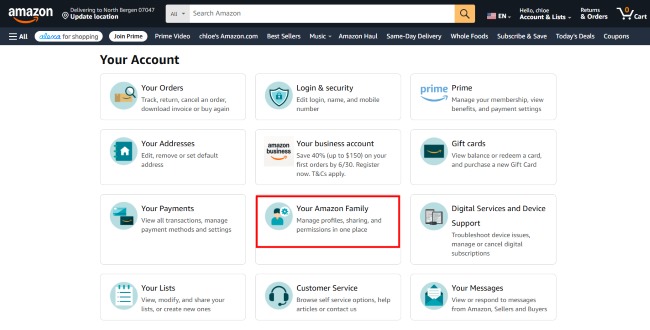
Step 1. Head over to the Amazon website and log into your primary account. Once you are on the homepage, look toward the top right corner for the "Account & Lists" menu. Hover your mouse over it and select "Account" from the drop-down menu to open your main settings dashboard.
Step 2. Scroll down the page until you find the section labeled "Your Amazon Family", and click on it to open your central sharing hub.
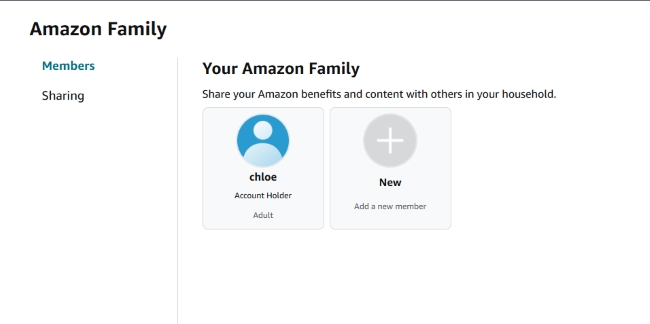
Step 3. Inside the dashboard, look for the "Add a new member" option. Select from the option for adding an adult or child to move forward with the invitation.
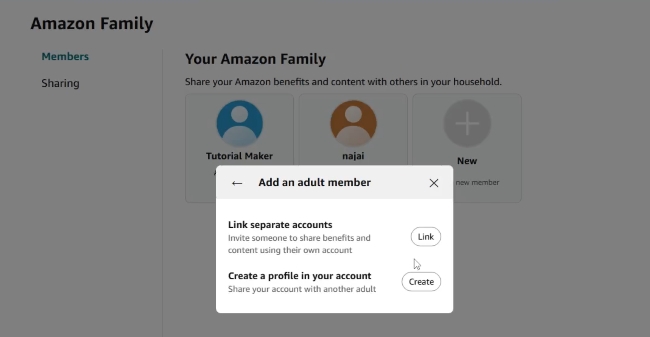
Step 4. You will now be asked whether you want to create a fresh profile under your own login or link a separate, existing Amazon account. Click "Link" to connect their independent account, which keeps everyone's viewing histories and watchlists separate.
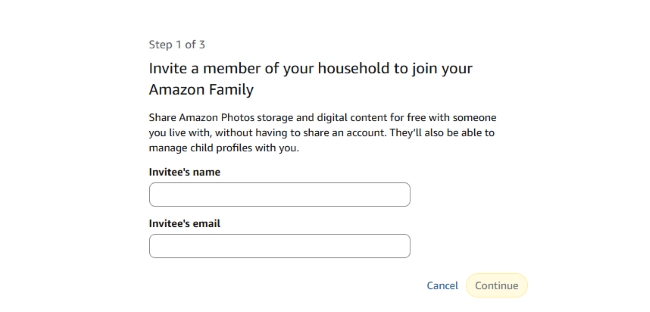
Step 5. Carefully type in your family member's name and the email address they use for their personal Amazon account, then hit continue.
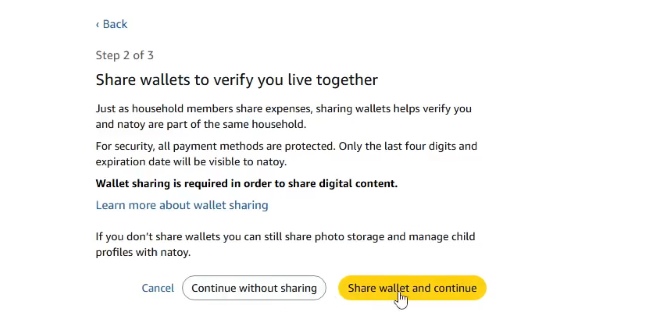
Step 6. Next up is configuring your shared wallet. Amazon will ask you to authorize payment sharing to build your shared wallet. Confirming these shared payment methods serves as a vital verification step to unlock digital streaming perks across the family group. Once you have reviewed the details, click "Send invitation".
Step 7. Now, it is your family member's turn. Have them open their email inbox and click the acceptance link inside the message from Amazon, sign into their personal account to verify their details. They can instantly open the Prime Video app on their favorite device and start streaming immediately.
Part 2. Alternative Ways to Share Video with Non-Household Family
Because official digital sharing is restricted to a single residential address, relatives and college students often find themselves locked out of the family library. When official methods fall short due to location constraints, utilizing a third-party tool offers a practical workaround. The VidiKeep Streaming Video Downloader serves as an effective solution to this geographical hurdle by allowing you to take your favorite content offline.
VidiKeep resolves account sharing restrictions by converting streaming media into permanent local files. By downloading your preferred Amazon movies and tv series to your computer as MP4 or MKV files, the software removes the platform's DRM and residency barriers. Then you can easily distribute them to your extended family members regardless of their physical location.
- Cloud Sharing: Upload the downloaded MP4/MKV files to a cloud storage folder where distant family members can view.
- Physical Transfer: Copy the video files onto a portable USB flash drive to give to your relatives during holiday visits.

Download your Prime Video movies and shows to MKV or MP4 with zero quality loss for offline viewing anywhere.
Step 1 Configure Your Download Preferences
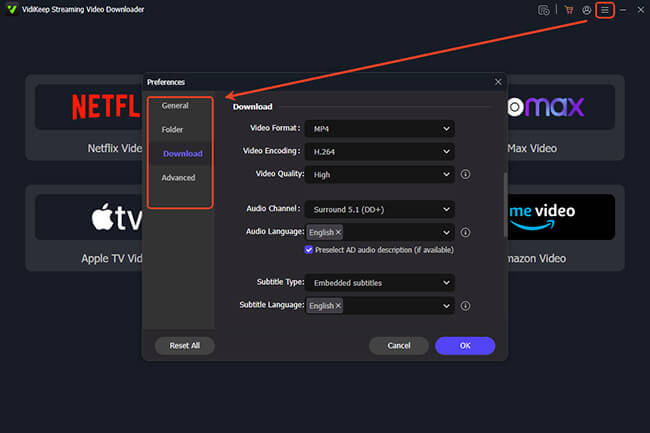
Once you have installed and opened VidiKeep on your computer, navigate to the "Menu" icon to access the "Preferences > Download" tab. This menu gives you total control over how your final video will look and sound, allowing you to tailor the media perfectly for your family. You can set your primary container format to MP4 or MKV for flawless compatibility with any screen in your home. In addition, you can select your ideal output resolution for a crisp picture on the television.
Step 2 Queue Up Your Family's Favorite Content
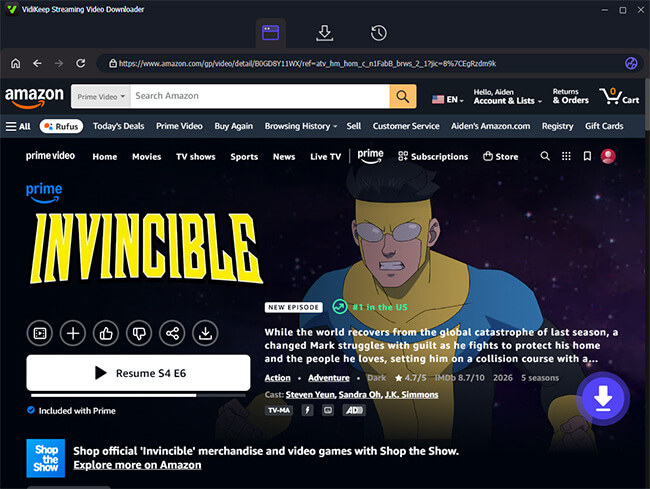
Click on the built-in "Amazon Video" icon and then click the "Sign In" button to securely access your Amazon media library. Finding the perfect movie for family movie night is incredibly simple. You can locate your desired video by pasting the streaming link or by typing the movie title into the search box. Once you land on the correct video page, simply click the purple "Download" icon to compile the available titles into a list.
Step 3 Confirm the Movies or Shows Selection and Settings
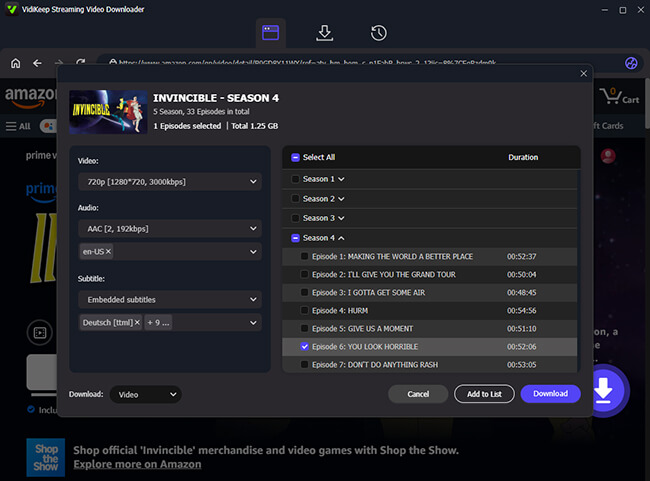
In the pop-up box, you can save massive amounts of time by utilizing the batch selection tools. Tick the "Select All" checkbox to queue up an entire season simultaneously, and manually unselect any specific episodes you do not want to keep. Then confirm the output settings in the left section before converting. Click the final "Download" prompt to initiate the video extraction process and save the DRM-free episodes to your local hard drive.
Step 4 Save the Prime Video Files to Your Computer
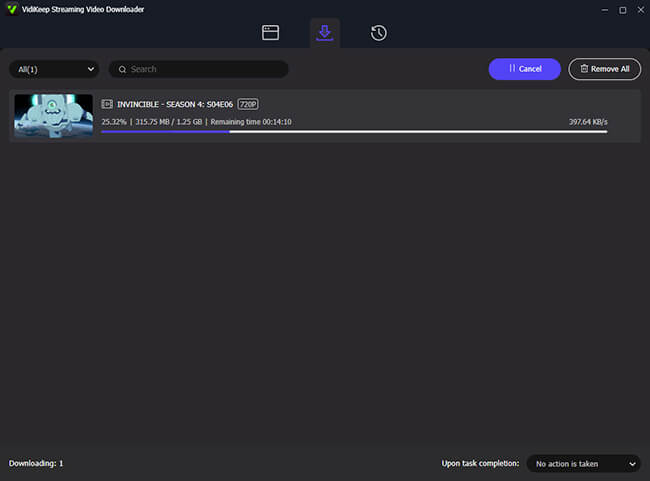
Once the extraction is finished, you can easily drag and drop these Prime Video files to your USB drive or upload them to a shared cloud folder, ensuring everyone in the family can watch what they want, regardless of where they live.
 Disclaim:
Please remember that Any content you download through the tools is meant exclusively for personal viewing and private family collection. These files should never be sold, used for commercial purposes, or distributed publicly on the internet. Let's keep our movie nights fun, responsible, and respectful of the awesome creators who make these shows possible.
Part 3. FAQs on Prime Video Family Sharing
Are my rented or purchased movies shared with my family?
No. While the standard streaming library is fully accessible to everyone in your Amazon Family, individual digital rentals and permanent video purchases remain locked. These titles can only be viewed by the specific profile that paid for them.
Does the Ad-Free Prime Video Ultra share across the family?
No. Premium upgrades like the Ad-Free streaming tier are non-transferable benefits. Even if the primary account holder pays for this upgrade, secondary accounts in the family group will still experience standard commercial breaks.
How many devices can stream Prime Video simultaneously?
Under the standard Prime Video package, your household can now stream up to four different titles concurrently. Families who subscribe to the new "Prime Video Ultra" add-on are upgraded to a maximum of five simultaneous streams.
Part 4. Sum Up
Consolidating your entertainment services through an Amazon Family group is an excellent way to share Amazon Prime Video with family memebers. However, strict residency regulations prevent direct account linking across different locations. For family members living further away, external tools like VidiKeep bridge the gap cleanly, ensuring your loved ones never miss out on your favorite Prime Video media recommendations.

Jordan Rhodes is a Chief Technical Editor and Media Specialist at VidiKeep, specializing in creating diverse tech content, including streaming tutorials, software reviews, and video encoding tips.
Leave a Comment