Download Amazon Prime Video to MP4 (2 Ways)
Is there a way to watch downloaded Amazon Prime videos offline or convert Amazon Prime video to MP4?
-- From RedditAmazon Prime Video boasts a massive library, but its offline mode remains heavily restricted. Strict DRM and short expiration windows mean you don't really own what you download. To truly unlock your media, converting Amazon Prime Video to MP4 is the best workaround. By using a universal format, you can watch your Amazon shows on any device, anywhere. Below, we explore the top Amazon video to MP4 converter to build your permanent offline collection.
Part 1. Can I Export Amazon Prime Video to MP4 Format?
No, the official Amazon Prime Video app does not allow users to save videos as standard, transferable MP4 files. When you click the "download" button, the platform creates an encrypted offline cache. These proprietary files are protected by DRM, a security layer that locks playback to the Amazon app. This prevents you from transferring movies to a USB drive or using universal media players like VLC. To truly get Amazon Prime Video in MP4 format and gain digital freedom, you must move beyond the official ecosystem.
Why You Need to Convert Amazon Prime Video to MP4
The official offline feature is a temporary convenience with strict limitations that often frustrate users seeking a permanent media library. The following download restrictions maybe the reason many users look for ways to download Amazon movies to MP4:
- Restrictive Expiration: Official downloads are time-sensitive. You usually have 30 days to start watching, but once you hit play, the file expires within 48 hours.
- Storage Caps: Most accounts are limited to 15–25 titles across all devices, making it impossible to archive entire series.
- Ownership Barriers: Access is tied to your subscription. If your membership ends, your "offline" library vanishes instantly.
Part 2. How to Download Amazon Video to MP4 With VidiKeep Downloader
Since the official Prime Video app downloads are tied to app restrictions and expiration rules, saving videos in MP4 format makes it easier to watch your favorite movies and shows on different devices and gain true digital freedom.
To achieve this, VidiKeep Streaming Video Downloader offers a practical and high-quality solution. With its built-in browser and advanced download engine, it can download Amazon Prime Video to MP4 in up to 1080p while preserving original audio tracks and subtitles. Thanks to hardware acceleration and batch downloading support, even full-length movies and entire TV seasons can be saved quickly, helping you build a permanent offline library without the usual viewing restrictions imposed by Amazon.
Convert Amazon Prime to MP4 with VidiKeep Amazon Video Downloader
Step 1 Configure Amazon Prime Video as MP4 Format
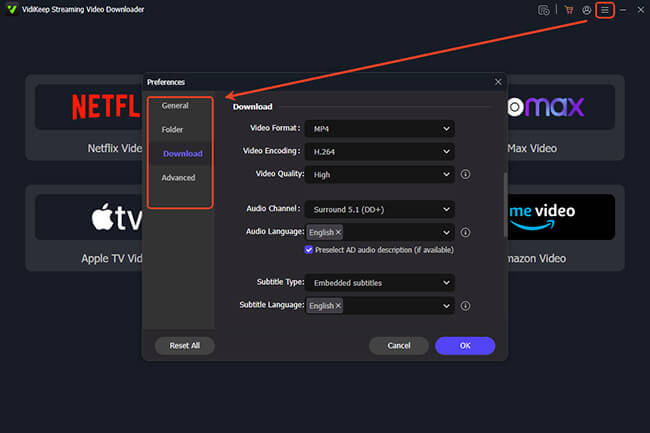
After installing and opening the software on your computer, head to the upper-right corner and click the "Menu" icon. Navigate through "Preference" and then "Download" to set up your video parameters. You can designate MP4 as your primary format to ensure universal playback across all your devices. Additionally, you can select your preferred video codec to balance visual fidelity with storage space.
Step 2 Access the Amazon Prime Video Streaming Library
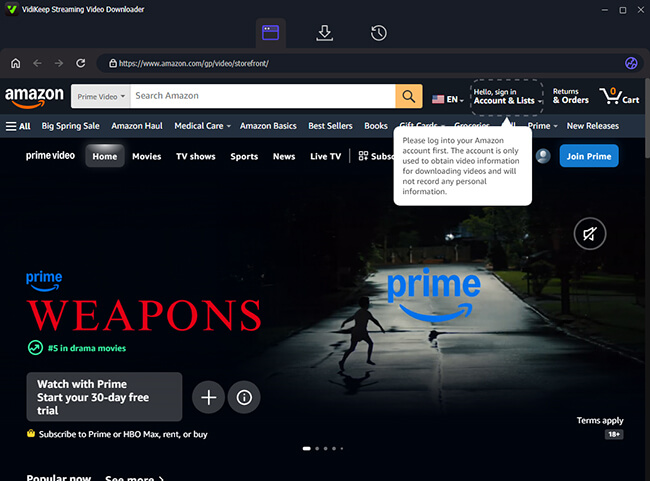
Click the dedicated Amazon Video portal on the main dashboard to launch the application's built-in, secure browser. Simply sign in using your regular account credentials. It allows the Amazon video to MP4 converter to securely access the high-definition media tied to your active Prime subscription.
Step 3 Locate Your Target Movie or Show from Amazon
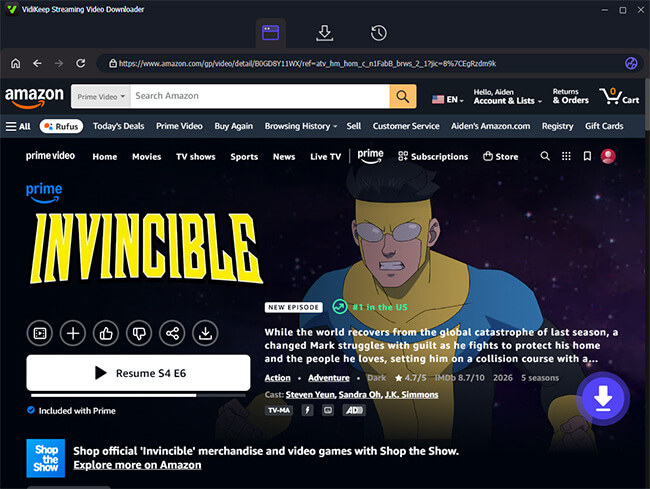
Search for the specific title you want to save and open its main detail page. On the lower right side of your screen, you will spot a floating purple "Download" button. Clicking this prompts the program to fetch the video's metadata, bypassing the DRM and preparing to convert Amazon Prime video to MP4 format smoothly.
Step 4 Finalize Settings and Initiate the Download
A new configuration window will appear prompting you to confirm your specific preferences before saving. You can quickly adjust a few key elements here. Once you are satisfied with these selections, hit the primary "Download" button to begin the extraction. If you are archiving a television series, take advantage of the batch-queue feature with "Add to List" to grab entire seasons simultaneously rather than clicking through each episode.
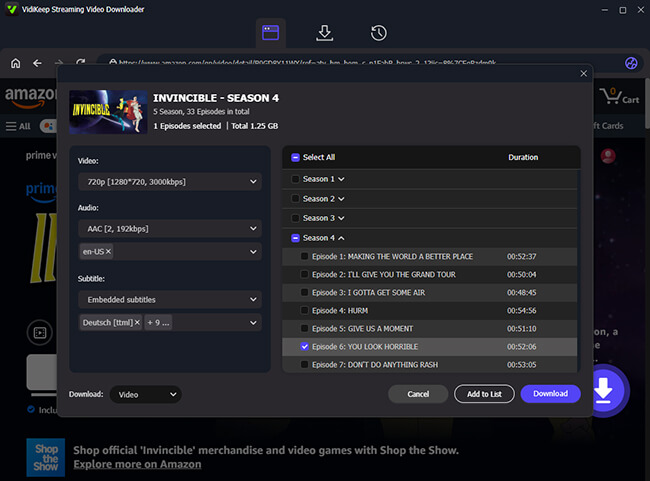
Step 5 Locate Your Permanent Amazon Prime MP4 Files
You can keep an eye on the active progress bar located in the top download queue. Once the task finishes, switch over to the "History" tab to find your newly saved media. Your content is now fully processed, stored locally on your hard drive, and completely free from expiration dates or app restrictions.
 Pros:
Pros:
- Extremely fast; handles data streams directly.
- Supports up to 1080p with 5.1 surround sound.
- Allows for batch downloading of entire seasons.
Cons:
- Requires an active Amazon subscription.
- Desktop-only software (Windows/Mac).
- Occasional updates needed for DRM changes.
Part 3. How to Capture Amazon Prime Content to MP4 via Recorder
For users who prefer a "legal-capture" approach, screen recording is a viable alternative. This method essentially "films" your screen as the movie plays, creating a new MP4 file from the playback. This is a reliable way to get amazon video mp4 files if direct downloaders encounter region-specific blocks.
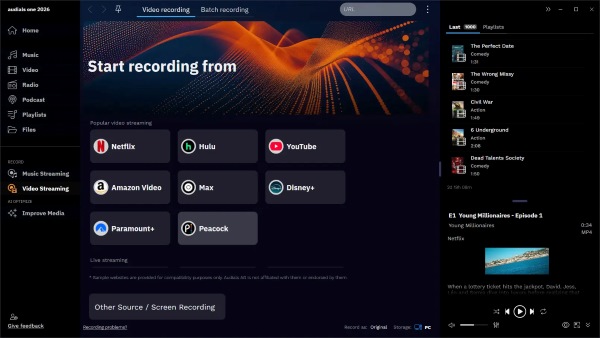
Audials One is a sophisticated media suite for Windows that specializes in high-quality stream capture. It acts as a digital bridge, recording the video feed directly from your hardware to ensure the best possible output without the black screen issues.
Record and Save Amazon Video to MP4 via Audials One
Step 1. Install Audials One on your PC. You can begin the process without a registered account to test the interface.
Step 2. Select the "Video Streaming" section from the sidebar and click on "Recording Scheduler". This allows you to plan your captures or even queue up a list of movies to be recorded overnight.
Step 3. Configure your output to MP4 and ensure your resolution is set to at least 720p or 1080p. Start the Amazon Video playback in your browser, and Audials will automatically detect the stream and begin recording.
Step 4. Once the video ends, the software automatically trims any silence at the beginning or end. It also fetches the correct metadata, saving the final file directly to your library.
 Note:
Note:
Record Amazon Prime Video via OBS is not recommended, since the results are often inconsistent. Some try bypassing the "black screen" by disabling hardware acceleration and using "Display Capture." However, due to the DRM updates, this method frequently fails. For a reliable Amazon to MP4 conversion in high-quality offline viewing, dedicated Amazon Prime Video Downloaders are much more effective.
Pros:
- Works regardless of Amazon's server-side changes.
- Automatically tags files with posters and titles.
- Can record sequences of episodes automatically.
Cons:
- Recording happens in real-time (slower).
- High CPU/GPU usage during the recording.
- Only available for Windows users.
Part 4. The Reality of Free Online Amazon Video MP4 Converters
Many users frequently search for an Amazon Prime to MP4 converter online in hopes of avoiding software installations. While the convenience of a web-based tool is appealing, the reality is that most "URL to MP4" sites, such as Keepvid, ConverterFactory or similar platforms, are almost universally ineffective when it comes to premium Amazon content.
This failure occurs because free online tools are designed to fetch public, unprotected video links. Amazon's library, however, is shielded by a secure login and sophisticated DRM encryption. Without the ability to log into your account or access decryption keys, these websites cannot "see" the data you wish to save. Consequently, attempting to convert amazon prime video to mp4 online usually results in an error message or, more dangerously, redirects to intrusive and suspicious advertisements.
 Tips:
Tips:
While these tools fail on movies and TV shows, they can occasionally handle unsecured, public-facing Amazon content, If you are attempting to save a public video, you can use AMZ Downloader extension to download Amazon product demonstrations or marketing clips.
Pros:
- No installation required; works directly in your browser.
- Usually free to use for basic tasks.
- Can occasionally download public product videos.
Cons:
- Zero support for DRM-protected movies or Prime series.
- High risk of malware, phishing, and aggressive pop-up ads.
- Extremely slow speeds and often limited to low resolution (360p/480p).
Part 5. FAQs about Amazon Prime Video
Can I download Amazon Prime video to MP4 for free?
Most reliable tools that can bypass Amazon's DRM require a paid license. While some recorders offer free trials, a completely free, high-quality Amazon Video to MP4 converter is rare because the technology required to keep up with Amazon's security updates is expensive to maintain.
Is it legal to download or convert Amazon Prime Video to MP4?
Generally, converting content for personal, offline use falls under "fair use" or "time-shifting" in many regions. However, distributing the files or using them for commercial purposes is a violation of copyright law and Amazon's terms of service.
Why do I get a black screen when trying to screen-record Amazon Prime?
This happens because of a technology called HDCP. When you activate screen-recording software, HDCP detects an "unauthorized" device trying to intercept the video signal. To protect the copyrighted content, it immediately cuts the video feed, leaving you with only audio and a black screen.
Can I move the downloaded Amazon MP4 files to my iPhone or Android?
Yes. Once you have the MP4 file on your computer, you can transfer it via a USB cable, cloud storage, or an SD card. Unlike official downloads, these files will play in any standard video app on your mobile device.
Part 6. Final Thought
while you might find a way to convert amazon video to mp4 free for public clips, these online portals are not a viable solution for building a high-quality, permanent library of Prime Video entertainment. For premium content, a dedicated desktop solution remains the only reliable path.

Jordan Rhodes is a Chief Technical Editor and Media Specialist at VidiKeep, specializing in creating diverse tech content, including streaming tutorials, software reviews, and video encoding tips.
Leave a Comment