3 Ways to Download Amazon Prime Video Offline
Many subscribers wonder how to watch their favorite movies and TV shows on the go without relying on a stable internet connection. While the Amazon platform offers an incredible library of entertainment, figuring out exactly how to execute an Amazon Prime Video download across different devices can sometimes be confusing due to strict digital rights management. In this guide, we will walk you through everything you need to know, so you can get your favorite videos from Amazon Prime offline with three effective methods.
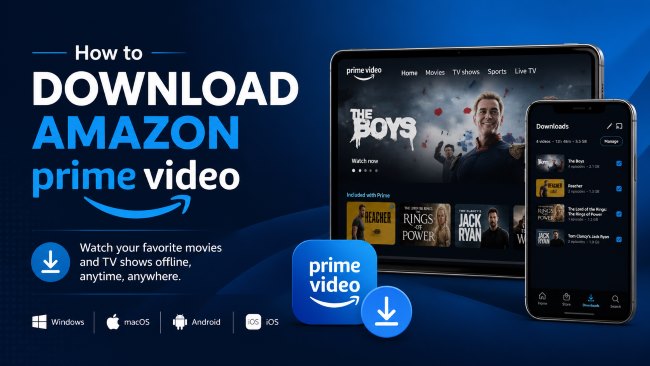
Part 1. Can You Download Movies from Amazon Prime Video
You can absolutely download from Amazon Prime Video, but you cannot simply save files directly from your web browser. To successfully get an Amazon Prime Video, you must utilize Prime Video App. Most users rely on the official applications provided by Amazon for their daily offline viewing needs. However, third-party software and screen recorders are also highly effective alternatives for those who need more flexibility.
Part 2. How to Download Using the Amazon Prime Video App
The safest and most straightforward way to get your Amazon Prime Video offline is through the official channels. If you want an Amazon Prime Video download for PC or mobile, you just need to install the correct application for your operating system.
Window/Mac
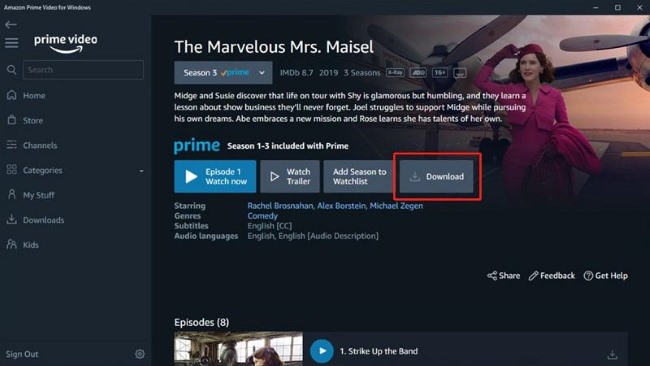
If you are using a PC, the application requires Windows 10 or Windows 11. For Apple users looking for an Amazon Prime Video download on Mac, your device must be running macOS Big Sur 11.4 or a newer operating system. Once you ensure your computer meets these essential system requirements, saving your favorite shows from Amazon Prime Video for offline viewing is incredibly straightforward.
Step 1.Open the Microsoft Store/APP Store on your computer, search for "Prime Video," and install the official application.
Step 2.Enter the newly installed program on your PC or Mac, and securely log in with your Amazon account details.
Step 3.On the video's main details page, simply click the "Download" button to start the transfer. To watch your saved content, simply navigate to the "Downloads" section found within the app's navigation menu.
Android/iPhone
Getting your favorite titles ready for a daily commute or a long road trip is easiest when using a smartphone or tablet. The official Prime Video application is fully optimized for both iOS and Android ecosystems, providing a reliable mobile viewing experience. Before you start downloading entire television seasons to your phone, it is always a good idea to check your available internal storage space.
Step 1.Navigate to the Apple App Store or Google Play Store on your device, search for the official Amazon Prime Video app and download it.
Step 2.Launch the application and input your credentials to sign in to your active Amazon Prime account. Use the search bar to pinpoint the exact movie or tv shows you wish to watch offline.
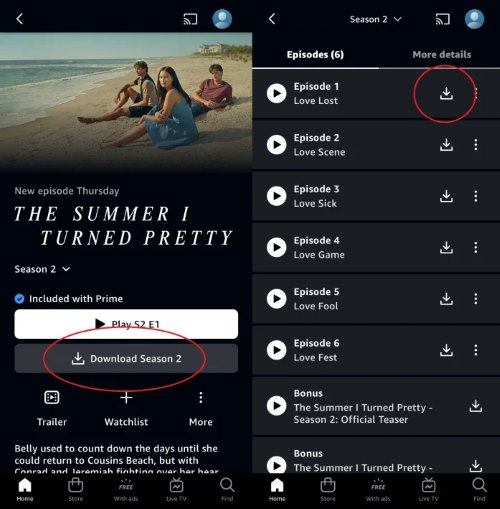
Step 3.If you are viewing a movie, tap the prominent "Download" button located under the description. For TV series, you can either tap the downward-pointing arrow next to a single episode or hit "Download Season" to grab the entire collection at once.
Official Limitations of Amazon Prime Video Downloads
While offline viewing is incredibly convenient, Amazon enforces strict DRM rules. Purchased videos are the only major exception to the strict time limits. If you explicitly buy a movie, you can keep it downloaded indefinitely as long as your Amazon account remains active. Before filling up your device's storage, you need to keep these three main restrictions in mind:
- The 30-Day / 48-Hour Time Limit: For standard Prime titles and rentals, you have exactly 30 days to begin watching a downloaded video. The moment you press play, a 48-hour expiration timer starts ticking, requiring you to finish the movie before it expires.
- Strict Device Caps: You can only download standard Prime subscription content to two devices at the same time. Rentals are restricted to just one single device, while purchased videos give you a bit more freedom with up to four compatible devices.
- Non-Downloadable Content: Not everything in the Amazon catalog can be saved offline. Free promotional videos (that include ads) and live Pay-Per-View events are strictly streaming-only and will never have a download button.
Part 3. How to Download Videos from Amazon Prime Permanently
If you are tired of the strict 48-hour expiration timer or the limited device caps imposed by the official app, you might be searching for a way to keep your favorite shows indefinitely. VidiKeep Streaming Video Downloader is a powerful, third-party software solution built for this exact core problem. It empowers you to bypass the official viewing restrictions, giving you the freedom to execute an Amazon Prime video movie download that never vanishes from your hard drive. Instead of temporarily caching files within a closed, platform-specific ecosystem, VidiKeep acts as a bridge, allowing you to save a truly permanent digital library.

Download your favorite Amazon Prime movies and shows to MKV or MP4 with zero quality loss for offline viewing anywhere.
- Universal MP4/MKV Formats: Save videos as universally recognized MP4 or MKV files for easy transfer to USB drives, smart TVs, or consoles.
- 1080P & Surround Sound: Preserve the original 1080P high-definition visuals along with immersive EAC3 5.1 and Dolby Atmos audio.
- Ad-Free & Permanent: Automatically strip away ads and completely bypass Amazon's 30-day/48-hour expiration limits to keep files forever.
- Multilingual Subtitles: Capture all available audio and subtitle tracks, saving them embedded directly into the video or as standalone SRT files.
How to Download Amazon Prime Video for PC/Mac
Step 1 Customize Your Output Preferences
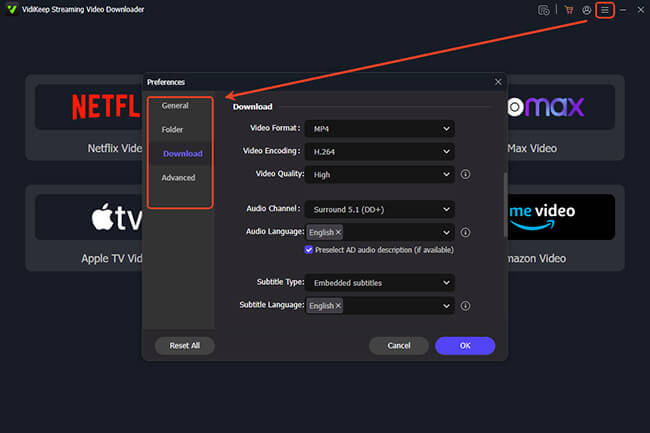
Install and launch VidiKeep Streaming Video Downloader to prepare for your Amazon Prime video download for PC or Mac. First, click the "Menu" icon to customize your output preferences. Here, by tapping "Preference" and "Download", you can select your video format as MP4 or MKV, choose between H.264 or AV1 codecs to optimize file size, and pick your preferred audio and subtitle languages.
Step 2 Log in to Your Amazon Account
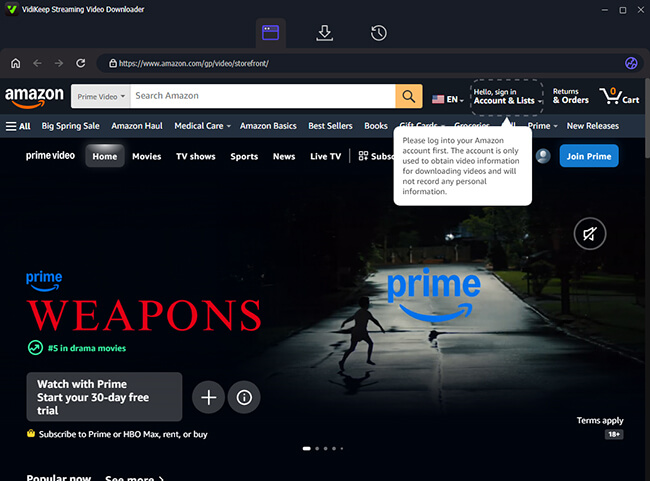
On the main interface of the program, locate and click the Amazon Video icon. This will launch a secure, built-in web browser directly within the application. Enter your credentials to log into your Amazon account just as you normally would on the official site.
Step 3 Select Your Video from Amazon Library
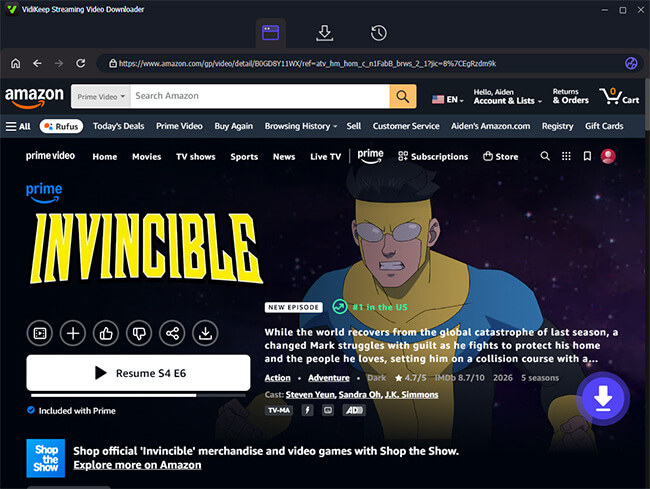
Once you are successfully logged in, you can navigate the Amazon library exactly as you would on the official app. When you locate the exact content you wish to save offline, click on its thumbnail to open the video's details page. Then press the floating "Download" icon in the right-lower, and VidiKeep will then automatically analyze the title's data to unlock your Amazon Prime video movie download options.
Step 4 Start Downloading Amazon Prime Video
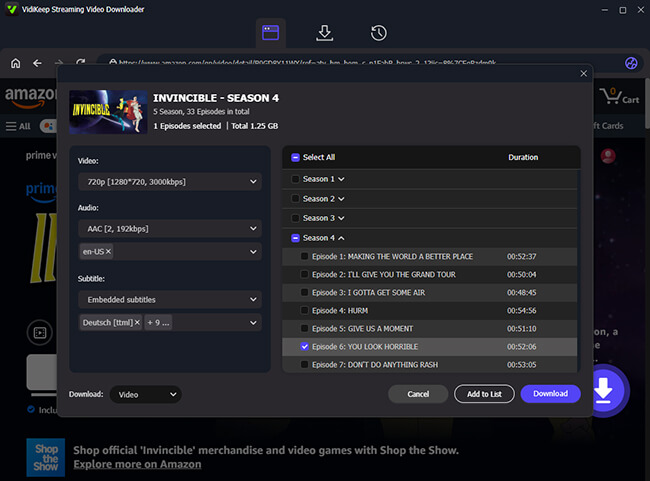
A pop-up window will appear, allowing you to adjust and confirm the output settings. Once everything is set, click the purple "Download" button to begin. For TV series, you can also use the batch download feature by selecting "Add to List", making it easy to queue multiple episodes or even full seasons at once.
Step 5 Access Your Downloaded Video Files
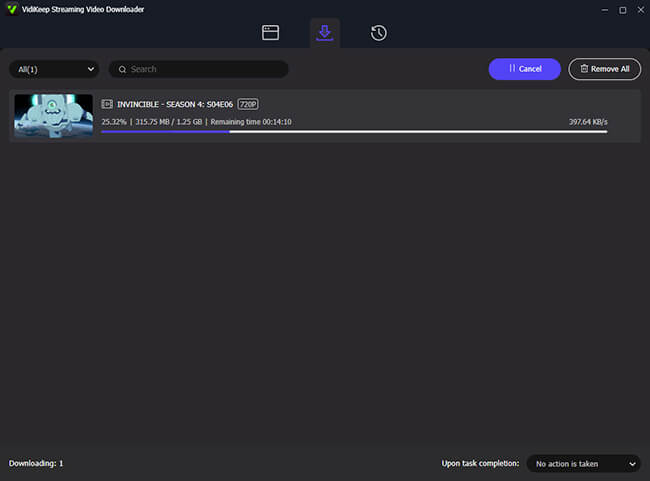
You can monitor the progress in the top "Download List" section. Once the process is finished, you can access your permanent, restriction-free Amazon Prime video download offline files by clicking the "History" tab. Your Amazon content is now ready to be watched or transferred anywhere.
Part 4. How to Record on Amazon Prime Video Offline
If you encounter a movie or live event that lacks a direct download button, you might be asking, can you record on Prime Video? Screen recording is a highly popular alternative, especially for content that cannot be downloaded traditionally. Capturing the playback directly from your screen is a highly effective workaround for titles with strict offline restrictions.
Method 1: Record Amazon Prime Video on a Windows PC with Audials One
For Windows users, Audials One is a premier Amazon Prime Video recorder. Rather than hacking into the streaming site, it legally records the video and audio directly from your computer's screen. It is particularly useful for binge-watchers because it features a high-speed batch recording mode that can capture entire TV seasons sequentially, while also automatically adding subtitles and file tags.
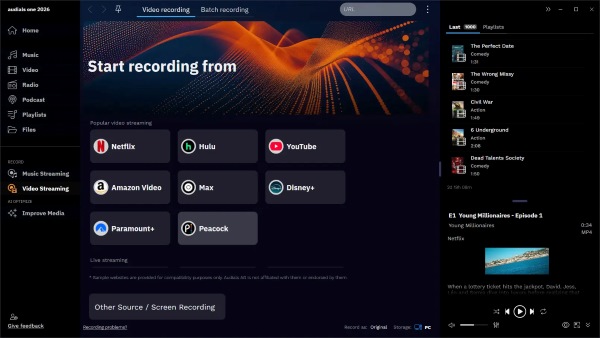
Step 1.Download and install the Audials One software on your Windows PC. The initial setup is completely free, and you do not need to register an account to get started.
Step 2.Launch the program, click on the "Video Streaming" menu, and select the "Recording Scheduler" at the top of the interface. Use this feature to browse your streaming library and add your desired movies or episodes to the Batch Recorder queue.
Step 3.Before initiating the capture, customize your output settings. Select your preferred file format (such as MP4) and adjust the video resolution. Playing the original video at full size while setting the recorder to at least 720p will yield the best visual results. Once configured, hit play to let Audials record the content.
Step 4.When the recording finishes, the final video will appear in your Audials playlist on the right side of the screen. The software automatically applies the correct movie title and episode tags, leaving you with a perfectly organized file ready for offline viewing or transferring to a USB drive.
Method 2: Capture Amazon Shows on Mobile with PlayOn Cloud
If you primarily use an iPhone or Android device and are wondering how do I record Prime Video without draining my phone's battery or leaving my screen on, PlayOn Cloud is the perfect solution. PlayOn Cloud functions as a mobile streaming DVR. Instead of recording directly on your device's screen, the app initiates the recording on a secure cloud server. Once the cloud finishes capturing the video, you simply download the final, ad-free MP4 file directly to your mobile device.
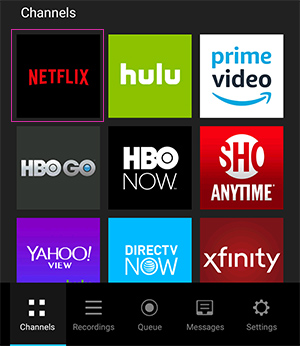
Step 1.Visit the Apple App Store or Google Play Store to download and install the PlayOn Cloud app. Create a free account to unlock your initial complimentary recording credits.
Step 2.Open the app and navigate to the "Channels" tab. Tap the Prime Video logo and securely sign in using your Amazon account credentials.
Step 3.Search through the catalog to find the exact video you want to save. To capture a movie, simply tap the "Record" button. If you are targeting a TV show, you can select specific episodes or tap "Record All" to process the entire season at once.
Step 4.The app will now record the video in real-time in the background. You can close the app or turn off your phone during this process. Once the server finishes, navigate to the "Recordings" tab to execute the Amazon Prime Video download directly to your local mobile storage, allowing you to watch the high-definition file anytime without Wi-Fi.
Part 5. FAQs about Download Videos on Amazon Prime
Can I get Prime Video without Amazon Prime?
Yes, you absolutely can enjoy the streaming library without paying for the full shipping membership. Amazon offers a standalone Prime Video subscription for users who only want access to entertainment. Currently, this standalone streaming plan costs $8.99 per month.
How to get ad free on Amazon Prime Video?
To remove advertisements, you must upgrade your account to the new Prime Video Ultra tier, which Amazon introduced in April 2026. This premium add-on costs an additional $4.99 per month on top of your base Prime or standalone video subscription. Upgrading to the Ultra tier not only strips away the mid-roll commercials but also permanently unlocks 4K/UHD streaming resolution and doubles your offline storage limit to 100 titles.
Why can't I download videos on the Prime Video app?
If your download button is missing or the process fails, it usually comes down to one of three common issues:
- Account Limits Reached: You may have hit Amazon's maximum cap of 50 downloaded titles for standard users or 100 for Ultra subscribers.
- Insufficient Device Storage: Your smartphone or computer might not have enough free internal space to save large, high-definition files.
- Content Restrictions: Not all videos are eligible for offline viewing. Free, ad-supported content (like Amazon Freevee) and certain third-party licensed movies strictly require an active internet connection.
Part 6. Wrap Up
If you just need a quick movie for a weekend trip, sticking to the official Amazon Prime Video app is the safest and most straightforward choice. However, if you are frustrated by the strict 48-hour viewing expiration timers and want to keep your Amazon Prime video download files permanently, investing in VidiKeep Streaming Video Downloader is highly recommended. Alternatively, screen recording tools provide flexible workarounds for capturing restricted titles. Choose the method that best aligns with your viewing habits, and start building your restriction-free offline Amazon library.

Jordan Rhodes is a Chief Technical Editor and Media Specialist at VidiKeep, specializing in creating diverse tech content, including streaming tutorials, software reviews, and video encoding tips.
Leave a Comment