7 Best Amazon Prime Video Downloaders Reviewed
Whether you want to manage downloaded videos more easily, or explore desktop solutions for different devices, choosing the right Amazon Prime Video downloader matters. This guide reviews the best Amazon Prime Video downloaders in 2026, comparing their features, output formats, compatibility, and overall performance to help you find a suitable option.
Here are the top Prime Video downloaders that stood out in our 2026 tests for performance, video quality, and overall reliability:
- VidiKeep Amazon Downloader: The best overall balance of high-speed batch downloading, 1080p video quality, and low system resource usage.
- StreamFab Amazon Downloader: Best for advanced users who want automated workflows, featuring auto-download capabilities for new episodes.
Part 1. Is It Safe to Use a Prime Video Downloader?
When considering tools that help save Prime Video content for offline viewing, it's natural to have concerns about account security and copyright issues. In general, downloading content you are legally allowed to access for personal, private use is less likely to cause problems. However, copyright laws and platform policies vary by region, so it's important to use these tools responsibly. Avoid using downloaders for commercial purposes, unauthorized sharing and redistribution.
 Tips:
Tips:
Reliable Prime Video downloaders often include built-in safety measures to reduce risks. For example, they limit automated request frequencies to mimic normal human viewing habits, ensuring your account remains safe from automated anti-bot sweeps.
Part 2. Amazon Prime Video Downloader Comparison
We tested every program on a Windows 11 machine connected to a 500 Mbps fiber network, using a standard 45-minute 1080p HD episode as our benchmark title.
- Video and Audio Quality: We inspect file metadata to confirm native 1080p output and Dolby Digital 5.1 surround sound preservation.
- Subtitle Handling: We verify whether subtitles can be saved as separate SRT files for personal media servers.
- Batch Download Efficiency & Stability: We assess extraction speeds and breakpoint resume capabilities when queue-downloading full TV show seasons.
| Prime Video Downloader | Best Feature | Max Resolution | Format Output |
|---|---|---|---|
| VidiKeep | Lightweight & Fast | 1080p | MP4 / MKV |
| StreamFab | Auto-Download Schedule | 1080p | MP4 / MKV |
| KeepStreams | Batch Processing | 1080p | MP4 / MKV |
| TuneBoto | Subtitle Extraction | 1080p | MP4 / MKV |
| MovPilot | Browser-like Experience | 1080p | MP4 / MKV |
| CleverGet | Multi-Platform Suite | 1080p | MP4 / MKV |
| Audials One | Screen Capture Failsafe | 1080p | MP4, MKV, AVI, MOV, WMV |
Part 3. The 7 Best Amazon Prime Video Downloaders in 2026
High-Performance Downloaders for Advanced Users
If you are managing multi-season TV queues or looking for lossless 1080p extraction at top speeds, standard downloading tools won't cut it. Finding the best Amazon Prime Video Downloader for power users comes down to advanced automation, rich metadata, and high-speed background processing without compromising quality.
Top 1. VidiKeep Amazon Prime Video Downloader
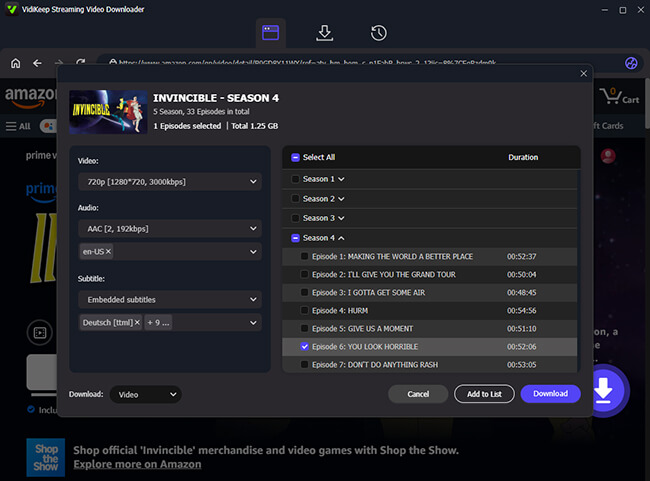
VidiKeep Amazon Prime Vieo Downloader takes the crown as our top recommendation, offering the ideal balance of extraction speed, visual fidelity, and lightweight system performance. Designed specifically to circumvent Amazon Prime Video's DRM protections, VidiKeep allows you to convert downloaded Amazon Prime videos to MP4 or MKV files with a few simple clicks. Instead of burying encrypted files deep within system folders, it lets you choose your save location so you can transfer your favorite Amazon Prime movies to USB drives or smart TVs without relying on the official app.
- Lossless 1080p HD & 5.1 Dolby Audio: Download video streams at 1080p Full HD resolution with EAC3 5.1 surround sound audio tracks for an uncompromised viewing experience.
- Universal MP4 & MKV Output: Supports both MP4 and MKV formats, allowing seamless playback across any device from smartphones and smart TVs to media servers like Plex.
- High-Speed Batch Downloading: Features multi-thread hardware acceleration to queue and extract full TV show seasons simultaneously.
- Flexible Subtitle Extraction: Gives you total control over subtitles by allowing you to export them as standalone SRT files, internal soft subtitles, or hardcoded text directly on the video.
 Editor's Experience:
During my recent test trying to archive The Boys, VidiKeep processed a full season faster than competitors. It consistently maintained an 8,000+ kb/s bitrate, ensuring the final MP4 looked identical to the live stream.
 Pros:
Pros:
- Extremely fast downloading speeds with low CPU overhead
- Preserves original 5.1 Dolby surround sound audio
- Saves multi-language subtitles as standalone SRT files
 Cons:
Cons:
- Requires an active subscription for full features
Top 2. StreamFab Amazon Downloader
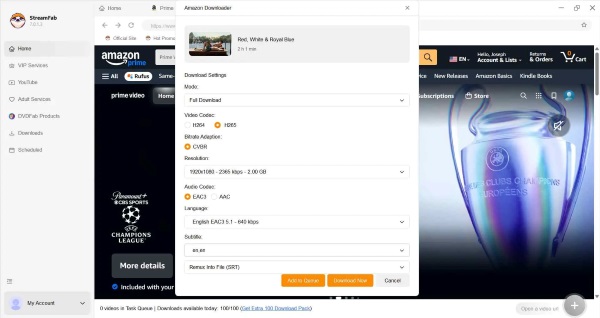
StreamFab stands out as a downloader engineered for serious media collectors who demand pristine 1080p offline archives. Beyond basic video extraction, it excels in media management by automatically embedding rich metadata into the file for flawless integration. Its most powerful asset is the automated schedule queue. You can track a currently airing TV show, and the software will quietly fetch new episodes the moment Amazon releases them, preserving EAC3 5.1 surround sound.
Our test benchmark completed in 2.8 minutes with a peak transfer rate of 14 MB/s, delivering an uncompressed 8,258 kbps stream. The software automatically embedded full series metadata and episode artwork during the download process. However, the lifetime license cost is noticeably higher than competing options.
Pros:
- Rapid background extraction and auto-scheduling
- Excellent metadata tagging for Plex and Jellyfin
- Rapid developer updates following DRM key rotations
Cons:
- Higher price point for lifetime licenses
- Occasional memory leaks during 50+ item queues
- Requires high-speed internet for max stability
Top 3. KeepStreams Downloader for Prime Video
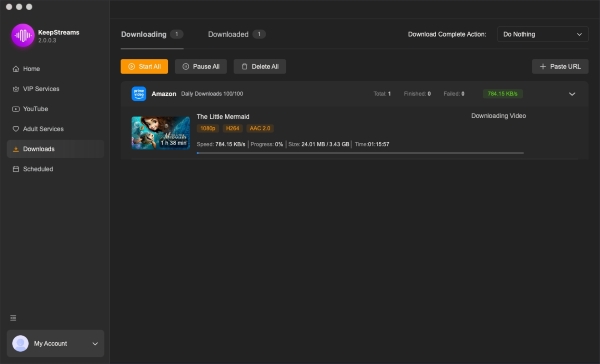
KeepStreams is engineered specifically to handle massive, multi-season batch queues without crashing. If you frequently download heavy box sets overnight, its resilient downloading engine seamlessly recovers from temporary Wi-Fi drops, ensuring partial files are never corrupted. Additionally, it features a highly efficient ad-detection algorithm that automatically removes ads from Amazon Prime Video's Freevee tier. By processing multiple HD videos simultaneously and saving them as uncompressed MKV or MP4 files, it dramatically reduces the time required to build a massive offline library.
During testing, KeepStreams processed our 45-minute episode in 3.8 minutes at an average bitrate of 8,200 kbps. System CPU usage spiked slightly higher to 18% during the MKV remuxing stage, but file integrity remained flawless.
Pros:
- Highly stable batch downloader for full seasons
- Built-in ad remover for ad-supported tiers
- Supports multiple regional Prime Video sites
Cons:
- User interface can feel slightly cluttered
- Free trial restricts users to three video downloads
User-Friendly Choices for Everyday Viewing
If your main goal is simply to save a few movies for an upcoming flight or save hard drive space, a reliable Amazon Prime Video Downloader tool offers the perfect middle ground. Whether you are managing a US Prime account or searching for a specialized Amazon Prime UK Video downloader to save region-locked British content, having full control over your locale settings is essential for an uninterrupted offline viewing experience.
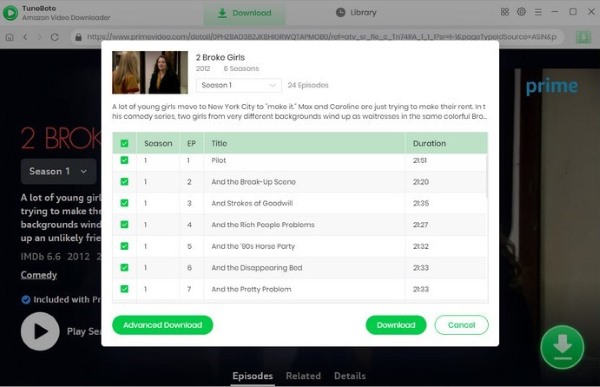
Top 4. TuneBoto Amazon Video Downloader
TuneBoto takes a hyper-focused approach by dedicating its decryption engine exclusively to the Amazon Prime Video platform. It reacts remarkably fast to Amazon's backend DRM updates, preventing the sudden black-screen failures on Prime Video. It operates with a minimal CPU footprint, making it ideal for older laptops. Furthermore, TuneBoto shines in subtitle management, giving users control to extract multi-language tracks as standalone SRT files or embed them into the video from Amazon Prime.
Our performance test logged a 4.2-minute download duration at a stable 9.5 MB/s transfer speed. TuneBoto excels at subtitle extraction from Amazon Prime, allowing users to choose between hardcoded, internal, or external SRT subtitle files.
Pros:
- Highly specialized and lightweight software engine
- Superior subtitle extraction and formatting options
- Clean, minimalist user interface with zero bloat
Cons:
- Restricted strictly to Amazon Prime content
- Does not support H.265 video re-encoding
Top 5. MovPilot Amazon Prime Video Downloader
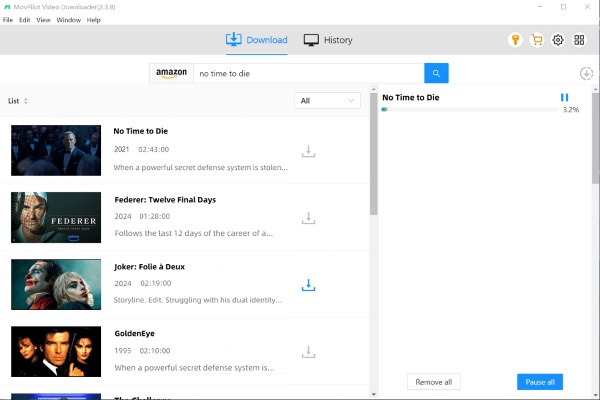
MovPilot excels by its native support for H.265 (HEVC) hardware encoding. While most tools output standard H.264 video, MovPilot leverages your GPU to compress 1080p HD files by nearly 50% without sacrificing visual clarity. This makes it an excellent choice for users who want to save high-resolution Amazon Prime movies to iPad and watch them offline without worrying about limited storage on mobile devices.
Pros:
- H.265 codec support saves significant storage space
- Intuitive embedded browser interface
- Consistent 1080p video extraction quality
Cons:
- Re-encoding adds slight processing overhead
- Free trial restricts download length heavily
- Batch queuing options are somewhat basic
Top 6. CleverGet Amazon Downloader
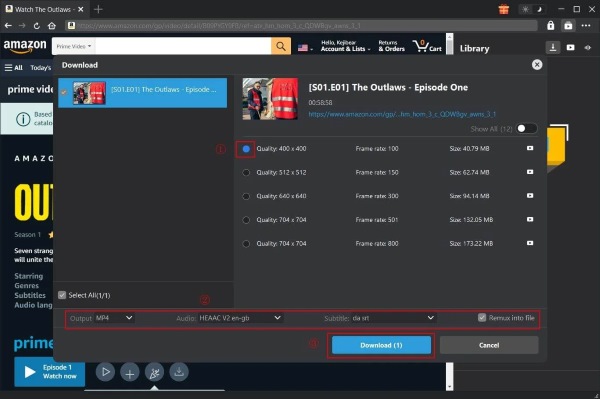
CleverGet Amazon Downloader is a powerful component of the CleverGet suite, supporting video downloads from over 1,000 streaming platforms. One of its standout features is automated local file organization. When you queue an entire Amazon TV series, CleverGet automatically identifies season and episode information and creates properly named sub-folders on your hard drive. Furthermore, its advanced browser engine can handle complex segmented Prime Video streams and combine them into a single MP4 or MKV file for easier playback and management.
Pros:
- Support multi-site download
- Saves clean folder structures for TV series
- Supports multiple output format preferences
Cons:
- Occasional URL parsing glitches require restarts
- Interface setup takes a bit more time
- Customer support response times vary
Screen Recording Tools for Maximum Compatibility
When streaming platforms deploy major DRM updates that temporarily disrupt traditional stream rippers, screen capture software serves as the ultimate failsafe. While recording operates in real-time and requires more hardware power, this method allows you to convert downloaded Amazon Prime video to MP4 format, guaranteeing your media remains accessible regardless of security updates.
Top 7. Audials One for Amazon Prime Video
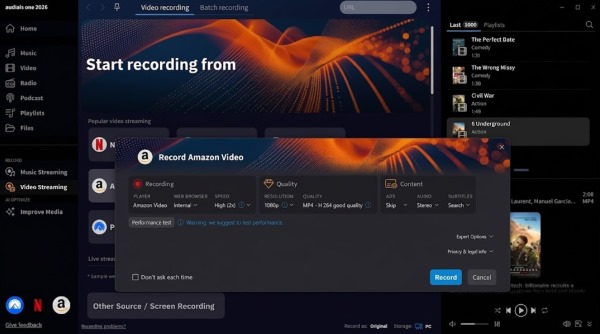
Audials One operates as a high-end screen recorder rather than a direct stream ripper. When Amazon deploys major encryption updates that temporarily disrupt traditional rippers, Audials One continues to work reliably.
Because it records playback in real-time, capturing a 45-minute episode takes exactly 45 minutes. System resource usage was significantly higher, consuming 38% CPU and GPU capacity throughout the recording session.
Pros:
- Immune to sudden Widevine DRM protocol updates
- Highly versatile across any streaming service
- Advanced post-processing and editing tools included
Cons:
- Captures video in 1:1 real-time speed only
- High CPU and GPU hardware resource usage
- Monitor cannot be used for other tasks while recording
Part 4. Why Free Online Tools Fail to Get Prime Video Content
Searching for a free Amazon Prime Video downloader online or a Chrome extension often leads to disappointing results. Many of these tools fail to work properly, produce unusable files, or simply cannot capture Prime Video playback. Here's why:
- The DRM Protection Challenge: Amazon Prime Video uses Widevine DRM to secure its streaming library. Browser extensions run inside limited environments and usually cannot interact with the protected playback process required for licensed streaming content.
- Authentication Restrictions: Most free online downloaders are built for openly accessible platforms. When dealing with Prime Video, they often cannot complete Amazon's account verification and playback authorization process, preventing them from retrieving playable videos.
- Security and Reliability Issues: Many free downloader websites and extensions rely on outdated methods, aggressive ads, or questionable download buttons. Even when they appear to work, the output quality and reliability can be inconsistent.
While free tools may work well for downloading public videos from supported websites, they are generally not suitable for protected streaming platforms like Amazon Prime Video. Users looking for a stable offline viewing experience usually turn to dedicated desktop solutions that offer better compatibility and download management features.
Part 5. Final Verdict
Amazon Prime Video's built-in download feature is limited by expiration rules, device restrictions, and file access limitations. Dedicated downloaders like VidiKeep provide more control over video quality, formats, and offline playback, while recorder tools remain a practical alternative for unsupported titles or users who prefer a more flexible approach.

Jordan Rhodes is a Chief Technical Editor and Media Specialist at VidiKeep, specializing in creating diverse tech content, including streaming tutorials, software reviews, and video encoding tips.
Leave a Comment