How to Get Amazon Prime on Nintendo Switch
For many console owners, the Nintendo Switch serves as the ultimate portable gaming system. However, its media streaming capabilities remain restricted. Many owners wonder whether they can watch Amazon Prime Video on their console. While the Switch supports a handful of streaming apps such as YouTube, Amazon has never released an official Prime Video app for the platform. Fortunately, by downloading your Prime Video titles to a computer and using alternative playback methods, you can still enjoy Amazon Prime Video content on your Nintendo Switch.
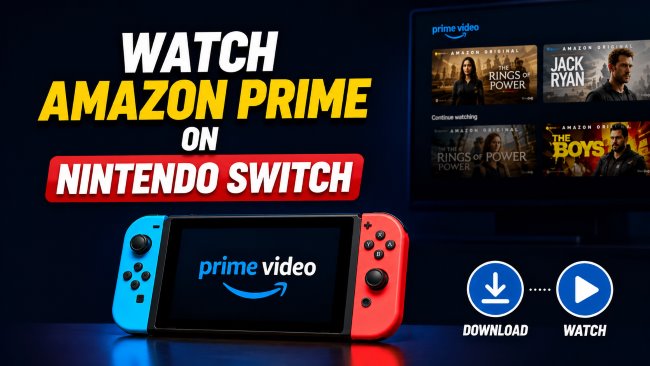
Quick Answer: Can You Get Amazon Prime Video on Nintendo Switch?
No, Amazon Prime Video is not officially available for download on the Nintendo eShop. Nintendo has prioritized Switch as a dedicated gaming device rather than a media center. Because the Switch features a locked-down operating system with a restricted web browser that uncapable of handling the DRM required to stream Prime Video content. While a few exceptions like YouTube exist, Amazon has not yet released a native client for the system.
Quick Answer: Can you Watch Amazon Prime on Nintendo Switch?
Yes. By downloading your authorized media to a standard video format on a computer first, you can bypass the console's strict app limitations. You can then stream these localized files to your Switch using supported methods.
Part 1. How to Watch Amazon Prime Video on Nintendo Switch
Since Nintendo Switch doesn't offer a native Prime Video app, you'll need to download Prime Video content first and then play it on your Switch through alternative methods. Here is a quick overview of the available methods to get your Amazon Prime library onto your console.
| Method | Required Tools | Ease of Use | Hardware Risk | Recommended |
|---|---|---|---|---|
| VidiKeep + YouTube | VidiKeep Downloader, YouTube Account | Easy | None | ⭐⭐⭐⭐ |
| VidiKeep + Plex | VidiKeep Downloader, Plex Media Server | Medium | None | ⭐⭐⭐⭐⭐ |
| Android Modification | Switchroot, Custom SD Card | Difficult | High | ⭐⭐ |
Part 2. Download Amazon Prime Video Locally For Switch Playback
Because standard web streaming fails on the Switch's hidden browser, the core solution involves handling your media files locally. You must convert your Prime Video episodes or movies into a DRM-free MP4 format so they can be played through unrestricted applications.
A practical tool for this is the VidiKeep Streaming Video Downloader. It allows you to log into your Amazon accounts and extract the authorized media into universal formats. Because the resulting files have no platform restrictions, you can easily bridge the gap between your Amazon Prime Video and Nintendo Switch.
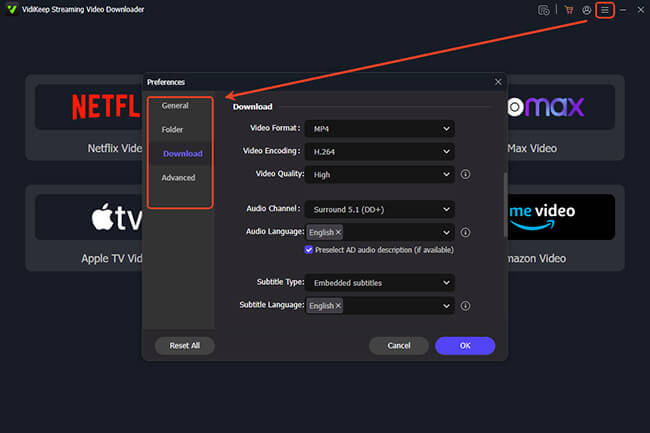
Step 1 Set Up Output for Nintendo Switch
Launch the installed VidiKeep software on your Mac or PC, then open the "Menu" in the top right and navigate to the "Preferences"> "Download" section. Select MP4 or MKV as your video output format to guarantee smooth playback when you stream the files to your Switch.
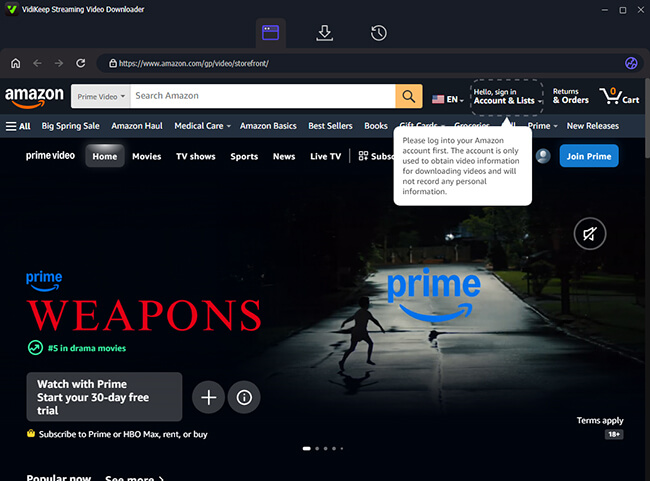
Step 2 Sign In to Amazon Prime Video
From the main interface, select the Amazon Video portal to open its secure built-in browser. Log in and authorizes the program to access the library tied to your Prime membership.
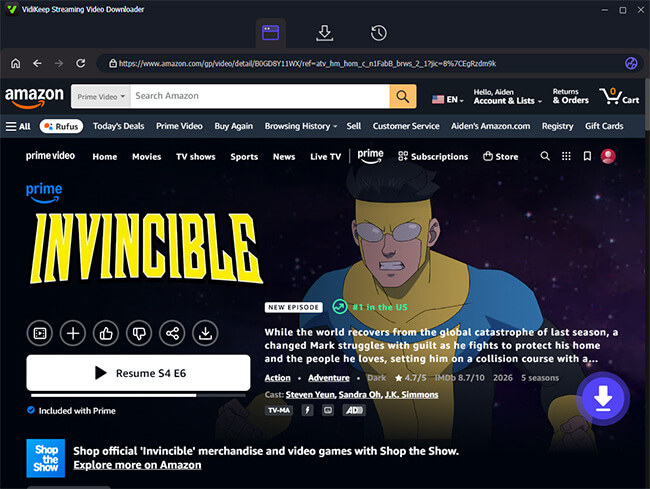
Step 3 Select a Prime Video to Watch on Nintendo Switch
Search for the movie or TV show you want to watch on your Switch and click into its main detail page. Look for a floating "Download" icon near the bottom right corner of the window, and click it.
Step 4 Download Amazon Prime Video as MP4/MKV
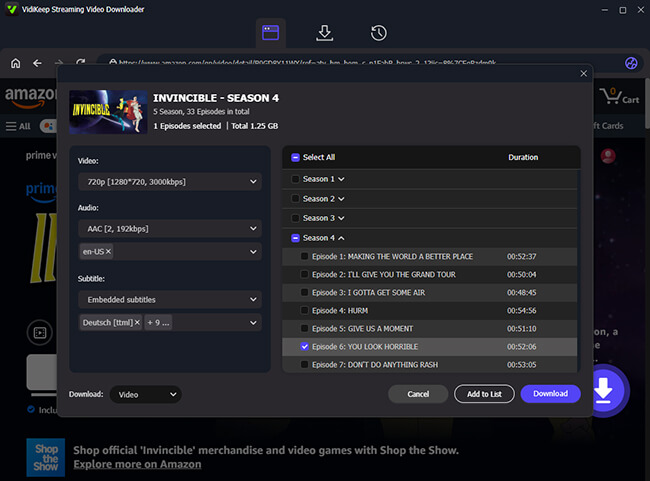
There is a settings window allowing you to review your preferences for audio tracks before committing. Hit the primary "Download" button to begin, or use the "Add to List" function to conveniently queue up an entire season of a show at once.
Step 5 Save Prime Videos for Nintendo Switch Playback
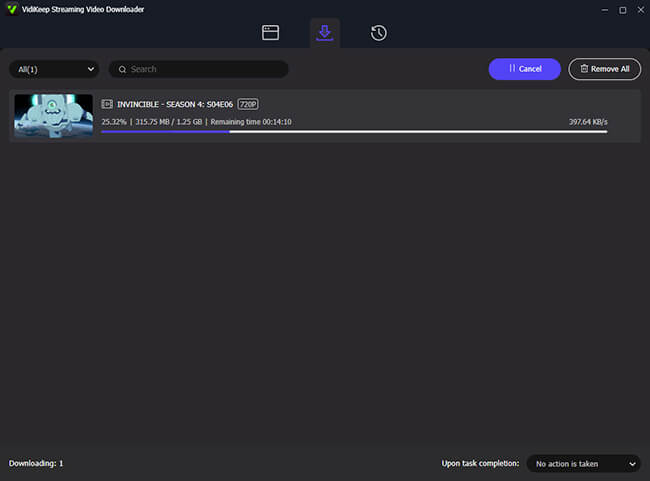
Once the download finishes, check the "History" tab to locate your files. Your Prime videos are now stored on your computer as MP4s, ready for the next phase of the playback process.
Part 3. Watch Downloaded Prime Videos on Nintendo Switch
Once the Prime Video files is safely stored on your computer, you have two primary methods for streaming them to your console without risking your hardware.
Use YouTube as a Cloud Playback Solution
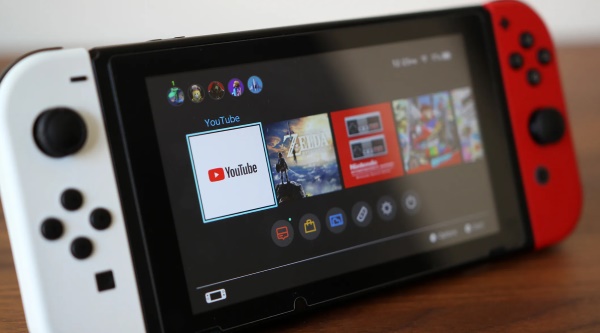
Since Nintendo officially supports the YouTube application, you can use your personal channel as a private cloud server. This is the most accessible method because it allows you to stream your videos on the go without needing to keep your home computer powered on.
Step 1. Open your desktop web browser and head over to your personal YouTube channel. Here, you will upload the Amazon Prime files you just extracted and saved to your computer.
Step 2. Make sure to change the video's visibility settings to "Private", which ensures only you can access your Prime Video library and prevents any copyright strikes against your account.
Step 3. Grab your Nintendo Switch, hop into the eShop, and download the YouTube app. Log in and navigate to the "Your videos" tab within the app. You can now select your private upload and start watching Amazon Prime on your Nintendo Switch.
 Pros:
Pros:
- Highly accessible and completely free to use.
- Allows for remote viewing anywhere with Wi-Fi.
- Completely safe and preserves your warranty.
 Cons:
Cons:
- Uploading large high-definition video files can be time-consuming.
- Requires you to navigate YouTube's backend for every new episode.
- Strict reliance on internet upload and download speeds.
Use Plex Media Server for Local Playback
For users with extensive media libraries who prefer not to wait for long cloud uploads, setting up a local Plex Media Server is the ideal choice. While there is no official Plex app on the eShop, you can access your server via the console's hidden web browser.
Step 1. First, install the Plex Media Server app on your PC or Mac. Then wake up your Nintendo Switch and navigate to the system's "Internet Settings". Select your current Wi-Fi network, choose "Change Settings", and switch your DNS Settings from "Automatic" to "Manual".
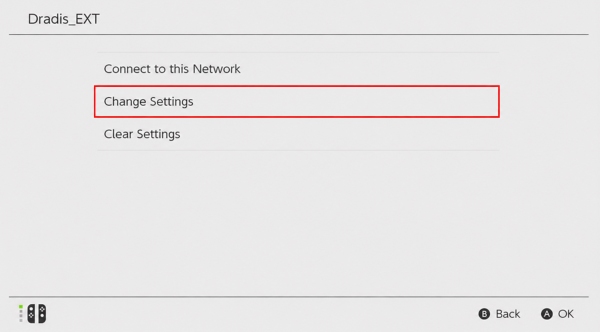
Step 2. Change your Primary DNS to route through the SwitchBru DNS by entering 045.055.142.122, and leave the "Secondary DNS" alone. Save the settings, then connect to your local Wi-Fi network.
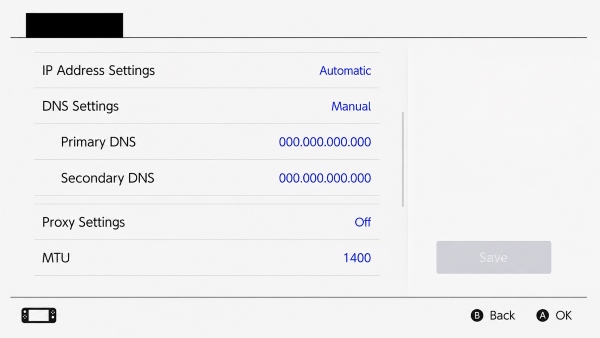
Step 3. The console will notify you that network registration is required to connect. Simply select "Next", and this clever DNS tweak will automatically prompt the Switch to open its normally hidden web browser,
Step 4. From the SwitchBru dashboard, select the "Enter URL" option. Type in the local web address for your personal Plex server, log into your account, and you are all set to stream your Prime Video library on Switch seamlessly.
Pros:
- Bypasses the need for lengthy internet uploads.
- Excellent for managing large collections of media.
- Maintains high video quality without cloud compression.
Cons:
- Requires a stable, fast local home network connection.
- Your host PC must remain powered on during playback.
- Accessing the hidden browser via DNS tweaks can be tedious.
Part 4. Alternative Solution: Install Android on Nintendo Switch
For experienced users, there is another way to access Amazon Prime Video on Nintendo Switch. By installing a custom Android operating system, the console can function similarly to an Android tablet, allowing you to install the Prime Video app directly from the Google Play Store. While this approach offers a more native streaming experience, it requires significant technical knowledge and is generally not recommended for most users.
 Risks and Limitations:
- Potential Risk of System Damage: Incorrect installation steps may render the console unstable or, in rare cases, unusable.
- Warranty Voidance: Because this is an unofficial modification, Nintendo does not support the process, and any remaining warranty coverage may be affected.
- Update Compatibility Issues: Future Nintendo firmware updates can interfere with custom Android installations, potentially causing boot errors, data loss, or reduced system stability.
- Complex Setup and Maintenance: Unlike the download-and-play methods described above, Android-based solutions often require ongoing troubleshooting and manual updates.
Conclusion
While the lack of an official application, get Amazon Prime Video on the Nintendo Switch is entirely manageable. By utilizing tools like the VidiKeep Downloader to prepare MP4 or MKV files, you can integrate your Prime library with the console through YouTube and Plex.

Jordan Rhodes is a Chief Technical Editor and Media Specialist at VidiKeep, specializing in creating diverse tech content, including streaming tutorials, software reviews, and video encoding tips.
Leave a Comment