How to Watch Amazon Prime Video on Samsung TV
Smart TVs have transformed the way we enjoy entertainment, bringing thousands of movies and TV shows directly to our living rooms. For many viewers, Prime Video is an essential streaming app for accessing popular originals content. However, like any streaming service, it can occasionally run into issues such as loading errors or playback problems. In this guide, you'll learn how to get and watch Prime Video on your Samsung TV, and troubleshoot the most common issues when it isn't working as expected.
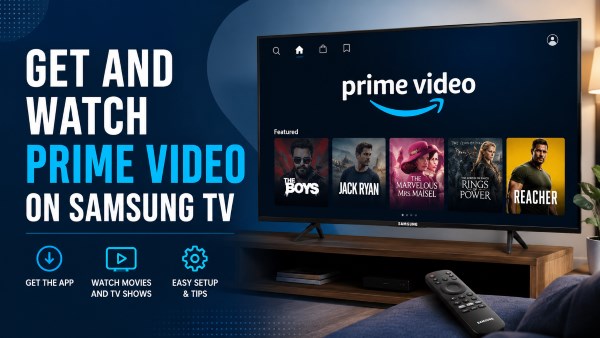
Part 1. How to Install Prime Video App on Samsung TV
Most newer Samsung models running the Tizen operating system come with Prime Video parked right on the home screen. But if you cann't find the app on your tv, getting it installed is a breeze.
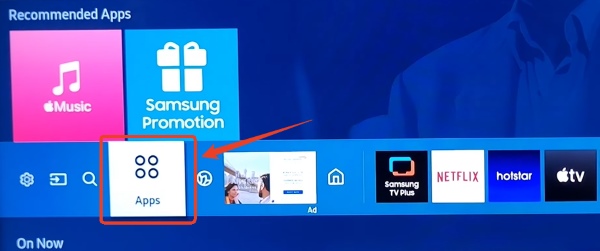
Step 1. Hit the "Home" button on your remote to pull up your smart hub dashboard where the bustling city center of your television's interface. Scroll over to the left side of the screen and click on the "Apps" icon. Use the search feature and type in "Prime Video", and select the official app to open its details page.
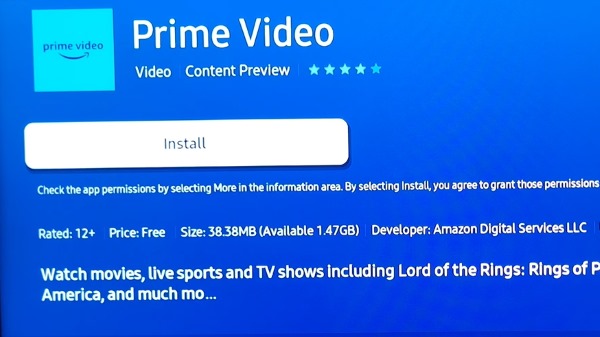
Step 2. Hit that "Install" button to add Prime Video app to your television. And Select the "Add to Home" option. This pins the Prime Video shortcut to your main navigation ribbon, saving you from digging through menus every time catching up on a new series.
Part 2. How to Watch Prime Video on Samsung Smart TV
Once the app is installed, the next step is to sign in to your Amazon account to start watching Prime Video on your Samsung Smart TV. Instead of struggling to type a lengthy login password with your TV remote, Amazon offers a quick wireless activation process. You can easily register your device and log in using a short activation code on your smartphone or computer.
Step 1. Fire up the Prime Video app from your home screen and select the "Sign In" button. Your TV will suddenly display a QR code alongside a random 5-to-6-character activation code.
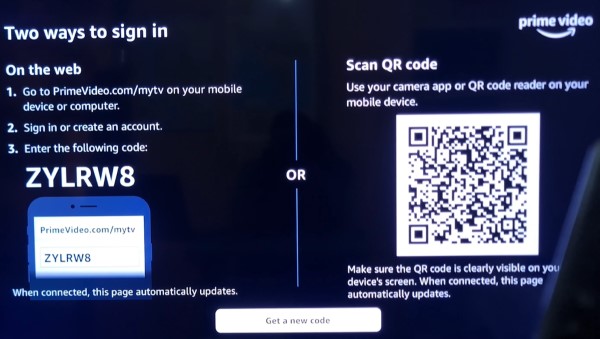
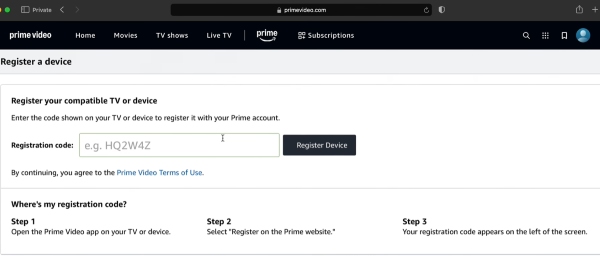
Step 2. Open a web browser on your device and head straight to the Amazon Prime Video website. Log into your Amazon account, and simply type the short code exactly as it appears on your TV screen into the registration box. Click "Register Device" and your television screen will magically update, welcoming you to your personalized dashboard within five to ten seconds.
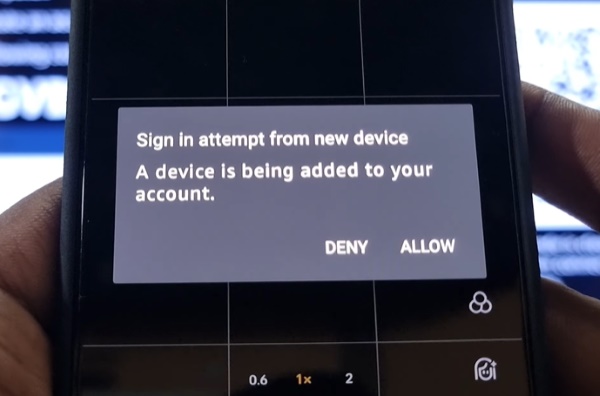
Step 4. If you prefer to use the camera, just whip out your smartphone, open the camera, and point it directly at the QR code on your TV screen. A secure Amazon link will pop up on your phone. Tap it, confirm your login details, and watch as your TV automatically refreshes into your streaming profile.
 Why Can't I Watch Prime Video Content on Samsung TV From Another Country?
If you're trying to access Prime Video content from a different region, you may encounter playback errors even when using a VPN. Samsung TVs do not support VPN apps directly on many models, and Prime Video may detect VPN or proxy connections. Some users also report that casting from a phone does not bypass regional restrictions. Community discussions suggest that router-level VPN setups or Smart DNS services are more reliable than TV-based VPN solutions.
Part 3. Bonus Tips: How to Watch Amazon Prime Video Offline
When Prime Video app experience server outages, firmware incompatibility on older TV models, or constant network buffering, playing files locally offers a reliable alternative. Utilizing a desktop tool like VidiKeep Streaming Video Downloader allows you to bypass the TV app ecosystem entirely, removing reliance on internet stability or operating system glitches.
VidiKeep permits you to download your favorite Prime Video movies and series onto a computer in high-definition MP4 or MKV formats, retaining original audio tracks and subtitles. Once the files are downloaded, you can transfer them onto a USB flash drive, and enjoy offline playback on Samsung TV via its built-in media player.
Step 1 Customize Your Output Preferences
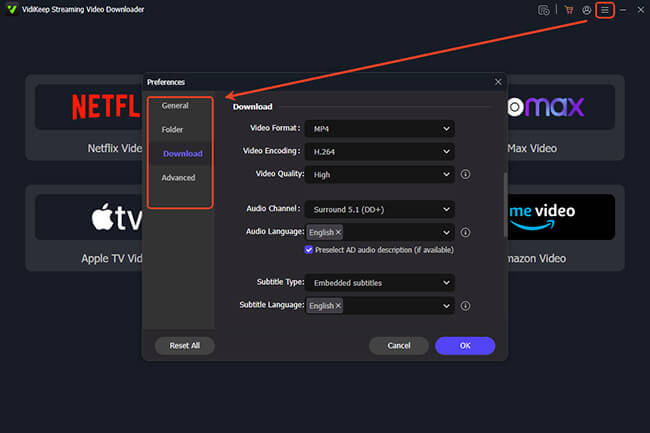
Start by launching the VidiKeep Streaming Video Downloader on your Mac or PC to prepare for your Amazon Prime video download. Click on the "Menu" icon, then head over to "Preference" and choose "Download". This is where you get to pull the strings. You can select your preferred video format (MP4 or MKV) and decide between H.264 or AV1 codecs.
Step 2 Log in to Your Amazon Account
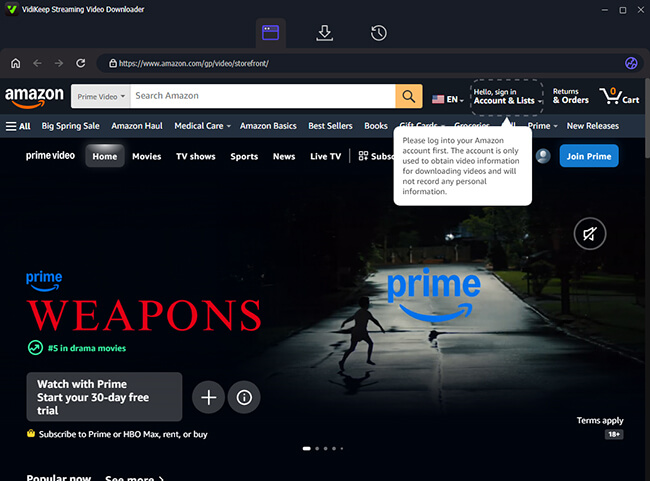
Click the Amazon Video icon right on the main interface and log into your Amazon account via the built-in web browser. Your login details remain entirely private and secure within the software.
Step 3 Select Your Video from the Amazon Library
Once you are in, the familiar Amazon library is at your fingertips. Browse through the catalog to find the exact movie or series you want to save for offline viewing. When you spot your target, click on its thumbnail to bring up the details page. Hit the floating "Download" icon in the lower-right corner.
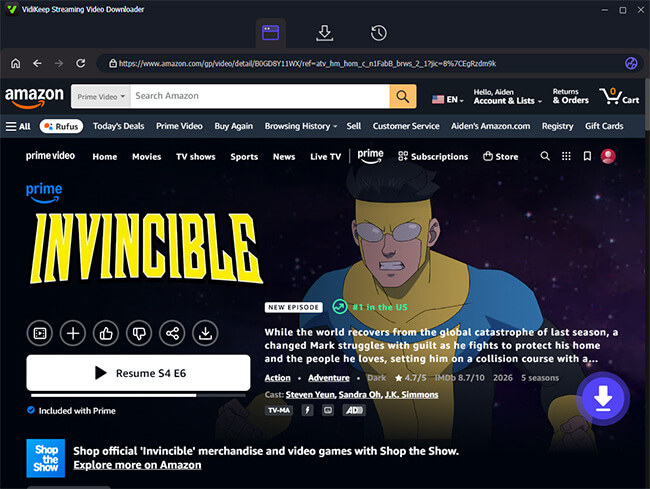
Step 4 Start Downloading Amazon Prime Video
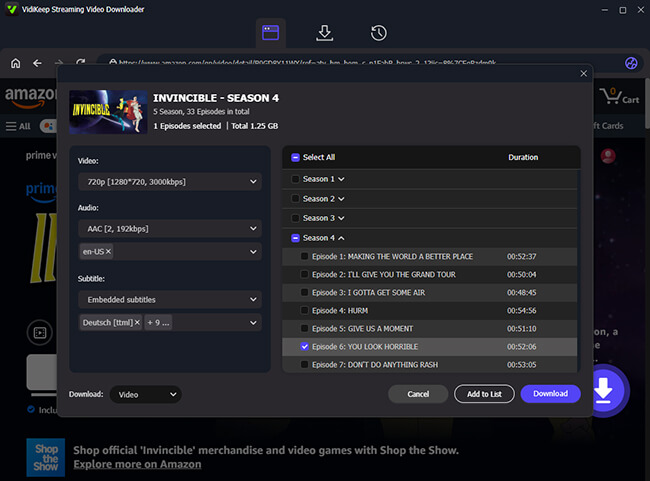
A customization window will pop up, allowing you to tweak and confirm your output settings. When everything looks perfect, click the purple "Download" button to kick off the process.
If you are grabbing a TV series, the software makes batch downloading a breeze. You can use the handy "Add to List" feature to queue up multiple episodes or even entire seasons in a single go, letting the program do all the heavy lifting in the background.
Step 5 Transfer to Your Samsung TV via USB
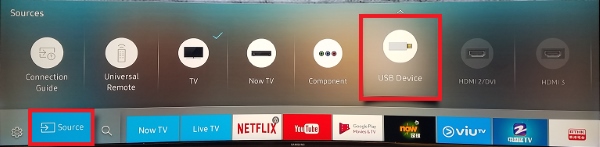
You can access these files from the "History" tab. With your Prime Video files securely saved on your computer, the final phase is getting them onto the big screen. Grab a USB flash drive and drag and drop the downloaded files directly onto it. Then plug the USB stick into the media port on your Samsung TV. By accessing the USB Device on your screen, you can now use the television's built-in media player to enjoy your favorite shows offline.
Part 4. Prime Video Not Working on Samsung TV? Try These Proven Fixes
System crashes, loading failures, and erratic software behavior can abruptly interrupt your entertainment. When the application refuses to open, gets stuck on a loading wheel, or exhibits sluggish performance, a sequence of targeted troubleshooting steps can restore functionality.
Device-Specific Cache Clearing Steps
When the app acts up, clearing corrupt temporary files solves many issues. On newer displays, navigate to "Settings > Support > Device Care > Manage Storage". Select Prime Video and choose "View Details" followed by "Clear Cache". This removes temporary data causing the app to freeze without deleting your watch history.
Fixes for "Too Dark" Playback
High Dynamic Range (HDR) content is designed to provide striking contrast, but it often causes the picture to look dim. This is typically caused by automated "Eco Solution" sensors. Open your main settings, locate the General or Power saving menu, and turn off "Ambient Light Detection". Additionally, navigating to your Picture settings and toggling the "Contrast Enhancer" to "High" can boost visibility.
Audio Sync Solutions
When dialogue fails to align with the screen, the culprit is often a processing delay. Open ‘Sound Settings", select "Expert Settings", and change the "Digital Output Audio Format" from "Auto" to "PCM." This often eliminates decoding delays. If using an external soundbar, adjust the "Audio Delay" slider in the same menu to manually realign the sound.
Resolving Prime Video Error Code 5256 / 0.2
These codes point to a communication failure between your TV and Amazon's servers. First, power cycle your router to clear IP conflicts. If the error persists, visit the Amazon website on a PC, go to "Manage Your Devices", and manually "Deregister" the TV. Sign back into the TV app to establish a fresh, error-free connection.
Part 4. FAQs About Prime Video on Samsung TV
Can I watch Prime Video without the app?
Yes. If the native TV app is unstable, you can plug an external streaming device like a Roku, Fire TV Stick, or Apple TV into an HDMI port. Alternatively, you can connect a laptop directly to your TV using an HDMI cable to stream from a web browser.
How do I adjust video quality settings?
The Prime Video app does not allow manual resolution toggles. It automatically scales quality based on your real-time internet speed. To ensure HD or 4K playback, use an Ethernet cable instead of Wi-Fi to maintain a stable bandwidth of 15-25 Mbps.
How do I turn subtitles on or off?
During playback, press the "Up" button on your remote to open the controller overlay. Select the "CC" or speech bubble icon in the top-right corner. From there, you can toggle subtitles on, off, or select your preferred language settings.
Part 5. Final Thoughts
Watching Prime Video on your Samsung TV is easy with basic set up and troubleshooting. To guarantee a flawless experience against internet drops, downloading shows via VidiKeep ensures perfect offline movie nights.

Jordan Rhodes is a Chief Technical Editor and Media Specialist at VidiKeep, specializing in creating diverse tech content, including streaming tutorials, software reviews, and video encoding tips.
Leave a Comment