StreamFab Netflix Downloader Review: Real Tests
When you download a movie via the Netflix app, it is locked within their ecosystem and will expire after a short period. StreamFab Netflix Downloader claims to solve this problem by ripping the video from Netflix to your hard drive. But does it actually work? In this review, we test its video quality, download performance, and overall value to see whether it lives up to its promises.
Part 1. What Is StreamFab Netflix Downloader?
StreamFab Netflix Downloader is a dedicated desktop application designed to permanently save Netflix movies and TV shows as standard local files. It accesses the original encrypted video streams directly from the platform. This means you end up with a clean MP4 or MKV file that you can play on your device without relying on the official streaming app. Instead of saving one episode at a time, the software allows you to queue up entire seasons for offline storage.
- Flexible Offline Viewing: Save Netflix videos as local files, giving you more freedom to watch downloaded content without its built-in offline viewing restrictions.
- Automatic Episode Downloads: Offers an auto-download feature that can monitor selected shows and help download newly available episodes automatically.
- Audio and Subtitle Preservation: Supports multiple audio tracks and subtitle options, allowing you to keep original language versions, dubbed audio, and subtitles.
Part 2. Is StreamFab Netflix Downloader Free?
StreamFab Netflix Downloader is not completely free. It offers a limited free trial that allows users to test the software before purchasing a license. However, the trial version only allows you to download three full videos. For continued access and unlimited downloads, you need to purchase a paid plan. The available pricing options are as follows:
| Plan | Price |
|---|---|
| 1-Month Subscription | $54.99 |
| Lifetime License (Netflix Only) | $99.99 |
| Lifetime License (2+ Platforms) | $159.99+ |
Part 3. Real Performance Test: Does StreamFab Actually Deliver?
 Test Environment:
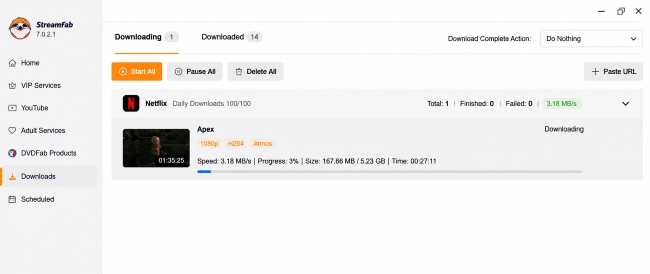
We set up a real-world testing environment to see how StreamFab handles a standard feature-length film. The test was conducted on a Windows PC with an internet connection hovering around 35 Megabits per second. Our target was a 1-hour-and-35-minute Netflix movie.
Test Results: Download Speed Performance
During our testing, StreamFab showed stable download performance throughout the process. The download speed consistently stayed between 3.5 and 3.7 MB/s, which was close to the maximum speed available on our test connection.
No noticeable speed drops or throttling issues were observed during the download. For the 95-minute movie we tested, StreamFab completed the download in 26 minutes and 29 seconds, providing a relatively efficient experience for a full-length HD video.
Media Quality and Subtitle Extraction
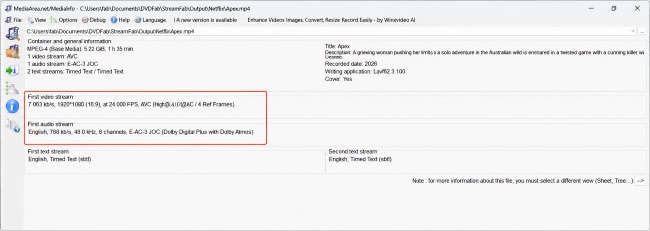
After downloading, we used MediaInfo to check the technical specifications of the output file. The results showed that the video was saved with the H.264 High Profile codec at 1920×1080 resolution, with a bitrate of 7,063 kbps. This indicates that StreamFab was able to preserve a high-quality 1080p video stream rather than producing a heavily compressed output.
The downloaded file also maintained:
- Original Dolby Atmos Audio: The audio track was preserved in E-AC-3 JOC format with a bitrate of 768 kbps, matching the original surround sound specifications.
- Flexible Subtitle Options: Subtitles were included as soft subtitles, allowing users to switch subtitle tracks during playback instead of permanently embedding them into the video.
Can StreamFab Download Netflix in 4K?
While StreamFab supports high-resolution downloads for some streaming services, Netflix downloads are more limited due to its DRM protection and playback restrictions. In our testing, StreamFab Netflix Downloader was able to download Netflix content at up to 1080p quality, but we could not verify 4K output for Netflix titles. This limitation is mainly related to Netflix's Widevine DRM system and the maximum video quality available through desktop playback environments, which are typically restricted to Full HD rather than 4K.
 Limitations:
Netflix's 4K quality is primarily designed for online streaming through supported devices and apps. Even with a Premium Netflix plan, 4K playback requires compatible hardware, display support, and approved playback environments. Desktop browser playback is often limited to lower resolutions, which affects the maximum quality available for download tools.

Part 4. How to Download Netflix Videos with StreamFab
After testing StreamFab's features and download performance, the next step is to see how the actual download process works. We'll walk through how to download Netflix movies or shows on PC/Mac using StreamFab Netflix Downloader.
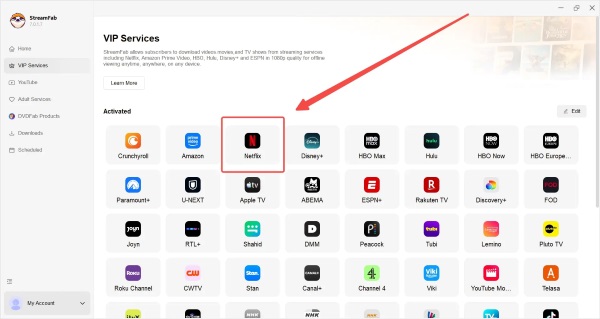
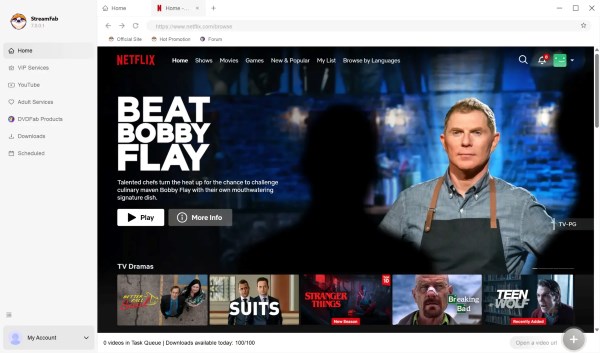
Step 1. Install the StreamFab application on your computer and launch it. On the main interface, go to the VIP Services section, click on the Netflix icon, and log in to your active account using your credentials.
Step 2. Browse the library or use the search bar to locate the specific movie or television series you wish to save. Once found, simply click on the title, and the software will immediately analyze the video.
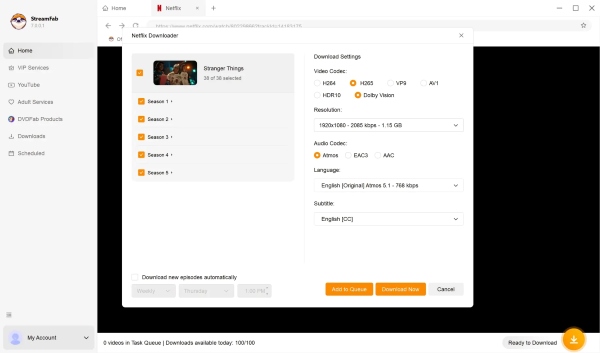
Step 3. A customized prompt will appear on your screen. Here, you can define your preferred resolution, choose your desired audio track, and select subtitle languages. Finally, click the Download Now button to begin the task. Then you can check the processing on the "Downloads” tab.
Part 5. StreamFab Netflix Downloader: Pros and Cons
Evaluating any premium software requires a balanced look at its overall performance compared to its cost. While this tool excels in delivering high-fidelity media extraction, it also has some notable drawbacks regarding its pricing structure and resolution limits. Below is a concise breakdown of its core strengths and weaknesses.
 Pros:
Pros:
- Genuine 1080p video with Dolby Atmos audio.
- Uncapped, high-speed bandwidth utilization.
- Toggleable soft subtitles instead of hardcoded.
 Cons:
Cons:
- True 4K Netflix downloads are unsupported.
- The free trial is strictly limited to 3 videos.
- High upfront cost for lifetime licenses.
Part 6. A Cost-Effective Alternative to StreamFab Netflix Downloader
If StreamFab's premium pricing does not fit your budget, VidKeep Streaming Video Downloader offers a more affordable Netflix Video Downloader alternative with essential features for flexible offline viewing. Compared with StreamFab, VidKeep focuses on a simpler workflow with lower overall cost. Meanwhile, it provides essential features such as high-quality batch downloads, subtitle support, and flexible output options at 7X faster download speeds.
One of VidKeep's advantages is its balance between video quality and storage efficiency. It supports widely used formats such as H.264 and AV1 encoding, allowing users to choose between broader device compatibility and more efficient file sizes.

Download Netflix movies and shows in MP4/MKV with flexible encoding options and subtitle support for convenient offline viewing.
StreamFab vs. VidiKeep
| Feature | StreamFab Netflix Downloader | VidiKeep Streaming Video Downloader |
|---|---|---|
| Platform Support | Netflix | Netflix, Amazon Prime Video, Disney+, Hulu, Max, and Apple TV |
| Video Quality | Up to 1080p | Up to 1080p |
| Video Encoding | H.264 | H.264, AV1 |
| Audio & Subtitles | √ | √ |
| Download Speed | Stable download performance | Up to 7X faster download speed |
| Monthly Subscription | $54.99 | $49.95 |
| Lifetime License for All-in-One |
$239.99 | $149.95 |
Part 7. Final Verdict: Is StreamFab Netflix Downloader Worth It?
StreamFab Netflix Downloader delivers solid performance in our testing, successfully providing high-quality 1080p video, Dolby Atmos audio, and stable download speeds. It is a strong choice for users who frequently save streaming content and need features like batch downloading and broader platform support.
However, the limited free trial and higher pricing may not appeal to occasional users. If you prefer a simpler and more affordable solution with flexible encoding options, VidKeep Streaming Video Downloader is also a competitive alternative. The best choice depends on whether you value advanced features or overall cost-effectiveness.

Jordan Rhodes is a Chief Technical Editor and Media Specialist at VidiKeep, specializing in creating diverse tech content, including streaming tutorials, software reviews, and video encoding tips.
Leave a Comment