Pazu StreamGet All-in-One Video Downloader: In-Depth Review
With streaming platforms constantly tightening their offline viewing rules, finding a reliable tool to save your favorite shows locally has become a necessity. Pazu StreamGet All-in-One Video Downloader positions itself as the ultimate single-hub solution to bypass these restrictions across major platforms. Our review team put it through its paces, combining our own lab tests with deep-dive feedback from the Reddit community to see if it actually delivers on its promises or if it is hiding some frustrating compromises.

What Is Pazu StreamGet All-in-One Video Downloader
Pazu StreamGet All-in-One Video Downloader brings together video downloading from multiple streaming platforms in one desktop application. It supports Netflix and 11 other popular services, allowing users to save supported movies and TV shows for offline viewing. Users can also customize video quality, subtitles, and output formats. But how well does it perform in real-world use? Here's a quick overview of its key specifications before we dive into our hands-on review.
| Core Feature | Specification |
|---|---|
| Supported Platforms | Netflix, Amazon Prime, Disney+, Hulu, HBO Max, etc. |
| Max Resolution | Up to 1080p Full HD |
| Audio Output | AAC 2.0 / EAC3 5.1 Surround |
| os | Windows 10/11 macOS 10.15 (Catalina) or later |
| Output Formats | MP4 / MKV |

Before using Pazu StreamGet, make sure you have active, valid subscriptions to the streaming services you want to access. You’ll need to sign in with your account credentials to browse available content and use the downloader's features.
Pazu StreamGet Performance Test: Video Quality, Speed & File Size
 Our Testing Environment
To evaluate Pazu StreamGet under realistic conditions, we tested it on a modern Windows desktop and monitored its download performance and system resource usage.
- Testing Setup: We used a Windows 11 desktop with an Intel Core i7 CPU, an NVIDIA RTX 4060 GPU, and 32GB of RAM, connected to a wired gigabit fiber network with an average measured download speed of 489 Mbps.
- Performance Evaluation: We monitored download speeds, CPU and GPU usage, video quality, output file sizes, and download stability to assess Pazu StreamGet's overall performance under real-world conditions.
To see how Pazu StreamGet performs beyond its advertised features, we tested its download speed and video quality using the free trial version. We also examined Reddit user reports to investigate concerns about CPU/GPU usage and output files. While our initial test results were promising, the short trial could not answer every question about long-term performance and storage efficiency. Here's what we found.
1. Hand-on Testing on the 6-Minute Free Trial
We tested Pazu using its free trial, which limits each download to the first six minutes of a video. Once the network connection stabilized, the software downloaded and processed the sample quickly. The resulting 1080p clip looked sharp during local playback, with no obvious compression artifacts. However, this short test was not sufficient to assess sustained hardware usage, heat generation, or performance during a full-length download.
2. High CPU Usage and Potential Re-Encoding
Reports from Reddit users raise concerns about Pazu's system resource usage and video processing. Some users describe significant spikes in CPU and GPU usage during downloads. These reports have also raised questions about whether Pazu preserves the original video stream or re-encodes it before saving the final file. However, the exact encoding process, whether re-encoding is unavoidable, and whether users can disable it still need to be verified through reproducible testing.
3. The Actual Video Quality of Pazu Downloads
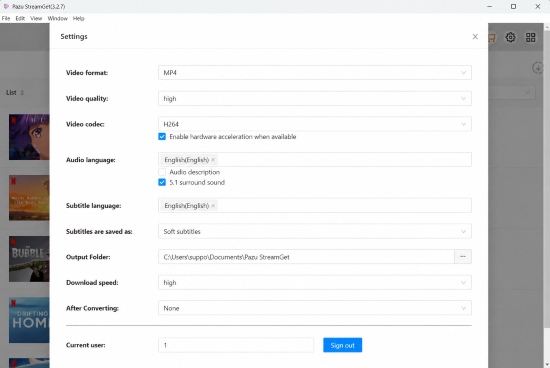
Pazu's interface offers settings such as 1080p resolution and a bitrate of 15,000 kbps. However, selecting these values does not necessarily mean the final file retains the original stream's quality or bitrate. If the software re-encodes the video, the output quality will also depend on the encoding settings and the quality of the source.
A higher bitrate can produce a larger file without a noticeable improvement in visual quality. Additional lossy encoding may also introduce compression artifacts or reduce fine detail, even when the output resolution remains 1080p.
4. Large Output Files: Is the Extra Size Justified?
"I downloaded an episode of Redakai using a VPN, but the resulting file was 2.6 GB, despite VPN traffic showing only about 1 GB downloaded. I selected 1080p at 15,000 kbps. Does Pazu re-encode videos or simply remux them?" —Reddit
Some Reddit users have reported unusually large output files compared with those produced by competing downloaders. In one reported case, VPN data usage was approximately 1 GB, while the resulting video file measured 2.6 GB. Another comparison cited the following file sizes for the same title:
- StreamFab-- 388 MB
- CleverGet-- 541 MB
- Pazu StreamGet--about 1 GB
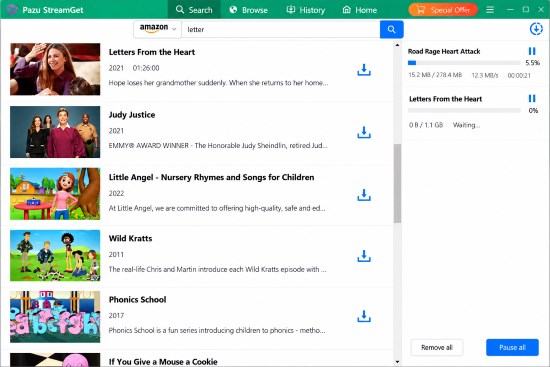
These figures suggest that Pazu may use storage less efficiently in certain cases. However, file size alone cannot establish the cause. Differences in video duration, source quality, audio tracks, bitrate, and encoding settings can all affect the final output, so the results should be treated as user-reported observations rather than a controlled benchmark.
 Our Take:
A larger video file does not necessarily offer better picture quality. If Pazu consistently produces significantly larger files without a visible improvement in quality, it could be a less efficient option for users who want to build and maintain a large offline video library.
Pazu StreamGet Video Downloader Pros and Cons
Based on our initial testing and feedback from the Reddit community, Pazu StreamGet offers a convenient interface and straightforward batch downloading, but questions remain about its encoding efficiency, storage requirements, and download reliability.
 Pros:
Pros:
- All-in-One Interface: Access multiple streaming platforms in one app.
- Batch Downloads: Queue multiple episodes or entire seasons.
- Quick Initial Processing: Starts processing quickly on stable networks.
- Inconsistent Downloads: Some users report failures or source-selection issues.
 Cons:
Cons:
- High Resource Usage: Some users report high CPU/GPU usage.
- Large File Sizes: Some outputs are significantly larger than competitors'.
- Encoding Transparency: Re-encoding behavior and settings remain unclear.
Is Pazu StreamGet Safe to Use?
We scanned the Pazu installer with multiple antivirus engines and found no malicious payloads or false positives. The software uses an embedded browser for account logins, but we couldn't independently verify how credentials are stored or transmitted. For safety, download Pazu directly from its official website and review any security warnings before installing it.
Pricing & Value: Is It Worth the Lifetime Commitment?
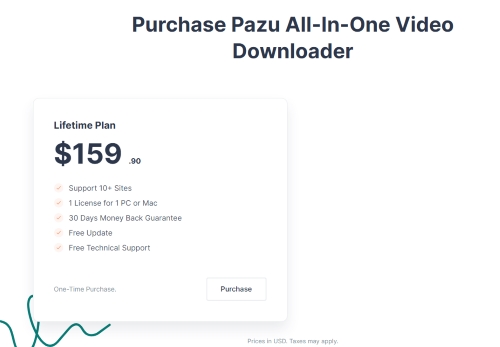
Pazu StreamGet All-in-One Video Downloader currently locks you into a single lifetime license, meaning there are no flexible monthly tiers for you to test the waters. When you weigh that steep upfront cost against its heavy hardware drain and unnecessarily bloated file sizes, it simply does not offer the best value for money compared to its competitors.
Finding a Better Solution: Why VidiKeep is the Superior Alternative
If you're concerned about Pazu's output file sizes or system resource usage, VidiKeep Streaming Video Downloader is another option worth considering. VidiKeep preserves the original video stream without unnecessary re-encoding; it could offer advantages in processing time, hardware usage, and storage efficiency.

Download your favorite Apple Originals, movies, and shows to MP4 or MKV with zero quality loss for offline viewing anywhere.
| Feature | Pazu StreamGet All-in-One | Vidikeep Streaming Video Downloader |
|---|---|---|
| Processing Method | Forced Re-encoding | Direct Remux (No Re-encoding) |
| Hardware Load | Very High (Spikes CPU/GPU) | Minimal (Runs quietly) |
| Pricing Structure | Lifetime Only | Monthly/Yearly/Lifetime available |
| Maximum Resolution | Up to 1080p | Up to 1080p and 4K support |
| Output Formats | MP4 / MKV | MP4 / MKV |
 Tips:
Tips:
Before choosing either tool, consider how often you download videos, how much storage space you have, and whether preserving the original video quality is a priority. Comparing actual output files and processing performance will provide a more reliable basis for your decision than feature lists alone.
The Verdict
Pazu StreamGet All-in-One Video Downloader offers a convenient way to access multiple streaming platforms in one application, and its initial download performance was promising in our six-minute trial. However, reports of high hardware usage and large output files raise concerns about its overall efficiency. If you value convenience, Pazu may be worth considering, but it's important to weigh these potential drawbacks against its lifetime price. If file size and processing efficiency are your priorities, VidiKeep is another option worth comparing before making a decision.

Jordan Rhodes is a Chief Technical Editor and Media Specialist at VidiKeep, specializing in creating diverse tech content, including streaming tutorials, software reviews, and video encoding tips.
Leave a Comment