How to Screen Share Netflix on Discord (Fix Black Screen)
Watching Netflix with friends is no longer limited to being in the same room. With Discord screen sharing, you can enjoy a movie night together from anywhere. In this guide, we'll show you how to stream Netflix on Discord without black screen, including the recommended settings, troubleshooting steps, and alternative options if screen sharing still does not work.
Part 1. Can You Stream Netflix on Discord?
Yes, you can stream Netflix on Discord by using Discord's built-in screen sharing feature. Although Discord does not offer a dedicated Netflix integration, you can share a browser window through a private voice channel and watch your favorite Netflix movies or shows together with friends.
However, many users run into a common problem: the Netflix video may appear as a black screen while the audio continues playing. Luckily, adjusting a few settings in your browser and Discord can often improve compatibility and help you enjoy smoother Netflix playback.
Part 2. How to Stream Netflix on Discord Without Black Screen
To stop your screen from turning black, you need to turn off a specific feature called "Hardware Acceleration." This feature normally helps your browser run faster by offloading tasks to your graphics card, but it also enforces the copyright protection that blocks Discord from seeing the video.
Step 1 Disable Hardware Acceleration in Chrome or Opera GX
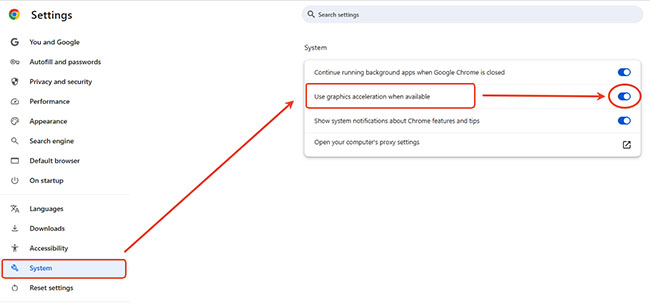
Chrome and Opera GX are popular choices for watching Netflix on Discord. To adjust this setting, open your browser settings and search for Hardware acceleration.
Turn off Use hardware acceleration when available (Chrome) or the similar graphics acceleration option in Opera GX, then restart the browser to apply the changes. After relaunching, open Netflix again and try streaming Netflix on Discord without a black screen.
Step 2 Disable Hardware Acceleration in Discord
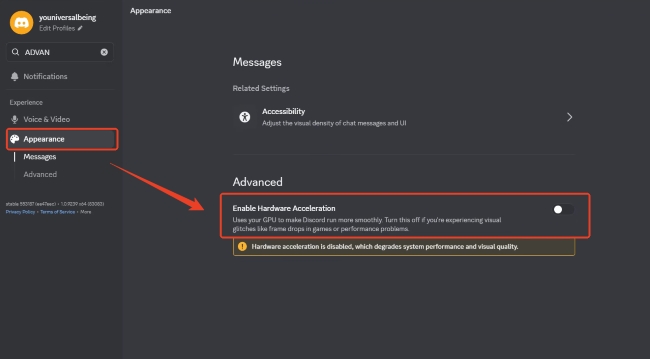
Sometimes, Discord's own visual processing settings can interfere with video capture, so you need to adjust the client as well. Click the gear icon next to your username to open Discord's User Settings, scroll down the left sidebar to the Appearance> Advanced tab, and toggle off the "Hardware Acceleration" option. Allow Discord to restart to lock in the fix.
Step 3 Share Netflix Screen Correctly
Even after disabling hardware acceleration, the way you start the screen share can affect whether Netflix displays properly. To share Netflix screen on Discord with better results, make sure you select the correct window and enable audio sharing before going live.
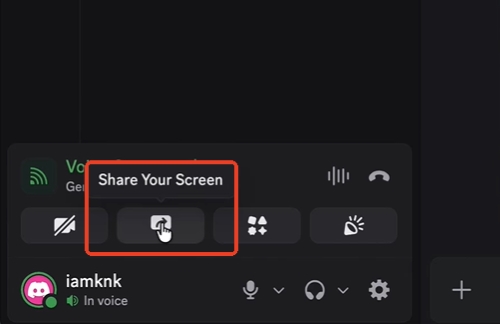
Action 1. Join a Voice Channel —Open your Discord server and enter a voice channel where you want to watch Netflix with friends. In the bottom-left corner, click the Share Your Screen button to open the streaming options.
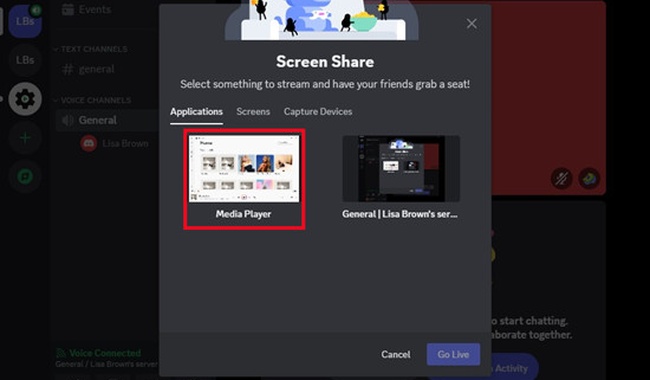
Action 2. Select the Netflix Browser Window —In the screen sharing menu, choose the Applications tab instead of sharing your entire screen. Select the browser window where Netflix is playing, such as Chrome, Edge, or Firefox. Sharing a specific application usually provides better video capture and helps avoid missing audio issues.
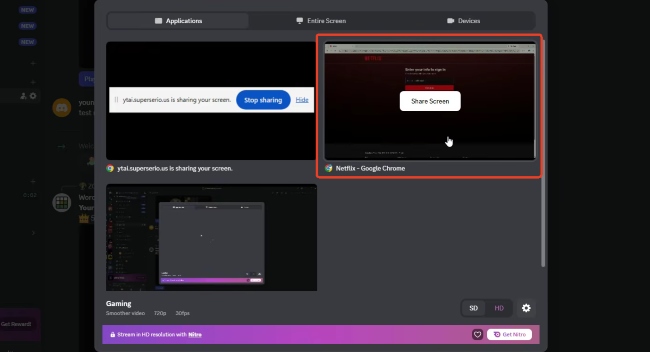
Action 3. Enable Sound Sharing On Discord —Before starting the stream, check that Discord’s audio sharing option is turned on. Without this setting, viewers may see the video but hear no sound during the Netflix Discord stream.
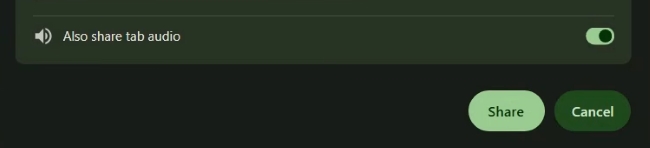
Action 4. Adjust Stream Quality and Start Streaming —Choose your preferred resolution and frame rate based on your Discord settings and internet connection. Once everything is ready, click Go Live to start sharing your Netflix window with friends.
 Tips:
Tips:
If Netflix still shows a black screen on Discord, switching browsers may help. Some users find that Firefox or Microsoft Edge works better depending on their system configuration.
Part 3. Why Can't I Stream Netflix on Discord?
If Netflix appears as a black screen when you try to share it on Discord, the issue is usually related to how protected video content is rendered and captured. Streaming platforms use DRM technologies to protect copyrighted content, which can affect how screen-sharing tools capture the video player.
Besides DRM-related restrictions, other factors can also cause Netflix Discord streaming problems, including browser settings, hardware acceleration, incorrect screen-sharing options, or missing audio permissions.
How to Fix the "No Sound" Issue When Streaming Netflix on Discord
Sometimes the opposite happens: the Netflix video works fine, but your friends cannot hear any audio. If you are trying to screen share Netflix on Discord with sound, the problem is often caused by the way you start the stream rather than Netflix itself.
1. Share an Application Window Instead of Your Entire Screen
One of the most common causes of missing audio is choosing "Screens" (full display sharing) instead of a specific application window. When you share your entire screen, Discord may not be able to capture the browser's audio channel correctly on some systems. Instead, choose the "Applications" tab and select the browser window where Netflix is playing.
2. Check Discord Audio Permissions
If Discord still cannot capture sound, make sure the app has the necessary permissions to record audio from your browser. Restarting Discord after changing these settings can also help refresh the connection.
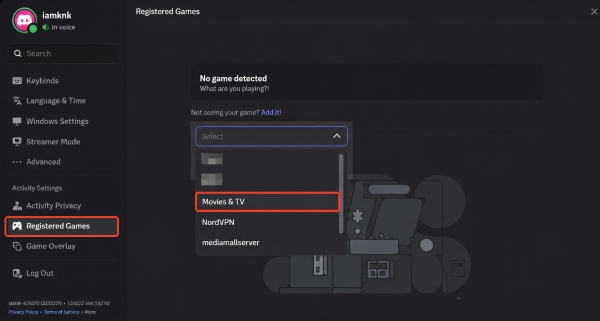
3. Add Your Browser as a Registered Game
If Discord does not detect your browser correctly, adding it manually may help:
Step 1. Open Discord User Settings and go to Registered Games or Activity Privacy.
Step 2. Click "Add it!", select your browser (such as Google Chrome or Microsoft Edge), and confirm.
Step 3. Return to your voice channel and start sharing the registered application. This can help Discord recognize your browser as an active application and improve audio capture, reducing issues such as Discord sharing Netflix no sound.
Part 4. Bonus Tips: Watch Netflix on Discord with Local Video Playback
 User Experience:
Even after adjusting browser and Discord settings, some users may still experience black screens, playback issues, or unstable streaming quality. Browser-based screen sharing depends on multiple factors, including browser compatibility, system settings, and network performance.
For a more consistent watch party experience, another option is to prepare the video for local playback before sharing it on Discord. VidKeep Streaming Video Downloader allows users to save Netflix movies and shows as local video files in MP4 or MKV formats, which can then be played through a media player like VLC and shared through Discord. This approach avoids many browser playback issues and gives you more control over video playback, subtitles, and audio options.
How to Use VidKeep for Netflix Discord Streaming
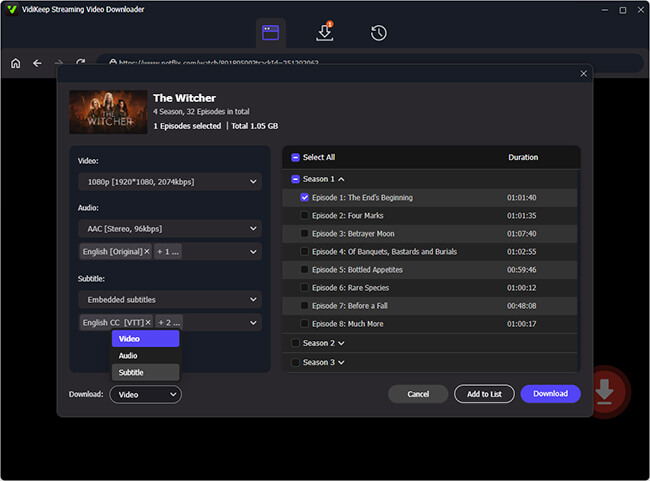
Step 1 Download and prepare the video
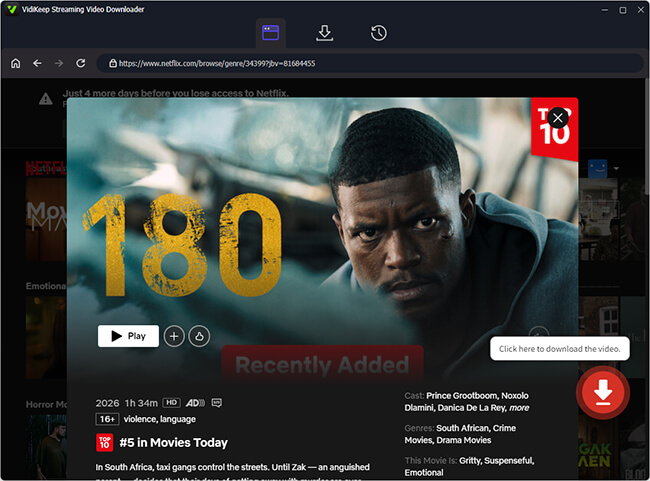
Install and open VidKeep Streaming Video Downloader. Log into your Netflix account using the built-in browser, and search for the Netflix movie you want to watch.
Step 2 Choose output settings
Select the title and adjust the available download settings. MP4 is usually a convenient choice for Discord sharing because it works well with most media players and devices.
Step 3 Share the local video on Discord
Once the video is saved, open it with VLC or another media player. In Discord, click Share Your Screen, select the media player window, and start streaming the playback to your friends.
Part 5. FAQs About Screen Share Netflix on Discord
Does Discord Screen Share Work with the Netflix App?
The Netflix Windows app may not work well with Discord screen sharing because its protected playback system can prevent video capture. For better compatibility, try opening Netflix in a web browser and sharing the browser window instead.
Can You Stream Netflix on Discord Mobile or Mac?
Both iOS and Android apply system-level restrictions to protect premium video content, which can prevent Netflix playback from appearing correctly during screen sharing.
For Mac users, the experience depends on the browser and system settings. Safari may have additional playback restrictions, so trying browsers such as Chrome or Firefox can sometimes provide better compatibility when sharing a Netflix window on Discord.
Does Discord Nitro Improve Netflix Streaming Quality?
Yes, Discord Nitro supports higher resolutions and frame rates, which may improve the viewing experience for friends watching your shared screen. However, streaming quality still depends on your device, network, and capture settings. Also, it does not fix Netflix black screen issues or remove playback restrictions.

Jordan Rhodes is a Chief Technical Editor and Media Specialist at VidiKeep, specializing in creating diverse tech content, including streaming tutorials, software reviews, and video encoding tips.
Leave a Comment