How to Fix Netflix Not Working on Xfinity Flex/X1
"Why is Netflix not working on Xfinity? Is anyone else with Xfinity having issues with Netflix? It's not an internet issue because my other streaming services work."
If Netflix is not working on Xfinity, you may find that the app suddenly won't open, keeps freezing, or simply refuses to load even though your other streaming services work normally. This guide explains how to identify what's going wrong and walks you through the proven methods to get Netflix working on Xfinity again.
Part 1. Why Is Netflix Not Working on Xfinity?
When Netflix is not working on Xfinity, the problem can look different from one device to another. Netflix may stay stuck on the loading screen, refuse to open, or keep freezing. To avoid trying fixes that do not match your situation, use the table below to identify the symptom first and see what is most likely causing it.
| What Happens on Xfinity | Possible Cause | Recommended First Step |
|---|---|---|
| Netflix is not loading on Xfinity | Network drop or service outage | Check Wi-Fi speed and verify Netflix server status --Part 2 |
| Netflix is not launching on Xfinity | App initialization error or remote issue | Reset the Netflix app --Part 3.1 |
| Shows a third-party app error | Xfinity-Netflix sync failure or provisioning glitch | Perform an Xfinity System Refresh --Part 3.3 |
| Netflix is frozen on Xfinity | Memory overload or background cache glitch |
Restart your Xfinity box --Part 3.4 |
| Netflix keeps crashing on Xfinity | Outdated firmware or low system resources |
Power cycle the Xfinity box --Part 3.5 |
| Netflix is not opening on Xfinity | Corrupted local data or authentication error | Clear local cookies and app storage in Privacy settings --Part 3.7 |
Part 2. Quick Checks Before Fixing Netflix on Xfinity
Before resetting accounts or clearing data, spend a few minutes on three quick checks. They can tell you whether the problem actually needs to be fixed on the Xfinity box.
Check Whether Netflix Is Down on Xfinity Today
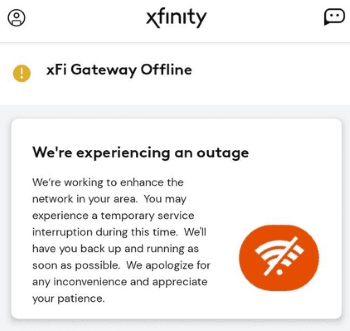
If Netflix suddenly stopped working today, first make sure you are not troubleshooting a wider service interruption. Check Netflix's service-status page and your Xfinity outage status with Xfinity Outage Map. You can also check Downdetector for any sudden increase. If a widespread interruption is underway, resetting your Netflix app repeatedly is unlikely to help until the affected service recovers.
Check Your Xfinity Internet Connection and Speed
Streaming high-definition video requires a stable and reasonably fast broadband connection. Even if your Xfinity box is properly connected to your television, a drop in bandwidth will immediately cause Netflix to buffer, freeze, or fail to load altogether.
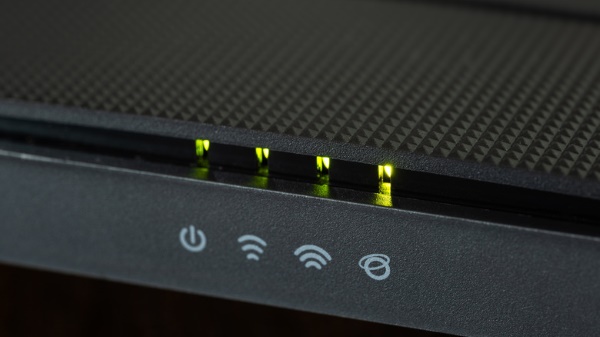
Verify that your Wi-Fi router is displaying solid green or white indicator lights. Then run a quick speed test on your smartphone while connected to the same home network. A minimum of 5 Mbps is required for standard high-definition streaming. If your internet is crawling, resetting your router is the logical first move.
Test Netflix on Another Device
Open Netflix on your phone, smart TV, or another supported streaming device using the same Netflix account. If Netflix fails there as well, the issue could involve Netflix itself, the account, or your broader internet connection. If Netflix works normally, the problem is more likely limited to the Xfinity box, its Netflix integration, or the device configuration rather than your Netflix account as a whole.
Part 3. How to Fix Netflix Not Working on Xfinity
Fix 1. Reset Netflix on Xfinity
If Netflix is frozen, not opening, or keeps returning to the Xfinity menu, resetting Netflix is one of the first fixes to try. This option refreshes the Netflix app connection on your Xfinity device, signs you out of the current Netflix session, and removes stored Netflix user information that may be causing app-related issues.
Step 1. Press the "A" button on your Xfinity Voice Remote to open the "Help" menu.
Step 2. Select "Reset Netflix" from the available troubleshooting options.
Step 3. Confirm the reset and wait for the process to complete. Then reopen Netflix and sign in again with your account.
After resetting Netflix, your saved Netflix login information on the Xfinity device will be removed, but your Netflix account, profiles, and viewing history will remain unchanged.
Fix 2. Sign Out of Netflix and Sign Back In
Account syncing issues can completely block access, especially if you recently changed your password on another device. Forcing a manual logout pushes the Xfinity box to request fresh authentication credentials directly from the servers.
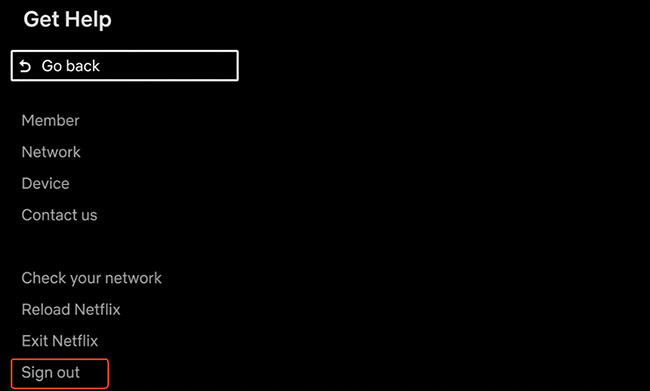
Step 1. Launch Netflix and use your remote to highlight the settings gear icon.
Step 2. Select "Sign Out" and confirm your choice.
Step 3. Wait a few seconds, then log back in using your updated email and password.
 Tips:
Tips:
If the app is completely frozen and you cannot reach the settings menu, you can force a logout via a web browser. Simply log into your account on a computer and select "Sign out of all devices" under the security tab.
Fix 3. Perform an Xfinity System Refresh
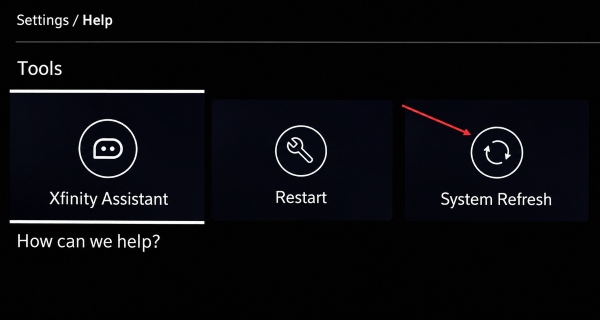
It is important to understand the difference between a simple restart and a System Refresh. A standard restart only reboots your Xfinity box and starts a new hardware/software session. A System Refresh performs a broader check of your Xfinity system, refreshing account-related information and resolving certain device or service issues that may prevent apps like Netflix from working properly.
Step 1. Press the "A" button on your Xfinity Voice Remote to open the "Help" menu.
Step 2. Select "System Refresh" from the available troubleshooting options.
Step 3. Confirm the refresh and wait for the process to complete. The box may take several minutes to restart and reconnect to Xfinity services before you can open Netflix again.
 Limitations:
A System Refresh temporarily interrupts Xfinity TV service while the process runs. If you have multiple X1 boxes in your home, the refresh may affect all connected devices, and you may need to wait until the system fully reconnects before testing Netflix again.
Fix 4. Restart Your Xfinity X1 or Flex Device
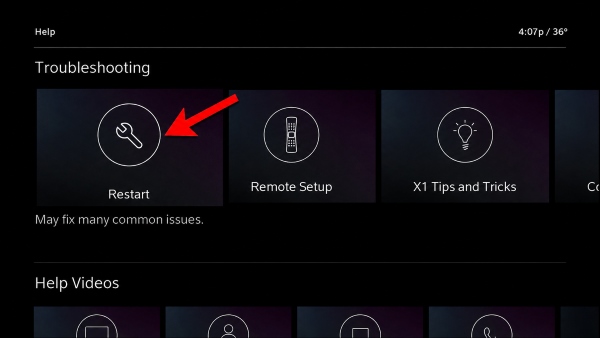
If resetting Netflix or performing a System Refresh does not solve the problem, try restarting your Xfinity device. A restart closes the current software session and reloads the system, which can help resolve temporary issues that prevent Netflix or other streaming apps from working properly.
Step 1. Press the "Xfinity" button on your remote and open the available troubleshooting or settings options. Select the "Restart" option and confirm your choice.
Step 2. Wait for your Xfinity X1 or Flex device to restart completely, then open Netflix again.
Alternatively, if you use an Xfinity Voice Remote, you can press the microphone button and say "Restart Box" to begin the restart process.
Fix 5. Power Cycle Your Xfinity Equipment
If a normal restart does not help, perform a full power cycle. Unlike a regular restart, a power cycle completely disconnects the Xfinity device from power before starting it again, which can help clear temporary device issues.
Step 1. Unplug the power cable from the back of your Xfinity X1, Flex, or streaming device.
Step 2. Wait for about 60 seconds while the device remains disconnected.
Step 3. Plug the power cable back in and wait until the device finishes starting up before launching Netflix.
 Editor's Note:
If Netflix is not the only service affected and other streaming apps are also having problems, you may also want to restart your Xfinity gateway or router to check whether the issue is related to your home network.
Fix 6. Check Whether Your Xfinity Box Supports Netflix
If you can't get Netflix on Xfinity at all, the problem may not be the app itself. Some users discover that Netflix is missing because their Xfinity TV Box does not support the service.
Netflix requires a compatible Xfinity device, and certain older models, such as the RNG150, are not supported for Netflix. Compatibility can also become an issue after replacing your TV Box, especially if the new equipment has not completed activation.
Step 1. Confirm your Xfinity TV Box model through your Xfinity account or device information.
Step 2. Make sure any replacement Xfinity equipment has been fully activated before testing Netflix.
Step 3. If Netflix is unavailable only on one Xfinity box but works on another, the issue is likely related to that specific device rather than your Netflix account.
Fix 7. Clear Xfinity Local Storage and App Data
Xfinity devices store temporary information for third-party apps like Netflix. Over time, stored app data can sometimes become outdated or cause problems such as repeated crashes, loading loops, or apps failing to open. Clearing locally stored data can refresh these app files and remove saved information that may be causing the issue.
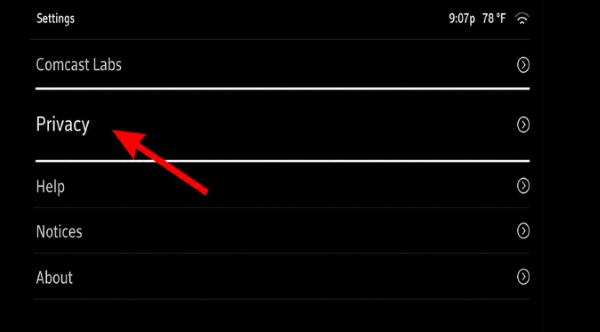
Step 1. Press the "Xfinity" button on your remote to open the main menu. Navigate to "Settings", then select "Privacy" to access your device's stored data options.
Step 2. Choose "Locally Stored Data" and review the information that will be removed. This option clears data saved by third-party apps, including temporary files and stored login information that may affect Netflix performance.
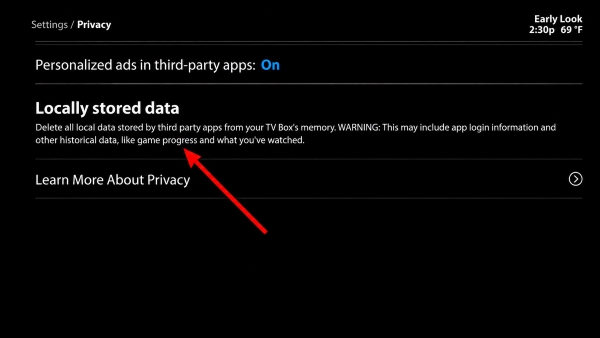
Step 3. Confirm the deletion and wait for the process to complete. After clearing the stored data, reopen Netflix and sign in again if prompted. You may also need to log back into other third-party apps installed on your Xfinity device.
Fix 8. Fix Netflix Account or Xfinity Package Linkage Issues
Sometimes Netflix opens normally on Xfinity, but access fails because your Netflix account is no longer properly connected to your Xfinity subscription. This can happen after changing your Xfinity plan, adding a Netflix-inclusive package, replacing equipment, or switching between different Netflix billing arrangements.
Step 1. Sign in to your Xfinity account and check your current subscriptions or included services.
Step 2. Confirm that your Netflix access has been activated correctly and that the correct Netflix account is linked.
Step 3. If the account connection appears correct, sign out of Netflix on your Xfinity device and sign back in to refresh the authentication.
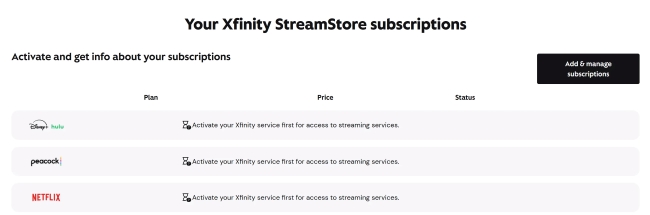
This type of issue is more common when Netflix is included through an Xfinity package rather than billed directly through Netflix. Rechecking the account connection can help when Netflix shows activation messages, subscription prompts, or access errors even though your plan should include Netflix.
Part 4. Still Can't Get Netflix Working on Xfinity? Try an Offline Alternative
If Netflix is still not working on Xfinity after trying all the fixes above, you might need a reliable workaround. Assuming the service plays normally on your computer, preparing videos for offline viewing is an excellent alternative that doesn't rely on your Xfinity box.
VidiKeep Streaming Video Downloader lets you save your favorite movies and shows locally as highly compatible MP4 or MKV files. It fully supports 1080p resolution and batch downloading, and preserves original audio and subtitle tracks. Once the files are prepared, you can play them through a compatible local setup instead of relying on the Netflix app on Xfinity for every viewing session.
- Bypass the Xfinity App: Save titles locally to ensure your playback is never disrupted by an Xfinity box that refuses to launch, load, or run applications stably.
- Immunity to Network Outages: Watch your downloaded content completely offline, making it the perfect backup plan for unexpected Xfinity internet drops or bandwidth throttling.
- Universal Device Playback: Transfer your saved files to a USB drive to watch Netflix on any compatible laptop, smart TV, or media player, freeing you from Xfinity hardware limitations.
How to Download Netflix Movies and Shows to MP4/MKV
Part 5. FAQs About Netflix on Xfinity Not Working
Why did Netflix stop working after I replaced my Xfinity TV box?
A replacement Xfinity box may need to complete activation and account provisioning before third-party apps work normally. Netflix may also need to reconnect to your existing account or Xfinity package. If the problem began immediately after replacing the box, confirm that the new device is fully activated before troubleshooting Netflix itself.
Why won't Netflix open with my Xfinity remote?
Not necessarily. If the remote works for channels and menus but Netflix does not launch, the problem is more likely related to the Netflix app, voice-command recognition, or the Xfinity box rather than the remote hardware. Try opening Netflix manually from the Apps menu to separate a remote-control issue from an app issue.
Can Xfinity parental controls prevent Netflix from opening?
They can sometimes restrict access to third-party apps or certain profiles. If Netflix appears on the Xfinity device but cannot be opened by a specific user or profile, review the parental-control and app-access settings before resetting the Netflix app.

Jordan Rhodes is a Chief Technical Editor and Media Specialist at VidiKeep, specializing in creating diverse tech content, including streaming tutorials, software reviews, and video encoding tips.
Leave a Comment