Guide to Apple TV on Xfinity: Activation & Fixes
You can get Apple TV on Xfinity through compatible X1, Flex, or Xumo devices by signing in with your Apple Account. I tested the setup flow on a supported Xfinity device and found that activation is usually smooth, but account linking and app loading issues are the most common roadblocks. This guide explains the exact setup steps, device compatibility, and fixes for Apple TV not working on Xfinity.
Part 1. Can I Get Apple TV on Xfinity?
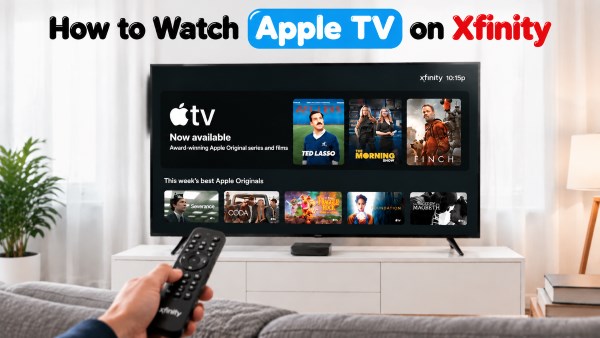
Yes. You can watch Apple TV on Xfinity through supported Xfinity devices, including compatible X1 TV Boxes, Xfinity Flex devices, and Xumo Stream Box. Instead of switching to a traditional cable channel, you access Apple TV through the Apps menu on your Xfinity device.
Is Apple TV Free With Xfinity?
The Apple TV app itself is free to access on supported Xfinity devices, but watching Apple TV content requires an active subscription unless it is included through an eligible Xfinity offer. Some Xfinity customers can get Apple TV through streaming bundles such as StreamSaver, which may combine Apple TV with other services. However, availability, pricing, and included benefits depend on your Xfinity plan and current promotions.
 Tips:
Tips:
Before subscribing, check whether Apple TV access is already included in your Xfinity package to avoid paying for the same service twice.
Part 2. How to Watch the Apple TV App on Xfinity X1/Flex/Xumo
How to Get and Watch Apple TV on Xfinity
Step 1 Open the Apple TV App on Your Xfinity Device
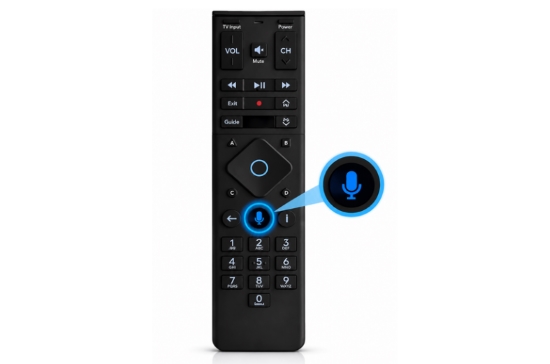
You usually do not need to manually add the Apple TV app to Xfinity because it is already available on supported X1, Flex, and Xumo devices. To open it, press the microphone button on your Xfinity Voice Remote and say "Launch Apple TV app". You can also access it manually by opening the Apps section from your Xfinity home screen and selecting Apple TV.
Step 2 Activate Apple TV Through Xfinity
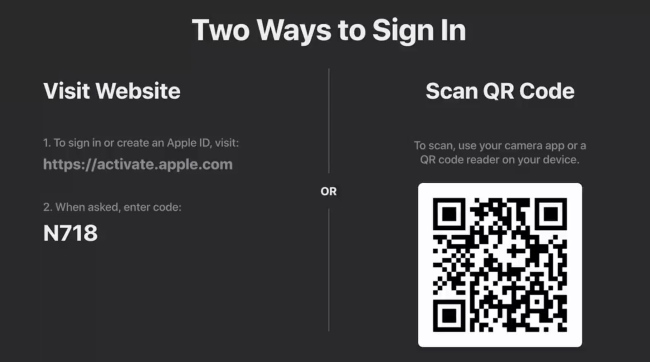
After opening the Apple TV app, select Sign In on your TV screen. The app may display a QR code and a verification code for activation. You can scan the QR code with your smartphone camera or follow the on-screen instructions to complete the sign-in process. Enter your Apple Account details when prompted to link your account and activate Apple TV on your Xfinity device.
Step 3 Start Watching Apple TV on Xfinity
Once your account is verified, the Apple TV app should refresh automatically on your Xfinity device. You can then choose your profile, browse available movies and shows, and continue watching content across supported devices. Your Apple TV viewing history and preferences may sync through your Apple Account, allowing you to pick up where you left off.
Part 3. Apple TV App Not Working on Xfinity? Fixes
When Apple TV is not working on Xfinity, the problem is usually related to device compatibility or network connection issues. For example, the Apple TV app may fail to appear on an older X1 box, get stuck on a loading screen, or return to the Xfinity home screen after opening.
Before resetting your Xfinity device, check these common causes first. In many cases, confirming compatibility or refreshing your connection can restore access to Apple TV without changing your setup.
- 1. Check Xfinity Device Compatibility: If the Apple TV app does not appear on your Xfinity device, your equipment may not support it. Some older X1 boxes like RNG150, Pace Xi3, and other models, are not compatible with the Apple TV app.
- 2. Change Your Xfinity Wi-Fi Connection: If the Apple TV app keeps buffering, fails to load, or cannot connect, restart your Xfinity gateway and check whether other streaming apps work normally.
- 3. Sign Out and Sign Back into Apple TV: Login issues can prevent Apple TV from loading correctly. If you keep seeing sign-in prompts, reconnect the app using the Apple Account linked to your subscription.
- 4. Verify Your Apple TV Subscription: If the app opens but content is unavailable, confirm that your subscription is active and that you are using the correct Apple Account. For subscriptions obtained through Xfinity bundles, billing and access may be managed through Xfinity.
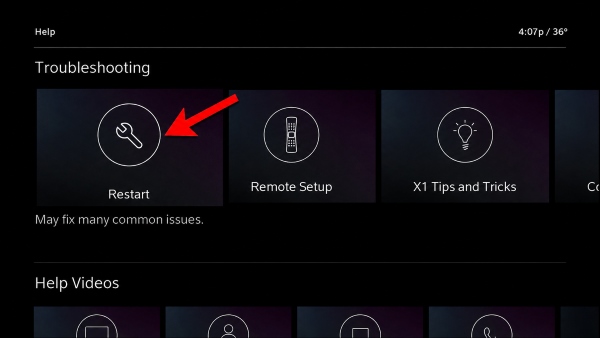
- 5. Restart Your Xfinity Device: Temporary system errors on X1, Flex, or Xumo devices can cause freezing or loading loops. Disconnect the device from power for about 30 seconds, reconnect it, and reopen the Apple TV app.
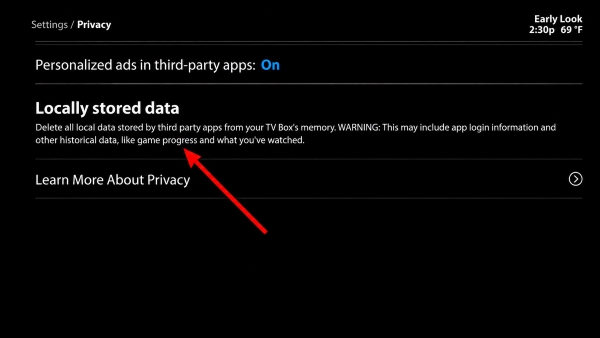
- 6. Clear Locally Stored Data on Xfinity: If Apple TV remains stuck on a loading screen, clearing stored data may remove corrupted temporary files. On supported devices, go to Settings → System Management → Resets and Updates → Locally Stored Data and clear the saved data.
Part 4. How to Watch Apple TV on Xfinity Offline
If you want to access Apple TV content on Xfinity without a stable internet connection, you may notice a limitation with Xfinity X1 and Flex devices: these TV boxes are designed for streaming and do not offer a built-in option to download Apple TV content for offline playback.
For users who want more flexibility, a desktop video downloader such as VidiKeep Streaming Video Downloader provides an alternative workflow. It allows users to save Apple TV streaming videos on a Windows PC or Mac and watch them later without relying on a constant internet connection. Depending on the available settings, videos can be saved in common formats such as MP4 or MKV and transferred to compatible devices for offline viewing.
VidiKeep Downloads vs. Official Apple TV Downloads
| Feature | Official Apple TV Downloads | VidiKeep Streaming Video Downloader |
|---|---|---|
| Storage Location | Locked inside the Apple TV app | Saved as local files on your PC/Mac |
| Xfinity Box Playback | ❌ Unsupported (cloud-only interface) | ✅ Playable via USB on compatible setups |
| Supported Devices | Limited to Apple devices & mobile apps | Any device supporting MP4/MKV (TV, Console, mobile) |
| Video Format | Encrypted proprietary cache | MP4 or MKV |
| Audio & Subtitles | Fixed to in-app stream selections | Multi-language audio tracks & subtitles selectable |
| Playback Expiration | ❌ Expires in 30 days or 48 hrs after starting |
✅ Permanent (no expiration or view limits) |
This makes VidiKeep useful for users who want to move beyond Xfinity's cloud-based streaming setup and keep their downloaded Apple TV videos available across different devices.
Step 1. Install VidiKeep and Select Apple TV. Download and open VidiKeep on your Windows PC or Mac, then select Apple TV from the available streaming platforms.
Step 2. Find the Apple TV Video for Xfinity Offline Playback. Log in with your Apple Account when prompted, then search for the Apple TV movie or series you want to save.
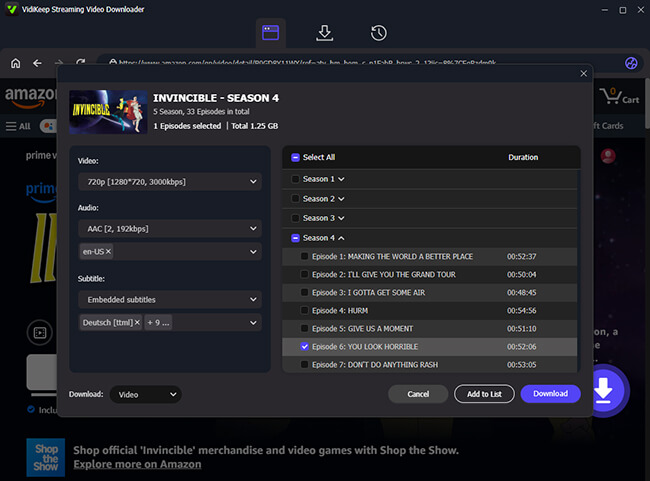
Step 3. Choose Your Download Settings. Select your preferred video quality to Save Apple TV in MP4 or MKV format, and available audio or subtitle options, then click the Download button.
Step 4. Transfer and Watch Apple TV Videos Offline. After downloading, transfer the video files to a USB drive for playback on compatible devices, or cast them from your computer to a supported TV connected to your Xfinity setup.
Part 5. FAQ on Apple TV on Xfinity
Does Xfinity offer a Netflix, Peacock, and Apple TV bundle?
Yes. Xfinity offers Xfinity StreamSaver streaming bundles, which include Apple TV, Netflix, and Peacock through options. For users who also want live television channels, there is the NOW StreamSaver option that also includes live TV channels alongside streaming services.
Does streaming the Apple TV app count toward my Xfinity data cap?
Yes. Because the application delivers video over the internet rather than through a traditional closed cable network, any shows or movies you stream through the Apple TV app on your X1, Flex, or Xumo box will count against your monthly Xfinity internet data plan.
Does Xfinity Bill Me for Apple TV?
It depends on how you get Apple TV through Xfinity. If your Apple TV subscription is included through an eligible Xfinity bundle, such as StreamSaver, the charge may appear on your Xfinity bill. However, if you subscribe directly through Apple or rent movies and shows using your Apple Account, those payments are handled separately by Apple.
Can You Watch Apple TV in 4K on Xfinity?
Yes, Apple TV content can be streamed in 4K on Xfinity when your setup supports 4K playback. You need a 4K-compatible TV and a supported Xfinity device, such as certain X1 TV Boxes, XiOne, or Xumo Stream Box models. If your equipment only supports HD output, Apple TV content may be limited to lower resolutions.
Part 6. Summary
Getting Apple TV into your Xfinity setup allows you to access Apple TV content as long as you have a compatible Xfinity box. If you want to keep Apple TV content available on Xfinity when an internet connection is unavailable, tools like VidiKeep provide an alternative way to save supported videos locally for more flexible playback.

Jordan Rhodes is a Chief Technical Editor and Media Specialist at VidiKeep, specializing in creating diverse tech content, including streaming tutorials, software reviews, and video encoding tips.
Leave a Comment