Can You Watch Netflix on Plex: Full Setup & Guide
Wondering if Netflix and Plex can work together? The two platforms handle video differently: Netflix is designed for streaming content from its service, while Plex organizes and plays media stored in your own library. If you're looking for how to watch Netflix on Plex, this guide explains what you can actually do, where the limitations are, and which setup makes sense for your needs.
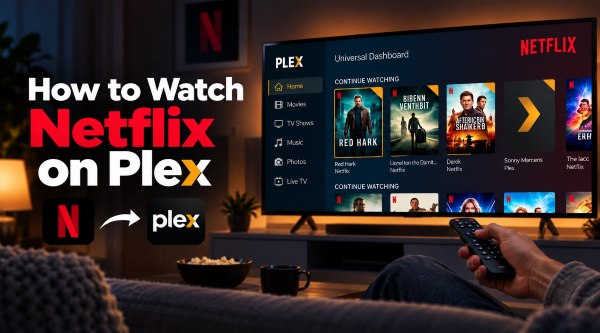
Part 1. Can You Watch Netflix on Plex?
Not directly. Plex does not provide a native Netflix integration that lets you sign in to Netflix and play its streaming catalog inside the Plex player. Instead, Plex can help you discover Netflix titles through its Discover feature, or play compatible local video files that you have added to your own Plex library.
If you want to bring Netflix-related content into your Plex setup, there are two approaches:
- Use compatible local video files and add them to your Plex Media Server library.
- Use Plex Discover to find Netflix titles and open them in the official Netflix app.
Part 2. How to Download Netflix Content for Plex
If you want Netflix-related video content to appear in your Plex library and play through Plex, you need a compatible local media file. Downloads kept inside the official Netflix app are generally tied to the app itself rather than exposed as ordinary video files that Plex can scan.
This is where a desktop downloader can fit into the workflow. VidiKeep Streaming Video Downloader provides a way to save supported Netflix titles as local video files, with options for output format, video quality, audio tracks, and subtitles before the files are added to Plex, giving you more control over the resulting file before you add it to Plex.
How to Download Netflix Videos for Plex
Step 1 Choose Your Output Settings for Netflix Conetent
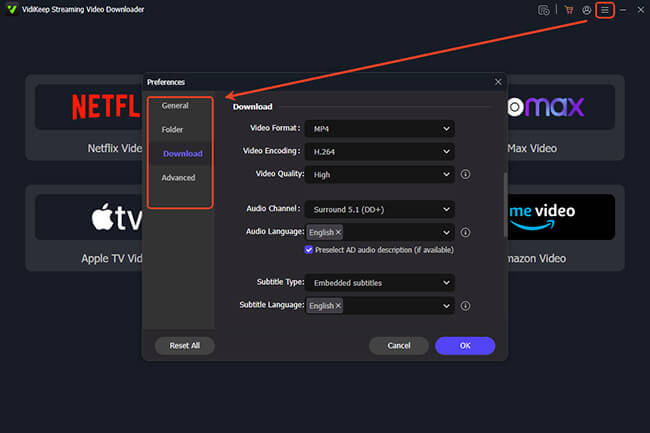
Install and open VidiKeep, then go to Menu > Preferences > Download. Choose an output format and adjust the available video quality, audio, and subtitle preferences to suit your Plex setup. MP4 can be a practical choice when broad device compatibility is important, while MKV may be preferable when you need to retain multiple audio or subtitle tracks.
Step 2 Sign In to Your Netflix Account
Click the Netflix icon in VidiKeep and sign in with your active Netflix account through its built-in web interface. This keeps the Netflix browsing and download workflow within the same application.
Step 3 Find the Netflix Video You Want to Add to Plex
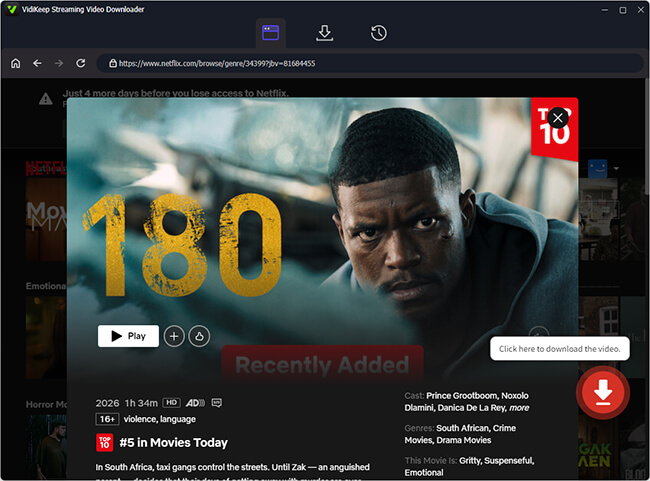
Search for a movie or TV show using the integrated search bar, or paste its Netflix URL into VidiKeep. Select the title you want and click the Download icon to add it to the queue.
Step 4 Download and Prepare the File for Plex
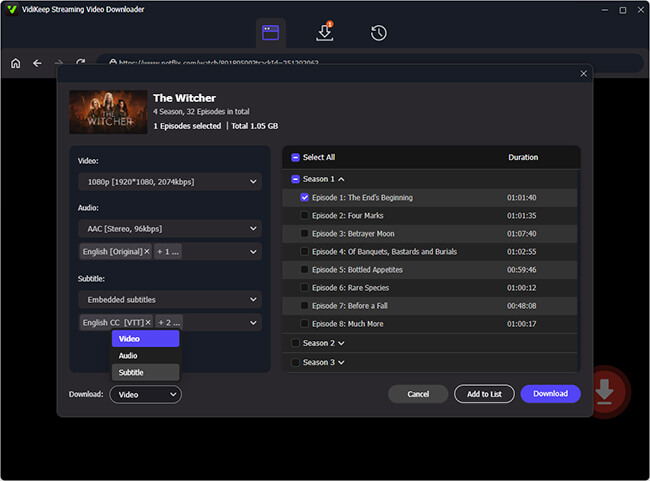
Click Download to start processing the selected video. When the file is saved locally, move it to a dedicated Plex media folder, and then add that folder to your Plex Library.
 Disclaim:
Downloading or storing Netflix content may be subject to Netflix's terms, copyright rules, and other restrictions in your region. Use the feature only where you have the right to do so.
Part 3. How to Add and Watch Netflix on Plex
Once the video files are saved locally, the next step is to make them visible to Plex. Rather than simply scanning your computer, Plex needs the specific folder containing your files to be added to a library first.
For better metadata matching, use clear file names and an organized folder structure. For example, movies can follow Movie Name (Release Year).mp4, while TV episodes can use a structure such as Show Name/Season 01/Show Name - S01E01.mp4.
Method 1. How to Import Netflix Shows and Watch on Plex:
Step 1. Move your downloaded video files into a dedicated storage folder on your PC or NAS. You must ensure that both the host machine and the Plex application have proper read permissions to access these new files.
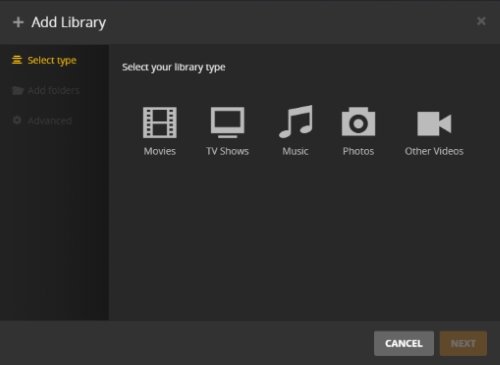
Step 2. Open your Plex Web App dashboard using a desktop browser and navigate to the Settings menu. Under the Manage section, select Libraries. Click Add Library to create a fresh database or simply click Edit to update an existing one.
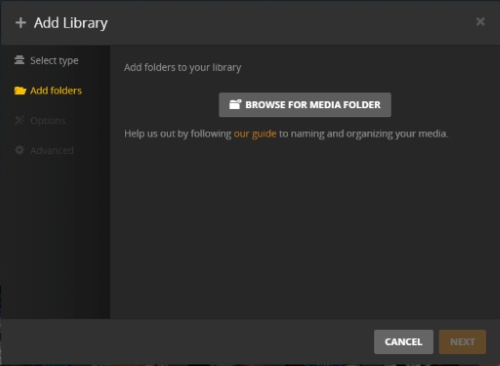
Step 3. Navigate to the Add folders tab and click the Browse for Media Folders button. Locate the specific directory holding your Netflix video files, select it, and then click Add Library or Save Changes to confirm your new storage path.
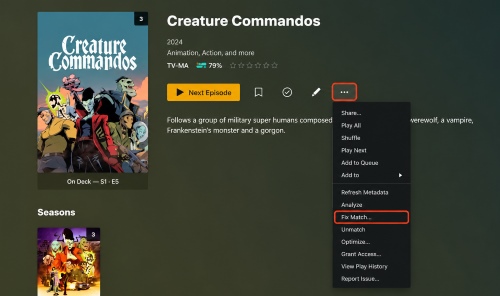
Step 4. Plex will automatically scan your folder to download titles, posters, and metadata. If a video is matched incorrectly or lacks cover art, simply click the Fix Match option to manually select the correct movie or television show.
Step 5. Launch the Plex client app on your smart TV, streaming stick, or mobile device. Open the library you just updated, navigate to the Recently Added section, and select your newly imported Netflix title to immediately begin playback.
Method 2. How to Connect Netflix to Plex via "Discover"
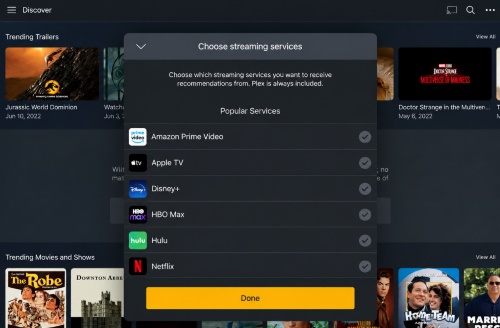
If you prefer not to store files locally, Plex provides an official feature called Discover that acts as a universal streaming guide. While it does not play Netflix videos inside Plex, it allows you to search the Netflix library, build a single Watchlist, and launch content with minimal friction.
Step 1. Open the Plex app, navigate to Discover, and select Streaming Services. Check Netflix from the list of available providers and save your changes.
Step 2. Search for any Netflix title within Plex; selecting the watch button will automatically launch the video in the official Netflix app on your device.
Part 4. Bonus Tips: Customize and Share Your Plex Media Library
Once your media is organized in Plex, you can take the setup a step further. A few simple customizations can make your library feel more like a familiar streaming service, while Plex's sharing features let you give friends and family access to selected media from your server.
How to Make Plex Look Like Netflix
Part of the appeal of modern streaming apps is their dynamic, row-based interface. By default, Plex displays standard folder layouts and basic recent lists, but you can customize the home screen to emulate the Netflix visual style using Smart Collections.
Smart Collections allow you to build dynamic, automated rows based on specific filters such as genres, studio labels, or release decades.
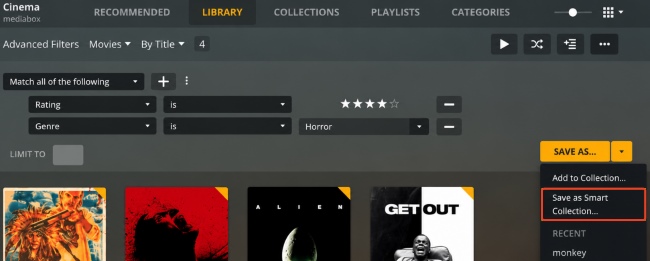
Step 1. Go to your Plex movie or television library and apply your desired filters, such as sorting the Sci-Fi genre by highest critic rating.
Step 2. Click the save icon next to the search bar and select Save as Smart Collection.
Step 3. Open the collection settings, navigate to the visibility tab, and set it to appear on your Home and Recommended screens. Organizing several custom collections will give your Plex home screen the look and feel of a premium streaming service.
How to Share Netflix Content on Plex with Friends
Limitations:
Plex's Watch Together feature, which was designed to sync playback with friends remotely, is being phased out on most TV and mobile platforms. While it may still be available through the web app for now, it may not be a reliable long-term option.
Fortunately, you can still share local media files, including downloaded Netflix videos, by granting other Plex users access to your media library. They can then browse and stream the shared content from their own devices.
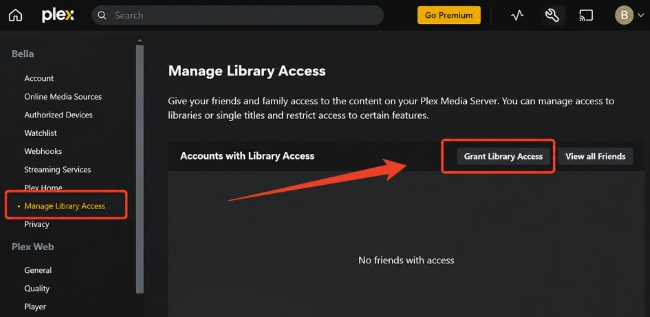
Step 1. Open Plex and go to Manage Library Access.Under the tab, you can click Grant Library Access and then enter your friend's Plex username or email.
Step 2. Select your Plex Media Server and choose the specific libraries you want to share, then send the invitation. Once accepted, the shared library will appear in their Plex account.
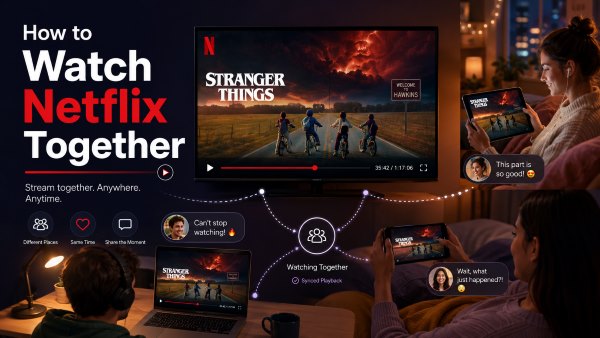
Want to watch Netflix with friends online? Compare 6 easy Netflix watch party methods for desktop, mobile, and tips for smoother playback.
Part 5. FAQs About Netflix and Plex
Is there a Netflix Plex plugin?
No working Netflix plugin exists for Plex today. Plex discontinued its legacy plugin architecture several years ago to improve security and app stability. Even when custom plugins were supported, DRM encryption prevented third-party developers from building stable, direct-playback tools for subscription services.
Can I play Netflix through Plex on Fire Tablet?
You can access Netflix content via Plex on an Amazon Fire Tablet in two ways. If you use the Discover feature, selecting a Netflix title inside Plex will pass playback to the native Fire OS Netflix app. If you have added DRM-free media files directly to your Plex server, they will stream natively inside the Plex app on your tablet without opening any external software.
Can You Watch Netflix Through the Plex App on Android or iOS?
Yes, but the playback behavior depends on the method you choose. Using Plex Discover on mobile devices creates a deep link; tapping a title opens the Netflix mobile app immediately. If you are playing locally hosted media files stored on your home server, playback occurs entirely within the Plex mobile player.
Part 6. Final Thoughts
Unifying Netflix and Plex into a single entertainment ecosystem depends entirely on your setup preferences. If your primary goal is avoiding the hassle of jumping between multiple apps just to find what to watch, Plex Discover offers an effective, officially supported search hub. For those who want unified playback within the Plex interface across every device in their home, maintaining local copies of your media files remains an easier and more reliable solution.

Jordan Rhodes is a Chief Technical Editor and Media Specialist at VidiKeep, specializing in creating diverse tech content, including streaming tutorials, software reviews, and video encoding tips.
Leave a Comment