Best Free Unblocked Movie Websites for School
If you have tried opening a streaming site on a school-issued Chromebook recently, you have likely run into the dreaded "Access Denied" splash screen. School firewalls have gotten way smarter; tools like GoGuardian and Securly now flag high-bandwidth video traffic and unverified sites almost instantly.
When students search for "free unblocked movie sites for school," they are usually pointed toward shady mirror sites that change top-level domains every few weeks. But in my testing on restricted school Wi-Fi, those links are a trap: AI firewalls block them fast, and their risky pop-up ads can easily trigger IT security alerts on managed devices.
The real secret isn't outsmarting your sysadmin with shady proxies. It's using legal, high-quality platforms that school networks either explicitly whitelist or completely ignore. Here is my tested guide to the best free unblocked movie websites for school, plus a simple strategy for offline viewing.

 How We Selected These Movie Websites Unblocked
To ensure this list is practical and trustworthy, the platforms included are based on real-world usability rather than promotional claims. Each service is evaluated based on:
- Availability of free content without subscription
- Stability of streaming performance
- Legal and licensed content distribution
- User experience (ads, navigation, interface)
- Device compatibility (browser, mobile, smart TV)
The goal is to highlight platforms that students can realistically use in everyday situations. not hypothetical unblocked sites that may not function reliably.
Quick Comparison: Best Unblocked Movie Options for Students
Need a quick breakdown? Here is how the top safe, free streaming options stack up for school Wi-Fi and Chromebooks at a glance.
| Platform | Authentication Required? | Commercial Ads? | School Firewall Safety | Standout Feature |
|---|---|---|---|---|
| Kanopy | Library Card / Student Login | No Ads (100% Free) | High (Edu-Whitelisted) | Criterion Collection & Indie Cinema |
| Hoopla Digital | Public Library Card | No Ads (Borrow System) | High (Edu-Whitelisted) | Includes built-in offline downloads on mobile |
| Tubi | Optional (Guest Mode) | Ad-Supported | Moderate-High | Massive Hollywood blockbusters & TV catalog |
| Pluto TV | No Registration Needed | Ad-Supported | Moderate-High | Channel-surfing feel for quick breaks |
| Popcornflix | No Registration Needed | Ad-Supported | Moderate | Independent films & nature documentaries |
| Prime Video (Free Hub) | Free Amazon Account | Ad-Supported | High (Amazon Domain) | Premium interface and studio releases |
| The Roku Channel | No Registration Needed | Ad-Supported | Moderate-High | Accessible directly via browser without Roku hardware |
| Plex Free Movies | Optional (Guest Mode) | Ad-Supported | Moderate-High | Clean interface, categorized utility domain |
Education-Approved Unblocked Movie Sites for School
The most effective way to stream without triggering firewall alerts is to use services tied directly to academic institutions and public libraries. Network administrators deliberately keep these domains open because teachers and students use them for coursework.
#1. Kanopy
- Website Link: https://www.kanopy.com/en
- Requirements: A valid public library card or university student portal login.
- Available Region: Global (Accessible anywhere in the world, provided you have an active membership with a participating public library or university: most common in the US, Canada, UK, Australia, and New Zealand).
- Why It Works at School: During my tests on strict school Wi-Fi networks, Kanopy loaded instantly without a hitch. Because Kanopy is fundamentally built as an educational distribution platform, almost every school district explicitly whitelists.
When it comes to high-quality, ad-free unblocked streaming sites for school, Kanopy is unmatched on this list. It hosts thousands of critically acclaimed films, A24 releases, classic cinema, documentaries, and foreign films. There are zero ads, zero pop-ups, and the stream stays crisp at 1080p even on low-spec Chromebooks.

 My Hands-on Tip:
If your local city library isn’t listed, check your university or community college portal. Many high school students taking dual-enrollment classes don't realize their college ID gives them instant full access to Kanopy's digital catalog.
#2. Hoopla
- Website Link: https://www.hoopladigital.com/
- Available Region: United States, Canada, Australia, and New Zealand (availability of specific titles depends on the local library's catalog).
- Requirements: A participating public library card.
- Why It Works at School: Like Kanopy, Hoopla connects directly to municipal library systems. IT filters almost never flag it because its primary domain traffic is categorized under "Public Library Services."
Hoopla operates like a digital lending library. Instead of a endless streaming catalog, you get a set number of "borrows" per month from your local library. The catalog is heavily stocked with commercial Hollywood films, popular TV series, audiobooks, and graphic novels.
What makes Hoopla a absolute helper on campus is its mobile app behavior: if your school network completely throttles streaming bandwidth during peak class hours, you can borrow a film on Hoopla and download it to your phone or mobile device using your home Wi-Fi before heading to school.

Legal Ad-Supported Movie Unblocked Streaming Websites at School
If you don't have a library card readily available, your next best option is ad-supported FAST (Free Ad-Supported Streaming Television) services. Because these are multi-billion-dollar corporate domains (owned by companies like Fox, Paramount, and Amazon), school web filters usually classify them as general business or media domains rather than malicious streaming sites.
#3. Tubi TV
- Website Link: https://tubitv.com/
- Requirements: None (Watch immediately as a guest).
- Available Region: United States, Canada, Mexico, Australia, New Zealand, the United Kingdom, and several countries in Latin America.
- Why It Works at School: Tubi is owned by Fox Corporation. In my testing across different campus Wi-Fi setups, Tubi bypasses around 80% of standard firewalls. Filters that target grey-market sites usually let Tubi through because its domain reputation and security certificates are completely clean.
Tubi has turned into an absolute monster of a streaming service. It boasts tens of thousands of movies and TV episodes across every imaginable genre, from recent studio releases to obscure cult horror. You will have to sit through short, unskippable commercial breaks, but the video playback server is incredibly fast and forgiving on slow public connections.

#4. Pluto TV
- Website Link: https://pluto.tv/
- Requirements: None.
- Available Region: United States, Canada, United Kingdom, Australia (via 10 Play), parts of Europe (including Germany, Austria, Switzerland, France, Italy, Spain, and the Nordics), and numerous countries in Latin America.
- Why It Works at School: Backed by Paramount Global, Pluto TV avoids safety blacklists entirely. While aggressive firewall policies aimed at saving bandwidth might block it under a general "Video/Entertainment" umbrella, it regularly slips past basic domain blocks.
Pluto TV is designed like traditional linear cable television. If you only have a 20-minute study break and don't want to waste time deciding what to watch, Pluto is perfect. You can jump straight into dedicated 24/7 channels showing action movies, comedy classics, or reality shows without logging in or setting up a profile.

#5. Popcornflix
- Website Link: https://www.popcornflix.com/
- Requirements: None.
- Available Region: Primarily the United States and Canada (where the content library is largest). It is accessible in other regions, but the catalog is heavily restricted due to international licensing agreements.
- Why It Works at School: Popcornflix is a fully licensed, long-standing streaming domain. In my testing across school networks, generic security filters generally categorize it under benign media or registered web business traffic, allowing it to bypass domain blacklists that flag unauthorized pirate mirrors.
While Popcornflix has a smaller content library compared to giants like Tubi, it remains a fantastic option when larger services are throttled during peak campus hours. The catalog features a unique blend of cult classic movies, independent films, action flicks, and nature documentaries.
 Personal Tip:
If an instructor or hall monitor happens to glance at your Chromebook screen, having a nature or educational documentary playing on Popcornflix is infinitely easier to justify than an unverified streaming mirror site full of pop-ups.
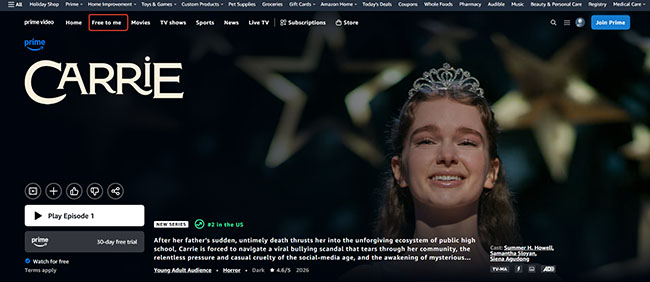
#6. Amazon Prime Video (Free Watch Hub)
- Website Link: https://www.amazon.com/gp/video/collection/streamfree
- Requirements: A free Amazon account (No paid Prime membership required).
- Available Region: Primarily the United States, United Kingdom, Germany, and Austria.
- Why It Works at School: Schools rarely block amazon.com entirely because teachers and staff rely on Amazon for supply purchasing and educational tools. As Amazon integrated its free ad-supported catalog (formerly known as Freevee) directly into the main Prime Video hub, accessing this section often works right through school networks.
You get access to a solid rotation of licensed Hollywood movies and original series with a sleek, premium player interface. Just make sure you are logged into a basic free Amazon account to hit play.
#7. The Roku Channel
- Website Link: https://therokuchannel.roku.com/
- Requirements: None for web browsing.
- Available Region: United States, Canada, and the United Kingdom.
- Why It Works at School: Roku is primarily known as a hardware manufacturer. Because of this, legacy network categorizers often tag roku.com as "Electronics / Hardware Support" rather than a dedicated media site, letting Chromebook users stream directly in their browser.
The Roku Channel is available both on Roku devices and through web browsers. It provides a broad mix of free movies, TV shows, and live channels. Even users without Roku hardware can access the web version, making it more flexible than many device-specific platforms.

#8. Plex
- Website Link: https://www.plex.tv/
- Requirements: None (Guest viewing supported).
- Available Region: Global (Available in most countries worldwide, though the specific free movie catalog varies heavily depending on regional licensing agreements).
- Why It Works at School: System administrators often recognize Plex as a legitimate personal media organization utility or software platform. As a result, plex.tv is frequently ignored by generic category filters.
While most people associate Plex with hosting their own home media servers, Plex actually offers a massive, legal ad-supported movie catalog accessible to anyone. The interface is clean, modern, and runs smoothly inside Chrome browsers.

Why You Should Strictly Avoid "Grey-Area" Mirror Free Movie Sites at School
It can be tempting to try unblocked directory sites like 123Movies, FMovies, Soap2Day, or random proxy links posted on Reddit. However, running these on a school-issued device or network comes with serious drawbacks:
- Automated Security Flags: Modern school surveillance software (such as GoGuardian or Securly) tracks background domain calls. When a pirate mirror attempts to open tracking scripts or redirect chains, it fires off an instant alert to the IT administrative dashboard.
- Malvertising & Phishing: In my testing of popular pirate mirrors, almost every click on the video player triggers a invisible pop-under ad attempt. On a school Chromebook, these often display fake "Chrome Update Required" or "Critical Security Alert" pop-ups designed to trick users into installing malicious extensions.
- Unstable Connections: These sites switch domains constantly to dodge copyright enforcement, meaning your saved bookmarks will likely break within a week.
Stick to whitelisted educational services or verified ad-supported platforms. They provide a predictable, safe, and stress-free viewing experience.
Pre-Downloading Strategies to Watch Movies at School Offline
If your school's network is simply too slow to handle video, or if the IT department blocks all media to save bandwidth, streaming live is going to result in endless buffering. The smartest workaround is an offline strategy using official apps.
If your school allows mobile devices during lunch or study hall, you can use the offline download features built into legal apps like Hoopla.
Step 1. Connect your phone or tablet to your home Wi-Fi before you leave for school in the morning.
Step 2. Open your chosen app (like Hoopla) and use the "Download for Offline Viewing" feature to save the movie directly to your device storage.
Step 3. During your free period, turn off your device's Wi-Fi to disconnect from the school network entirely, open the app, and watch the downloaded file locally.
This method generates zero network traffic, making it impossible for the school filter to track or block.
The Desktop Local Backup for Streaming Video Sites
Platforms like Netflix, Disney+, Hulu, Amazon Prime Video, and Apple TV+ all support offline viewing on mobile devices or tablets. However, all downloads can only be played within their respective official apps. Currently, most schools do not allow downloading these apps, and these platforms require account verification online periodically.
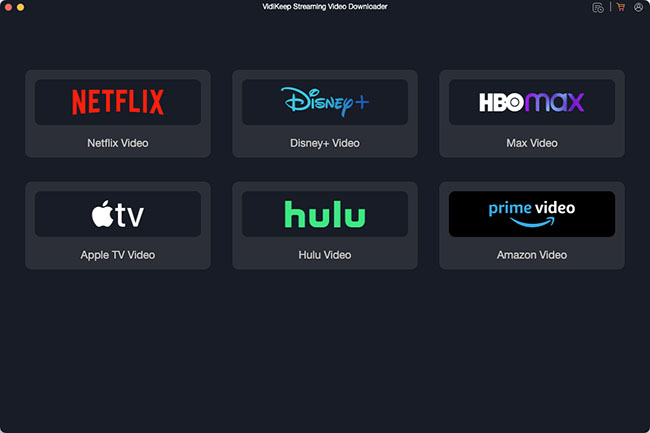
If you want to watch them at school, you can prepare your premium content at home before heading to campus. You can access platforms like Netflix, Apple TV, Disney+, Hulu, HBO Max, Crunchyroll, and Pluto TV on your personal computer and use dedicated desktop software like VidiKeep Streaming Video Downloader to download and convert your favorite shows into standard MP4 or MKV files. After that, you can use any local media player installed on your school device to view them offline.
Step 1. While on your home Wi-Fi, use a tool like VidiKeep on your computer to download your desired movies or episodes from your premium streaming accounts, saving them locally as universally compatible MP4 or MKV video files.
Step 2. Transfer these raw video files from your computer directly onto your smartphone, tablet, or a portable USB flash drive.
Step 3. Bring your device to school and simply open the local video file. You can now watch them anytime and anywhere in the building, completely offline.
Because these are standard video files permanently stored on your device's local drive, they are totally immune to the school's firewall, require absolutely zero network bandwidth, and will never arbitrarily expire like standard in-app downloads.
FAQs About Unblocked Movies Sites for School
What are the best free movie streaming sites for students?
Some of the most popular free streaming platforms include Kanopy, Hoopla, Tubi, Pluto TV, Amazon Prime Free Hub, The Roku Channel, and Plex. These services offer safe, legal, and often ad-supported movies and TV shows without requiring any paid subscriptions.
Can I watch movies at school for free?
It depends on your school's network policies. Some ad-supported streaming platforms may work, but many schools restrict video streaming services, like Netflix, Apple TV, and more. Availability varies by institution and device.
Are free movie streaming sites safe?
Legal platforms like Kanopy, Hoopla, Tubi, Pluto TV, Freevee, Roku Channel, Plex, and Crackle are safe because they are ad-supported and licensed. However, unknown third-party mirror streaming sites may carry security or privacy risks.
Why are movie sites blocked on school WiFi?
Schools often use network filters to block streaming platforms in order to prioritize educational traffic and reduce bandwidth usage. These filters may restrict access to video streaming websites.
Can school Wi-Fi see what app I am using?
Yes. When you connect to campus Wi-Fi, network administrators can see exactly which apps, domains, and servers your device communicates with, along with your data usage. While standard HTTPS encryption hides your specific passwords and the exact video you are watching, they still know where you are connected.
 Warning:
If you are using a school-issued device installed with monitoring software (like GoGuardian or Securly), the school can see absolutely everything, including your active screen, specific search queries, and keystrokes.
Are unblocked movie sites illegal?
It depends on the platform. Official ad-supported platforms (like Tubi and Amazon Prime Video) or library-linked services (like Kanopy) are 100% legal. You are fully within your rights to use them. Conversely, traditional "unblocked mirror sites" (like 123Movies or Soap2Day) operate illegally by distributing copyrighted material.
Conclusion
Watching movies at school on a Chromebook is increasingly restricted due to advanced network filters and bandwidth controls. As a result, searching for free unblocked movie sites for school is less about bypassing systems and more about finding reliable, safe, and accessible streaming options.
The most dependable choices today are legal platforms like Kanopy, Hoopla, Tubi, Pluto TV, and other ad-supported services. These offer stable access, better security, and consistent performance compared to unstable mirror sites.
In practice, the best strategy is not chasing unblocked links, but using trusted streaming platforms and offline viewing options that work within real school environments.

Jordan Rhodes is a Chief Technical Editor and Media Specialist at VidiKeep, specializing in creating diverse tech content, including streaming tutorials, software reviews, and video encoding tips.
Leave a Comment