How to Get Netflix on DIRECTV: Channel 192, Setup, Fixes
If you're trying to get Netflix on DIRECTV, the first thing to figure out isn't your Netflix password; it's which DIRECTV setup you have. You can stream Netflix through compatible DIRECTV devices directly, such as Gemini and Gemini Air, while some older DIRECTV or AT&T TV equipment handles the app differently.
You can also choose to add Netflix to an eligible DIRECTV account if you'd rather manage the subscription through your DIRECTV bill. If you already subscribe to Netflix separately, you generally don't need another account. You can simply sign in on a compatible device, or link the existing account if you choose DIRECTV billing.
The sections below will help you find the right route without mixing up watching Netflix on DIRECTV, adding Netflix to DIRECTV, and activating a DIRECTV-billed Netflix subscription.
Part 1. Device Compatibility: Can You Get Netflix on DIRECTV?
Before trying to find the app on your TV, it helps to verify your current set-top box. Traditional satellite Genie DVRs do not natively host modern streaming applications. Instead, accessing these third-party platforms usually requires the newer DIRECTV Gemini device or the Gemini Air dongle.
These Android TV-based units usually come with the Netflix app pre-loaded and support both satellite and internet-only customers. If you still have an older receiver, you might need to contact customer support to request a hardware upgrade. Use this table to identify the path that is most likely to fit your setup:
| Your DIRECTV Setup | Netflix Supported? | Recommended Action |
|---|---|---|
| DIRECTV Gemini | Yes (Preloaded) | Press APPS on remote > Open Netflix |
| Gemini Air | Yes (Preloaded) | Select Netflix from the home app interface |
| Select DIRECTV/AT&T Boxes | Select Models | Press APPS or tune directly to Channel 192 |
| Older DIRECTV receiver without Netflix | No | Use a Smart TV app, Roku/Firestick, or request a box upgrade |
| DIRECTV app on Roku, Fire TV, or a smart TV | Netflix runs separately | Exit DIRECTV app and open the native Netflix app on that device |
| Want Netflix on your DIRECTV bill | Available for eligible packages | Add Netflix in your DIRECTV account and activate it |
 Note:
Note:
Watching Netflix through DIRECTV hardware does not mean you have to subscribe to Netflix through DIRECTV.
Part 2. How to Watch Netflix on DIRECTV Gemini or Gemini Air
Once you have a current Gemini device, launching Netflix on DIRECTV can be quite simple. The interface offers a couple of reliable ways to get started using your remote control.
How to Open Netflix on DIRECTV Gemini
Netflix comes preloaded on current Gemini devices, so there is generally no need to download it before your first use. To find it:
Step 1. Press the APPS button on your Gemini Voice Remote.
Step 2. Find Netflix in your apps or Featured Apps area.
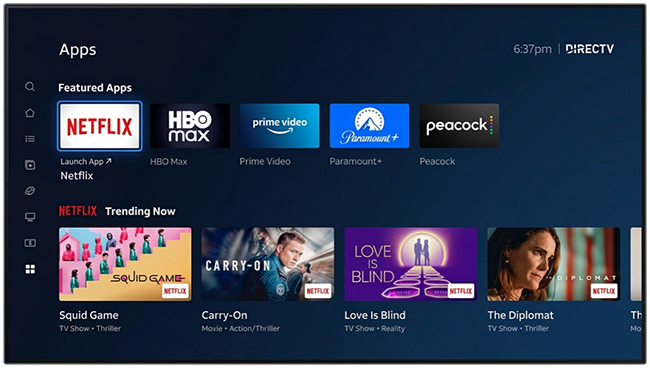
Step 3. Open Netflix and choose Sign In. You can enter your existing Netflix credentials and select your profile. Now, you can watch Netflix through DIRECTV.
 Tips:
Tips:
If you're using another supported DIRECTV/AT&T TV interface, the layout can be slightly different. Netflix currently documents another route: Home > Apps > Netflix > OK > Sign In.
What Channel Is Netflix on DIRECTV?
You may have seen Channel 192 mentioned in older tutorials or forum discussions. It isn't simply outdated advice: Netflix still documents Channel 192 as an access method on select compatible DIRECTV/AT&T TV boxes. To try it:
Step 1. Enter 192 with your DIRECTV remote.
Step 2. If your device supports the shortcut, the Netflix app should open.
Step 3. Select Sign In and connect your Netflix account.
If Channel 192 does nothing on your setup, that doesn't necessarily mean Netflix is unavailable. Use the APPS menu instead, particularly on Gemini.
Note:
Channel 192 is better thought of as a shortcut into the Netflix app, not a conventional Netflix TV channel. Netflix still requires an internet connection and a valid Netflix membership.
Part 3. How to Add Netflix to Your DIRECTV Account
Opening Netflix and adding Netflix to your DIRECTV bill are separate processes. If you already pay Netflix directly and simply want to watch it on Gemini, you can skip this section. DIRECTV billing becomes relevant when you want your Netflix subscription managed as part of your DIRECTV account.
Step 1 Choose a Netflix Plan Through DIRECTV
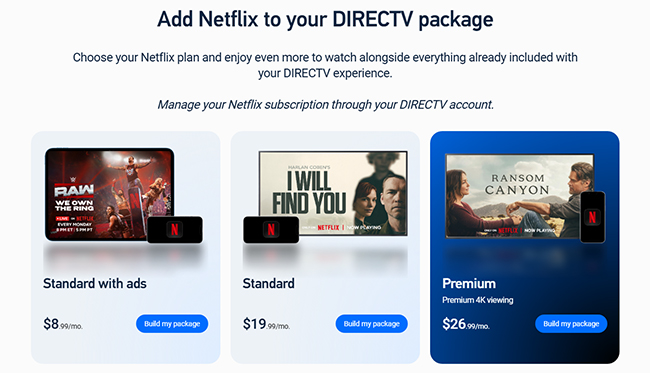
Eligible DIRECTV customers can add Netflix as a streaming-service add-on. The normal account-management route begins by signing in to DIRECTV and opening My TV Package, where available add-ons can be selected. DIRECTV lists the following Netflix plans:
| Netflix Plan | Price Through DIRECTV |
|---|---|
| Standard with ads | $8.99/month |
| Standard, no ads | $19.99/month |
| Premium, no ads with 4K | $26.99/month |
 Note:
Note:
These are current prices rather than permanent rates, so it is worth checking the price shown in your DIRECTV account before completing the purchase.
Step 2 Add a Netflix Plan to DIRECTV
From your DIRECTV account, locate Netflix under the available streaming-service add-ons and click Add to choose the plan you want. Follow the purchase prompts until Netflix has been added.
Note:
One notable exception involves some customers streaming a Signature Package while paying DIRECTV through Amazon or Roku. Netflix through DIRECTV may not be available in that arrangement, while Genre Pack eligibility differs.
Step 3 Activate Netflix through DIRECTV
To activate the membership before you can start watching, you can locate Netflix on the My TV Package page and click Activate.
Alternatively, DIRECTV may send an activation link by email or text. Follow that link to Netflix and complete the account setup. This is worth checking if you've already purchased Netflix through DIRECTV but the service still appears unavailable.
Step 4 Link Your Existing Netflix Account
Already have Netflix? You normally don't need to cancel it first or create a second account. During activation, choose the option to link an existing Netflix account and use the email associated with that membership. Once the account is successfully linked, billing moves to DIRECTV. Your Netflix email also does not have to match your DIRECTV user ID.
Apple Billing Warning:
If your Netflix subscription is billed through Apple: after successfully linking the Netflix membership to DIRECTV, cancel the Apple-billed Netflix subscription through Apple. Otherwise, Apple may continue charging you separately.
Part 4. Is Netflix Free With DIRECTV?
Netflix is generally offered as a separate subscription through DIRECTV rather than being automatically included with every DIRECTV plan. There is, however, a current promotional exception.
Current DIRECTV Netflix Offer: 12 Months at $0
DIRECTV is promoting 12 months of Netflix Standard with ads at $0/month when a DIRECTV Gemini is added to a Genre Pack. After the promotional period, the Netflix subscription automatically renews at the then-current monthly rate unless canceled. The customer must maintain the qualifying Genre Pack and an active DIRECTV device to remain eligible.
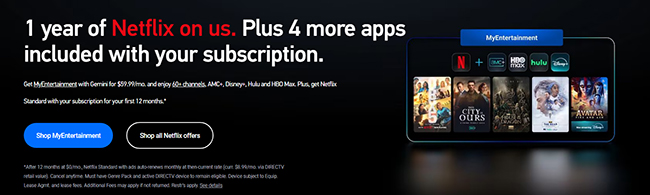
So the answer to "Is Netflix free with DIRECTV?" isn't a simple yes or no. Netflix normally costs extra, but eligible customers may currently qualify for a limited promotional offer. Because promotions change more frequently than device functionality, it's worth checking the offer terms when you sign up rather than assuming the same promotion will still be available later.
Part 5. Can You Get Netflix on DIRECTV Satellite or an Older Genie Receiver?
Having DIRECTV satellite service doesn't mean you can't watch Netflix; it simply depends on your set-top box. While newer DIRECTV Gemini devices run Netflix natively alongside your satellite setup, older receivers (like classic Genie DVRs) lack built-in streaming app support. If you're using an older DIRECTV receiver without native Netflix support, you have three primary workarounds:
Use a Smart TV or Streaming Player:
Switch your TV input and use built-in smart TV apps or external streaming devices like Roku, Fire TV, or Apple TV.
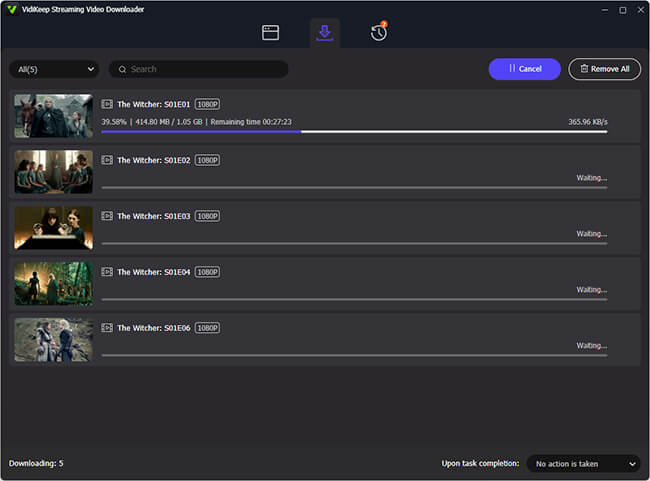
Convert Netflix Videos to MP4 via VidiKeep:
If your hardware setup limits direct streaming or internet connectivity, you can use VidiKeep Netflix Video Downloader to download Netflix movies and show episodes to local MP4 files. Once downloaded, simply transfer the files to a USB flash drive and plug it directly into your Smart TV's USB port for local offline playback.
Upgrade Your Receiver:
Contact DIRECTV to swap your legacy receiver for a Gemini box, which integrates both satellite TV and streaming apps into a single interface.
Part 6. Netflix Not Working on DIRECTV? Quick Troubleshooting & Diagnostics
If Netflix worked before and suddenly stops, repeatedly changing random settings usually isn't the fastest approach. First check what else still works and try the easy solutions:
| Problem | Potential Cause | Immediate Fix |
|---|---|---|
| DIRECTV works, Netflix fails | App bug / Account issue | Restart Gemini box (Press red button or unplug for 30s). |
| All streaming apps fail | Network disconnection | Go to Settings > Help > Troubleshooting > Network Diagnostics. |
| Billed by DIRECTV, but can't stream | Pending activation | Re-check My TV Package to complete account linking. |
| App uninstallation failing | System restriction | Netflix is preloaded; reset the app cache via settings instead. |
Part 7. FAQs About Netflix on DIRECTV
Can I watch DIRECTV-billed Netflix on my phone?
Yes. Billing consolidation does not restrict access. Sign into any supported mobile device or browser using your linked credentials.
What happens to Netflix if I cancel DIRECTV?
Your Netflix add-on will terminate at the end of the billing cycle. If Netflix has a backup payment method on file, it will revert to direct billing; otherwise, your account will be paused.
Why Can't I Find Netflix as a DIRECTV Add-On?
First check your package and billing arrangement. Netflix through DIRECTV is not currently available to some customers streaming a Signature Package and paying DIRECTV through Amazon or Roku, although Genre Pack eligibility differs.
Is Netflix Channel 192 on Every DIRECTV Receiver?
Not necessarily. Netflix documents Channel 192 as an access method for select compatible DIRECTV/AT&T TV boxes. On Gemini, opening Netflix through the APPS interface is the more straightforward route.
Can You Watch Netflix in 4K on DIRECTV?
Yes. 4K Netflix is possible on select compatible equipment, but ensure you meet all four requirements:
- Plan: Netflix Premium Tier ($26.99/mo).
- Hardware: 4K-compatible TV & HDCP 2.2 compliant HDMI port.
- Settings: Set playback quality to High or Auto in your Netflix profile.
- Bandwidth: Minimum stable connection speed of 15 Mbps (24+ Mbps recommended for multi-device households).
How do I remove Netflix from my DIRECTV account?
You can cancel your DIRECTV-billed Netflix subscription by following these steps:
- Sign in to your Account Overview on the DIRECTV website.
- Go to My TV Package.
- Locate Netflix, select Remove, and follow the on-screen prompts.
Conclusion
Getting Netflix on DIRECTV is simple once you separate the device from the subscription. You can stream directly via Gemini, use Channel 192 shortcuts on compatible boxes, or consolidate your billing under My TV Package. If your older receiver lacks native support, simply switch to a Smart TV app, play videos on your TV from the USB port, or upgrade to Gemini for an all-in-one setup.

Jordan Rhodes is a Chief Technical Editor and Media Specialist at VidiKeep, specializing in creating diverse tech content, including streaming tutorials, software reviews, and video encoding tips.
Leave a Comment