How to Download Disney+ Movies to MP4 on Mac/PC/Online Free
 Quick Answer:
Disney+ does not officially support MP4 exports due to Widevine DRM and HDCP encryption, which locks downloads to the official app. To bypass these restrictions and save Disney+ videos as permanent MP4 files, you must use a specialized downloader like VidiKeep or a screen recorder with Hardware Acceleration disabled.
Offline viewing on Disney+ comes with several limitations. The Disney+ app allows downloads on mobile devices only, and those downloads are encrypted and can only be played inside the app itself. Under this circumstance, many users are looking for a way to download Disney+ movies to MP4. This helps users to move Disney+ videos to a USB drive, transfer them to another device or media player for offline watching, or keep them permanently after your subscription ends. This guide provides the most effective, tested methods to convert Disney+ videos to MP4 while maintaining high-definition quality and avoiding common technical pitfalls.
 Editor's Top Pick:
- Best for Efficiency & Quality: VidiKeep (720p authentic HD, 5X hardware-accelerated speed, batch download entire seasons with SRT subtitles).
- Best for Short Clips: Apowersoft (Free, web-based, no installation required, 1-hour recording limit).
Part 1. Why Can't You Just "Save As" MP4 on Disney+?
If you've ever tried to right-click a Disney+ video or find a downloaded movie in your file explorer, you've likely encountered a wall of encryption. This isn't a technical oversight; it is a sophisticated security architecture designed to enforce licensing agreements.
1. The DRM Wall: Widevine & FairPlay
Disney+ content is protected by Digital Rights Management (DRM), specifically Google Widevine (on Android/Chrome) and Apple FairPlay (on iOS/Safari).
Instead of a single video file, the app downloads hundreds of encrypted chunks or data fragments. These fragments are useless on their own; they require a key from Disney's servers to be reassembled and decrypted in real-time. This ensures that the moment your subscription lapses or you go offline for too long, the key expires, rendering the data unplayable.
2. The HDCP Handshake
Even if you try to bypass the download limit by using screen recording software, you will likely end up with a black screen and only audio. This is due to High-bandwidth Digital Content Protection (HDCP).
HDCP is an authentication protocol that creates a handshake between the Disney+ player and your monitor. If the system detects an unauthorized recording device or software in the middle of that handshake, it instantly kills the video signal to prevent piracy.
3. The App Dependency Trap
When you use the official "Download" button, you aren't saving a file; you are creating a temporary cache.
- Encrypted Storage: The files are hidden in deep system folders with non-standard extensions.
- Hardware Binding: These files are often bound to the specific device that downloaded them, making them impossible to play on VLC, Plex, Smart TVs, and Gaming Consoles without an active internet connection or a recurring subscription check.
4. MP4 vs. Official App Downloads: Comparison Table
| Feature | Official App Download | MP4 Download |
|---|---|---|
| Storage Location | Hidden/Encrypted App Data | Local Folder (Desktop/Downloads) |
| Portability | Locked to the device | Move to USB, SD Card, or NAS |
| Expiration | 48 hours after playback/30 days | Permanent (No Expiry) |
| Format | Proprietary Encrypted Segments | Universal MP4 (H.264/H.265) |
| Subtitles | Toggleable in-app | SRT External or Hardcoded |
Part 2. Best Ways to Download Disney Plus Movies to MP4
While Disney+ does not provide a direct "Save as MP4" button, several reliable third-party Disney+ MP4 downloaders can help you achieve this. Below are the two most effective methods tested in 2026, ranging from dedicated video converters to high-quality screen recording solutions.
Use VidiKeep Disney Plus to MP4 Converter
VidiKeep is a specialized all-in-one streaming video downloader, which is designed to fetch high-definition video streams directly from Disney+ and other popular servers. It supports downloading and converting Disney Plus movies and TV shows to MP4 or MKV. Unlike screen recorders, it preserves the original metadata, multi-language audio tracks, and subtitles, making it the top choice for users who want a permanent, high-quality MP4 media library.
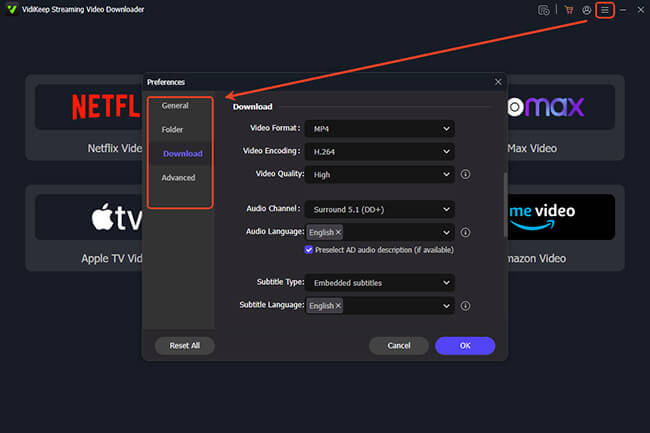
Step 1. Install and launch VidiKeep on your computer. Tap the "Menu" icon on Windows or "VidiKeep Streaming Video Downloader" on Mac and choose the "Preferences" > "Download" section. Here you can select "MP4" as your output format. You can also customize the output video quality, video encoding mode, audio channel, audio and subtitle language, and subtitle type.
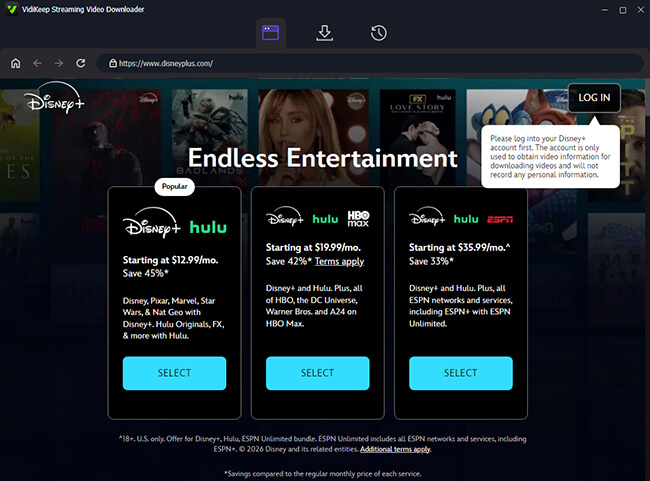
Step 2. Clickthe "Disney+" icon to open the Disney Plus to MP4 downloader, and log into your Disney+ account through the software's secure internal browser.
Step 3. Find the Disney+ movie or TV show you want to download by searching for the title or pasting the Disney+ video URL into the search bar. Tap the "Download" icon to select your favorite Disney+ series.
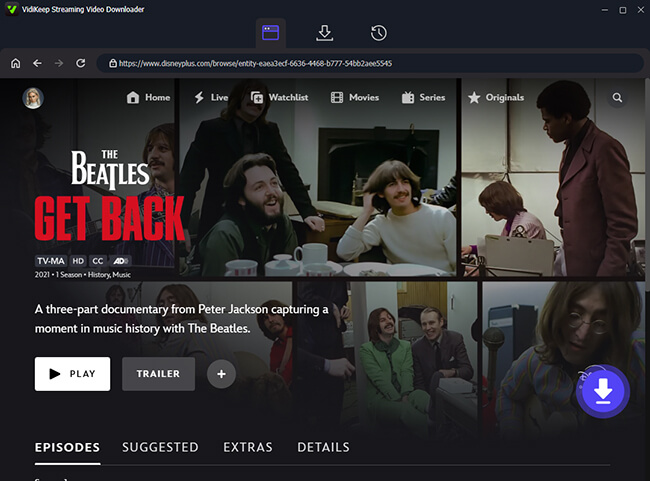
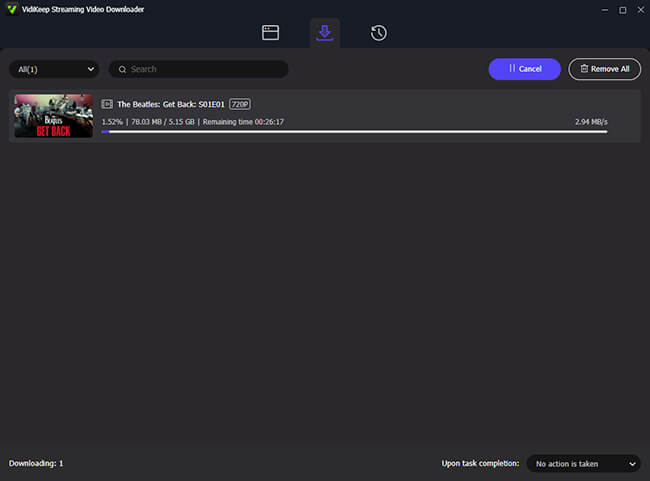
Step 4. Click the "Download" button to begin the Disney+ to MP4 conversion process. Once finished, the Disney MP4 file will be saved locally to your hard drive without any expiration dates. You can find them by clicking the "History" section.
Comparing the Top Disney+ to MP4 Converters
While VidiKeep is our top pick for stability, several other Disney+ downloaders offer specific niche benefits while downloading Disney+ video to MP4. The following table provides a technical breakdown based on 2026 performance benchmarks.
| Feature | VidiKeep | StreamFab | KeepStreams | MovPilot | CleverGet |
|---|---|---|---|---|---|
| Max Resolution | 720p (FHD) | 720p | 720p | 720p (FHD) | 720p (FHD) |
| Download Speed | 5X | 3X | 10X | 10X | 5X |
| Batch Processing | Yes | Yes | Yes | Yes | Yes |
| Subtitle Support | SRT / Remuxed | SRT / Remuxed | SRT / Remuxed | SRT Only | SRT Only |
| Success Rate | 99% (Stable) | 95% | 90% | 92% | 85% |
| Best For | Reliability & Stability | Direct Stream Capture | High-Speed Batching | Fast Performance | Occasional Use |
 Refined Technical Analysis: The 4K Quality Reality Check
While some converters claim to support 4K with HDR10 or Dolby Vision, there is a technical catch: most rely on the Disney+ Web Player. Since browsers on computers are restricted to 720p due to DRM limits, any 4K or 1080p output is often just upscaled. This increases file size without adding real detail, making 720p the most authentic high-quality choice for MP4 downloads.
Use Apowersoft Online Free Screen Recorder
If you prefer not to install heavy software, the Apowersoft Online Free Screen Recorder is a lightweight, web-based tool to get Disney+ MP4 movies and TV shows. It is particularly useful for capturing short clips or specific scenes, though it requires a 1:1 time commitment for full-length movies. You will also need to perform a specific technical tweak to avoid the "black screen" issue mentioned earlier.
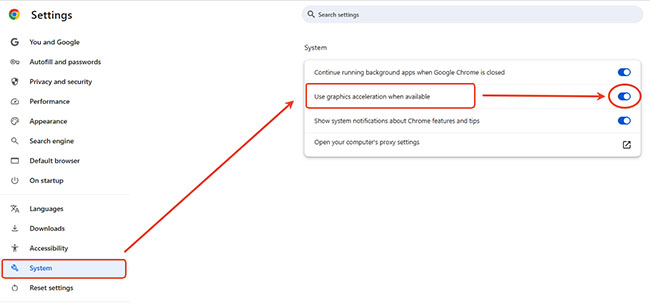
Step 1. Open your desktop browser (Chrome or Edge) and navigate to the "Settings" menu. Search for "Acceleration" in the settings search bar and toggle the switch to "Off".
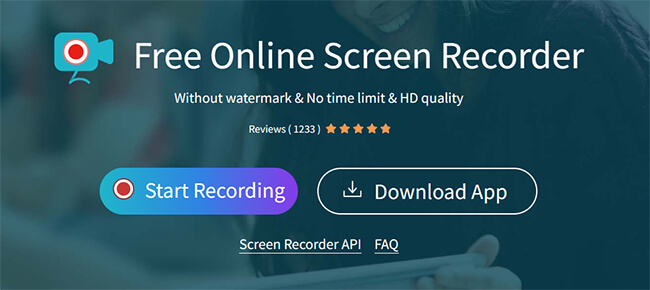
Step 2. Restart your browser, log into Disney+ website, and visit the Apowersoft official website. Click "Start Recording" to launch the online tool. (If it is your first time, you may need to download a small launcher).
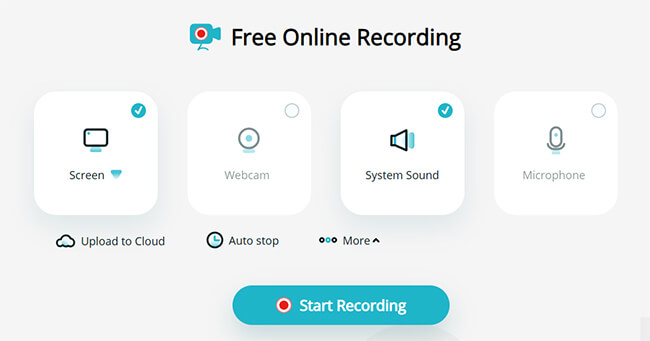
Step 3. Here, you have to customize the recording parameters by choosing the "Screen" and "System Sound" options. After that, click the "Start Recording" button to next step.
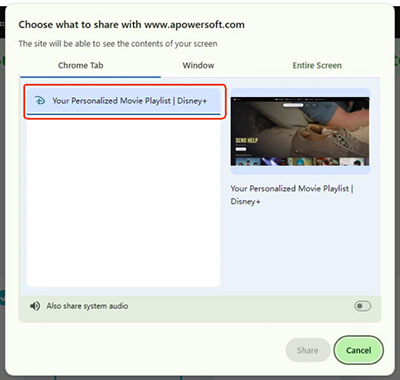
Step 4. Select the recording area (Chrome Tab) and Disney+ tab as the source. Hit the "Share" button and play the Disney+ video that you'd like to capture. It will automatically begin recording the playback.
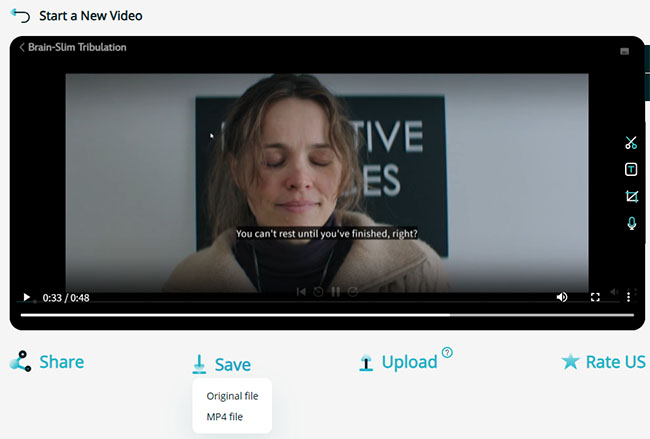
Step 5. Once the playback concludes, click "Stop" to finalize the capture. You can then refine the output using built-in editing tools: trim unnecessary headers or footers, extract high-fidelity audio for external use, or utilize AI-driven transcription to generate accurate, synchronized subtitles automatically. After that, you can choose the "Save" > "MP4 files" option to save the Diney+ recording as an MP4 file online free to your local disk.
 Note:
Note:
Although this method is free, it's limited to one hour per per recording session and often results in lower frame rates and capped 720p resolution.
 Disclaimer:
When downloading content from Disney streaming service, it is vital to respect copyright laws. These methods should be used strictly for personal, offline viewing. Distributing or sharing downloaded MP4 files is a violation of Disney+'s Terms of Service and can lead to account suspension or legal action.
Part 3. The Reality of Free Disney Plus to MP4 Converters
Many third-party sites claim to offer free Disney+ to MP4 downloading services, but in the current 2026 security landscape, most fail to bypass Disney's updated DRM (Digital Rights Management). Here is what we found during our testing of popular "free" options.
1. FreeGrabApp: Free Disney Plus Video Downloader
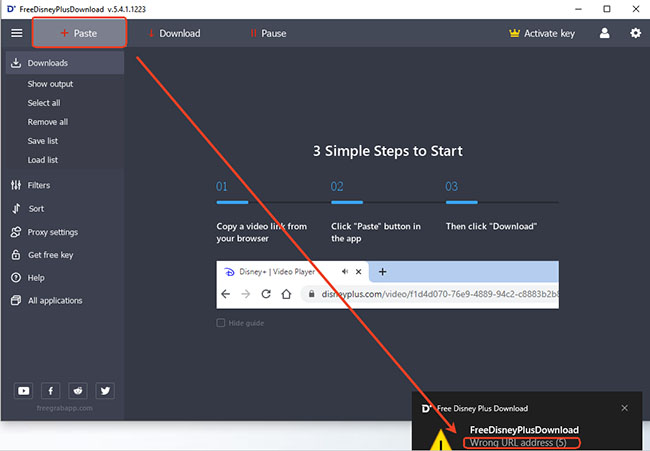
FreeGrabApp is often cited as a free solution for Windows users. However, the user experience is frequently marred by technical failures.
- The Problem: The standard workflow involves copying a Disney+ URL and clicking the "Paste" button. In our recent tests, this consistently results in a "URL Error" message.
- Why it fails: Disney+ regularly updates its encryption keys. Free tools often lack the development resources to update their software as quickly as premium competitors, leading to broken link parsing and failed downloads.
2. disneyplusdownloader.com (and similar web-based tools)
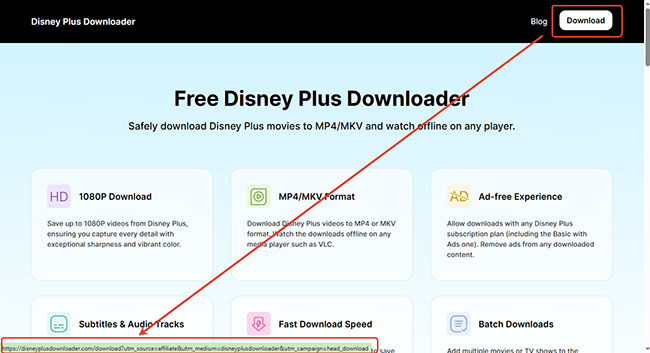
Online web-based downloaders are a popular search target because they don't require an installation. However, these sites are often used as "bait" for advertising networks.
- The Problem: Upon clicking the "Download" button to initiate the process or install a client, the site frequently redirects users to unrelated premium websites or intrusive landing pages.
- The Result: There is often no genuine free download option. Istead, users are caught in a "redirect loop" designed to generate ad revenue, or they are prompted to pay for a completely different service.
Part 4. FAQs about Disney Plus MP4 Download
Can I convert official Disney+ downloads to MP4?
No. Those official downloaded Disney+ files are fragmented and encrypted. You must use a downloader to fetch a fresh, unencrypted copy from the server.
Is downloading Disney+ to MP4 legal?
Under most jurisdictions' "Fair Use" or "Private Copying" doctrines, creating a backup for personal, non-commercial use is generally tolerated. However, distributing or uploading these MP4 files is a direct violation of copyright law and Disney's Terms of Service.
Will I lose 4K quality when downloading to MP4?
Yes. While Disney+ offers 4K UHD content for streaming on certified devices (like 4K Smart TVs or Apple TV), third-party downloaders are generally limited to 720p (HD). This is because 4K streaming requires Widevine L1 hardware-level security, which involves a "Trusted Execution Environment" that third-party software cannot currently replicate on a PC or Mac.
Can I watch Disney+ MP4 videos offline forever?
Yes. Official Disney+ downloads can expire over time due to subscription or license limitations. However, Disney+ MP4 files stored locally are generally more flexible for offline playback.
Part 5. In Conclusion
For casual viewers, the official app is sufficient. However, for home theater enthusiasts, travelers, and Mac/PC users, downloading Disney+ to MP4 is the only way to ensure your content is truly portable and permanent.
By using a reliable tool like VidiKeep, you can bypass app-based expiration, turning temporary streams into universal digital assets. Whether you choose a high-speed downloader or a free screen recorder, moving your Disney+ library to MP4 ensures your favorite movies are truly portable and ready for offline viewing on any device.

Jordan Rhodes is a Chief Technical Editor and Media Specialist at VidiKeep, specializing in creating diverse tech content, including streaming tutorials, software reviews, and video encoding tips.
Leave a Comment