Cancel Amazon Prime Subscription: Steps & What to Check
Canceling Amazon Prime takes a few steps, but ending your membership doesn't cancel every Amazon subscription. Separate subscriptions and add-ons may continue to bill your account. For instance, a $2.99 monthly charge for an extra perk could still appear after your Prime membership ends. This guide walks you through canceling your Prime plan on desktop and mobile, and explains how to check for any remaining subscriptions that could lead to further charges.
-
You can cancel Amazon Prime on the Amazon website or in the mobile app. If you signed up through a third party like Apple or another service provider, you may need to cancel through that billing platform instead. Before you finish, check both your Prime membership status and any other active subscriptions on your account.
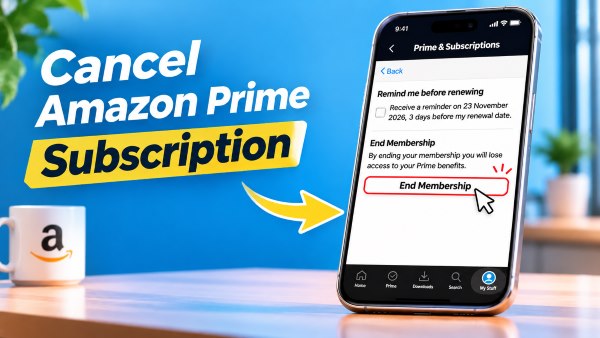
What Happens After You Cancel Prime Video?
When you cancel Amazon Prime, your Prime Video access keeps working until your current billing cycle ends. Once that date passes, your account switches to a standard Amazon account, and Prime included titles are no longer available.
Offline downloads inside the Prime Video app also stop playing once your membership ends, so watch saved episodes before your billing period closes. Any movies or shows you bought outright stay in your library, while active rentals follow their own viewing windows.
Limitations
Canceling Amazon Prime does not automatically stop separate Prime Video channels like Max or Paramount+. Check your active subscriptions so you do not keep getting billed for extra add-ons after your Prime plan ends.
| What You Can Access After Canceling | Status | Notes |
|---|---|---|
| Included with Prime Movies & Shows | ❌ | Access stops once your current billing cycle ends |
| Offline App Downloads | ❌ | Downloaded Prime titles lock up when your membership ends |
| Purchased Movies & Shows | ✅ | Stay in your library if you keep your Amazon account open |
| Active Rentals | ✅ | Still playable until the rental period expires |
| Add On Channels (Max, Paramount+) | ⚠️ | May keep billing separately; check and cancel if unneeded |
| Free Ad Supported Titles | ✅ | Still accessible with ads through your Amazon account |
How to Cancel Amazon Prime on a Web Browser
If you have a choice, do this in a web browser instead of the app. The layout is much cleaner, and it is easier to spot the sneaky buttons Amazon uses to keep you around.
Step 1. Open Prime Video and sign in to your account. Click your profile icon, select Account & Settings, then go to the Your Account tab.
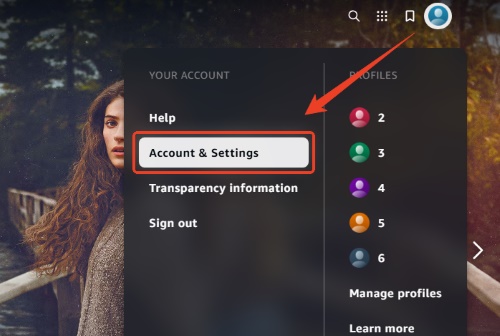
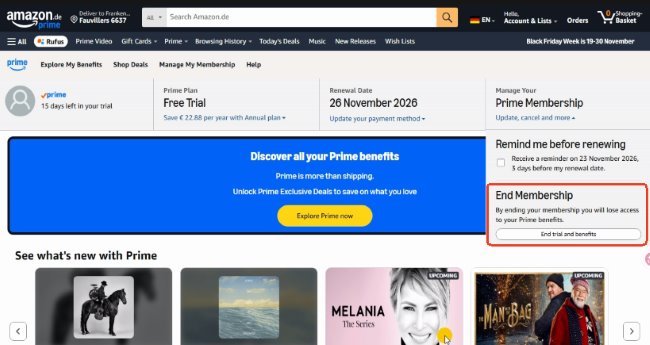
Step 2. Find the Prime Membership section and click Manage or Cancel. You will be redirected to Amazon's website, where you can view your next renewal date and access the membership management options.
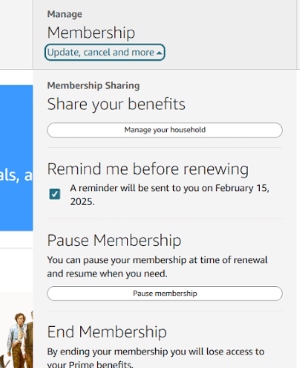
Step 3. To cancel, select the option to end your membership benefits and follow the on-screen prompts. Select Update, cancel and more, and tap End Membership. Skip the renewal reminder and alternative plan offers by choosing Continue to Cancel. On the final screen, click End on [Date] or End Now if available to confirm.

How to Make Sure My Prime Video Subscription Is Canceled?
Do not close the browser tab until you see proof. Look for a banner on the Prime Membership page that states your exact end date, and wait a few minutes for Amazon's confirmation email to land in your inbox. I always star that email just in case a weird charge shows up later.
How to Cancel Amazon Prime Video on Your Phone (iPhone & Android)
If you would rather just handle it from the couch on your phone, the Amazon Shopping app works fine too. The menu is just buried a little deeper.
Cancel Plan Inside the Prime Video App
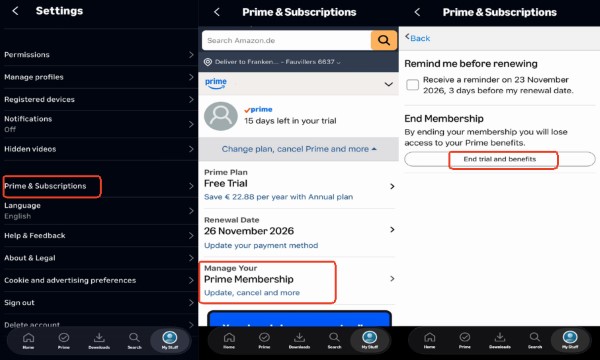
Step 1. Open the Prime Video app on your phone, tap My Stuff at the bottom, and open Settings to tap Prime & Subscriptions.
Step 2. Under the Prime & Subscriptions screen, tap Manage Your Prime Membership, where you can update or cancel your Prime Video plan.
Step 3. Scroll down to the End Membership section and tap End Membership or the End Trial and Benefits button shown on your screen to finish canceling.
Cancel Through Apple or Google Play
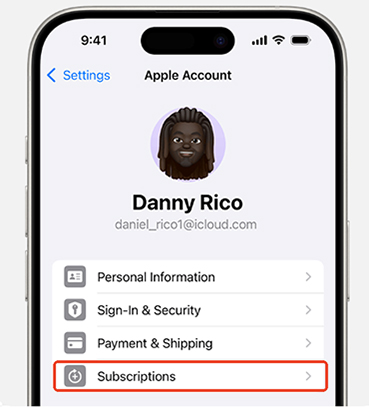
Did you sign up for Prime or Prime Video directly through your phone's app store? If the End Membership button is missing from your Amazon account, your phone's billing system is in charge.
- On iPhone or iPad: Open Settings, tap your Apple ID name at the top, go to Subscriptions, tap Amazon Prime, and hit Cancel Subscription.
- On Android: Open the Google Play Store, tap your profile picture, go to Payments & subscriptions > Subscriptions, pick Amazon Prime, and tap Cancel subscription.
How to Cancel via Mobile Carrier or Customer Support
If you open your Amazon account and cannot find the cancel button anywhere, do not worry. That usually means your Prime membership is bundled into a cell phone plan, so Amazon is not the one billing you directly. Other times, the cancel page simply glitches out, or you might just prefer having a real person handle it and confirm everything is closed. In either case, you still have two simple ways to wrap it up.
Cancel Carrier Bundles with Prime Video
If you get Prime through a wireless carrier like Metro by T-Mobile, Amazon cannot turn off the billing on their end. Log in to your carrier's app or website, open your plan add-ons, and remove the Prime perk there. Once you do that, hop back into your Amazon account and check your payment methods. If you ever saved a personal card as a backup, Amazon might try to bill it after the carrier stops paying.
Cancel Amazon Prime by Phone or Live Chat
Unlike Netflix, Amazon actually lets support agents cancel your plan for you. Scroll to the bottom of any Amazon page, click Help, choose Need More Help, and click Contact Us. You can start a live chat or request a quick phone call, and an agent will shut the membership down on the spot.
Stop Hidden Charges: Cancel Prime Video Channels and Add Ons
Remember that $2.99 charge I mentioned earlier? That was the Prime Video Ad Free upgrade. Ending your main Prime subscription does not automatically cancel the extra subscriptions tied to your Amazon account.
- Prime Video Channels like Max, Paramount+, Starz, and MGM+
- Prime Video Ad Free (the separate $2.99 monthly fee)
- Other Amazon plans such as Kindle Unlimited, Audible, and Amazon Music Unlimited
Go to the Amazon Subscription page in your browser. It lists every active add-on in one spot, so you can click through and cancel anything you do not want to pay for next month. It takes thirty seconds and saves a lot of frustration.
 Amazon Prime Refund Policy: Can You Get Your Money Back?
You may search for how to cancel because you just saw a $14.99 or $139 charge hit your bank account. The good news is that Amazon is actually pretty fair about refunds if you act fast.
If you paid for the current billing cycle and nobody on your account used a single Prime perk (no free shipping orders, no Prime Video streams, no Prime Music), the final cancellation screen usually gives you an automatic full refund. If you only used a tiny bit of your benefits, Amazon may offer a partial refund based on what you used. Tell the agent the renewal was an accident and that you have not used the benefits yet. In my experience, they are usually happy to reverse the charge if you ask politely.
Alternatives to Canceling Prime Video: Pause or Switch to a Cheaper Plan
Maybe you do not actually want to leave Prime behind for good. If you are just trying to trim your monthly bills, heading out of town for a while, or realizing you only ever use it to watch shows, quitting completely is not your only move. Amazon gives you a few flexible ways to cut costs without closing the door forever.
How to Pause Your Amazon Prime Membership Instead of Canceling
If you just need a short break, pausing lets you freeze your billing at the end of your current cycle without starting from scratch later. Keep in mind that Amazon only shows this option on eligible accounts, so it may not appear for every plan.
Step 1. Head to the Amazon website, open your account, and click Manage Membership.
Step 2. Select Update, cancel and more, then click Pause Membership (on some accounts, you may need to click End Membership first to see the pause button).
Step 3. Confirm the pause. Your benefits continue until your current billing period ends, and Amazon stops charging you until you choose to turn it back on.
Cancel vs. Pause vs. Cheaper Prime Plans: Which Fits You Best?
Not sure which route makes the most sense for your budget? Here is a quick side by side look at your main choices:
| Option | Cost | Best For | Key Catch |
|---|---|---|---|
| Cancel Membership | $0 | Leaving long term | Check extra add ons |
| Pause Membership | $0 while paused | Short breaks | No perks while paused |
| Prime Video Only | $8.99/month | Streaming only | No shipping or photo perks |
| Discounted Prime | $6.99 to $7.49/month | Eligible students or assistance recipients | Needs eligibility check |
Want to Keep Your Prime Video Downloads After Canceling?
Here is a small snag I ran into right before my own Prime cycle ended. I had downloaded a full season of a show inside the Prime Video app for an upcoming flight, completely forgetting that those app downloads lock up and vanish the moment your membership expires.
If you have a few favorite episodes or movies you want to rewatch offline without paying for another month, saving them to your computer before your end date is a simple fix. I used VidiKeep Streaming Video Downloader for this. Instead of locking videos inside the Amazon app, it saves supported Prime titles to Windows or Mac as normal MP4 or MKV files up to 1080p, and lets you keep the audio tracks and subtitles you want.

Download your favorite Amazon Prime movies and shows to MP4/MKV with zero quality loss for offline viewing after canceling.
 Secure Download
Step 1. Open VidiKeep on your PC or Mac before you cancel your Prime Video plan. Hit the Menu icon, go to Preferences > Download, and pick MP4 or MKV, along with your audio, codec, and subtitle choices.
Step 2. Click the Amazon Video icon on the home screen and sign in. Browse for the movie or show you want to keep, open its details page, and tap the Download button in the lower right to load the options.
Step 3. Check your settings in the window that pops up, then hit the purple Download button. For a whole series, just click Add to List to queue up multiple episodes or full seasons in one go.
Step 4. Once it wraps up, open the History tab to find your local files. You can watch or move them anywhere, even after you cancel your Prime Video subscription.
YouTube Video: How to Back Up Prime Video Before Canceling Subscription
FAQs About Canceling Amazon Prime
If I cancel my Amazon Prime free trial early, do I lose access right away?
No. Canceling your Amazon Prime free trial early generally does not end your benefits immediately. You can cancel before the 30-day trial expires and continue using Prime benefits until the displayed trial end date. This also prevents the trial from automatically converting into a paid membership.
Why is Amazon still charging me another fee after canceling Prime?
The charge may come from a separate subscription rather than your Prime membership. For example, the $2.99 fee could be for the Prime Video Ad Free add-on, while other charges may come from Prime Video Channels such as STARZ or Paramount+. Check your Amazon subscriptions and digital orders to identify the charge and cancel any services you no longer need.
How do I cancel Amazon Prime if I forgot my email or password?
Start by selecting Forgot Password on the Amazon sign-in page to recover your account using your registered email or phone number. If you no longer have access to either, contact Amazon Customer Service for help recovering the account. Have relevant billing information ready so they can assist with identifying the account associated with the charges.
Final Thoughts
When canceling Amazon Prime, you need take an extra moment to click all the way through the retention pages until you see your confirmation email, check your memberships page for stray add on channels, and back up your video from Amazon Prime Video before your final day arrives.

Jordan Rhodes is a Chief Technical Editor and Media Specialist at VidiKeep, specializing in creating diverse tech content, including streaming tutorials, software reviews, and video encoding tips.
Leave a Comment