How to Bypass DRM Protection: How DRM Works
Downloading a movie or song from a streaming service does not always give you a normal MP4 or MP3 file. In most cases, the download remains protected and can only be played through the service's app or device. This is the result of Digital Rights Management (DRM). So, can you bypass DRM protection and get a regular local files?
Technically, circumvention methods exist, but whether circumvention is permitted depends on the content, purpose, jurisdiction, and applicable exceptions. Before trying to remove DRM protection, it helps to understand why these files are protected and what alternatives are available.
What Is DRM Protection and Why Can't I Open Downloaded Files?
At its core, DRM protection is a collection of technologies used to control how protected digital content is accessed and played. It's implemented by media distributors to prevent unauthorized copying, sharing, and distribution of digital content. Unlike a simple password or file format restriction, modern DRM integrates deep system-level components:
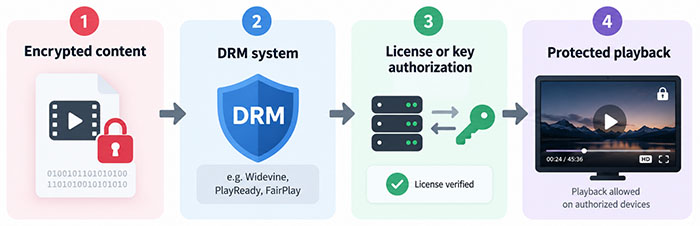
When you download a movie from Netflix or a song from Spotify, the content is not necessarily saved as an ordinary video or audio file. The data is encrypted, and the official app uses your account and a valid license to make the content playable.
That's why changing a file extension or opening it with a regular media converter usually does not work. The problem is not the filename or container. The content itself is protected.
How Does DRM Protection Work?
Different services use different DRM technologies, but the basic principle is similar: encrypt the content and allow an authorized application or device to decrypt it during playback.
On the web, Encrypted Media Extensions (EME) provides a way for browsers to work with encrypted media. EME is not itself a DRM system. Instead, it provides the interface between websites and content-protection systems. Three DRM technologies appear frequently in streaming ecosystems:
- Google Widevine: The industry workhorse for web browsers, Android devices, and smart TVs.
- Apple FairPlay Streaming: Deeply integrated into iOS, macOS, and Apple's ecosystem, supporting persistent offline contexts.
- Microsoft PlayReady: Tailored for Windows environments and hardware-level digital media protection.
This is also why DRM-protected downloads can behave differently from normal files. The app, account, device, license, and encryption system can all be part of the playback process.
How to Bypass DRM Protection via Media Converter
We first checked how the official downloads behaved. The downloaded content stayed inside the streaming apps and couldn't be opened as normal MP4 or MP3 files. So, if you only need offline playback, there is little reason to look for another solution.
If your goal is to extract a portable, DRM-free media file for offline storage, flexible transfer, or playback on independent hardware, standard app downloads will not suffice. This is where dedicated media converter tools come into play. It can product locally saved files, which can be opened independently in a standard media player.
How to Get Around DRM Protection from Netflix, Disney+, Apple TV, Amazon Prime, etc.
Services such as Netflix, Disney+, Amazon Prime Video, and Apple TV use DRM to protect their streaming content. Their official downloads are generally designed to remain inside the supported app rather than appear as ordinary video files.
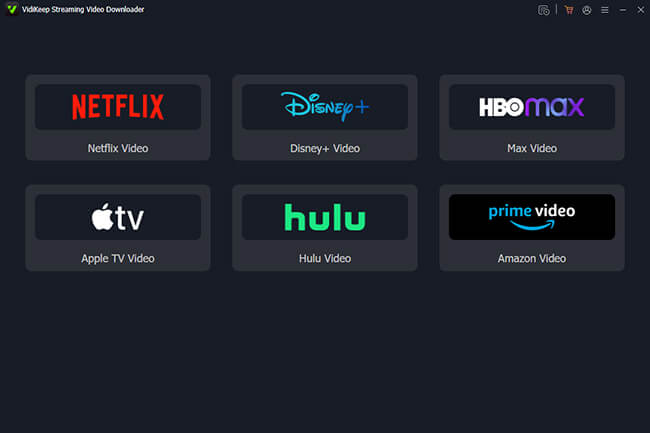
If your goal is to create local video files, one option is VidiKeep Streaming Video Downloader. It provides built-in access to supported streaming services and lets you choose available video quality, audio tracks, subtitles, and output settings before downloading. All local files are fully compatible with USB drives, smart TVs, and generic media players like VLC.
Step 1. Open VidiKeep on your Windows or Mac computer. On the main interface, you will see icons for supported video platforms (such as Netflix, Disney+, and Amazon Prime). Click the platform you wish to use.
Step 2. The software's built-in secure browser will open the platform's login page. Enter your streaming credentials to sign into your account safely.
Step 3. Browse or search for the movie or TV show you want to download. Open its detail page and click the Download icon. And then, you can select the target videos and customize the output download settings, such as video quality, audio quality, language, and subtitles.
Step 4. Click the Download button. You can monitor progress under the download queue tab. Once complete, switch to the History tab to locate your files in your local folder, complete with embedded metadata and cover art.
 Real-world Test Experience with VidiKeep:
We tested VidiKeep with all six supported streaming platforms. We did run into one issue with Disney+. The login didn't work while our VPN was on. After we turned the VPN off, we could log in normally and download the videos without any further problems.
The other five platforms had no login issues, and we were able to download and convert videos successfully. We also noticed that download speeds varied from one platform to another. Some were noticeably faster than others, but overall, VidiKeep was faster than using the platforms' own download options.
One limitation we noticed during testing is the free trial. Videos are limited to 5 minutes in length, so you'll need to upgrade to the paid version if you want to download full-length movies or TV shows.
h3: How to Get Rid of DRM Protection from Spotify, Apple Music, SoundCloud, Tidal, etc.
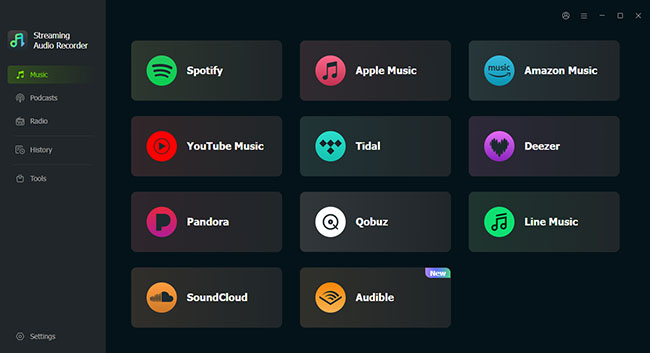
Music services have a similar limitation. Spotify, Apple Music, Tidal, Amazon Music, SoundCloud, YouTube Music, Deezer, Qobuz, and other platforms use their own systems for offline playback. If you want to manage your music as regular local files, DRmare Streaming Audio Downloader is designed for this type of workflow.
It supports multiple streaming services from one application and can convert tracks into common formats such as MP3, FLAC, WAV, M4A, AIFF, and M4B. Depending on the source and service, it can also retain metadata such as song title, artist, album, artwork, and lyrics.
Step 1. Launch DRmare Streaming Audio Recorder on your computer. On the main software dashboard, choose Music option to select your preferred music service from the list. Use the embedded web player to log into your account and find the songs, albums, or playlists you want to download. You can click the glowing Add icon and Add to List button to queue them up for batch processing.
Step 2. Open the Settings in the bottom-left corner and select Music to choose your target output format and adjust parameters like sample rate or bit rate if desired.
Step 3. Click the Convert button. DRmare will process the tracks at high speed, removing the protection layer. Once finished, click the History tab and open the output folder to access your brand-new, unrestricted local music files.
 Real-world Test Experience with DRmare:
In our latest test, we also found Audible in DRmare's supported services. We hadn't included it in our earlier checks, so this was one of the updates we noticed. It also includes free tools for downloading podcasts and radio stations. We also tested the converted audio files on a portable music player. The files transferred over without any issues and played normally on the device, so we didn't run into any compatibility problems during playback.
There is one limitation to keep in mind with the free trial. Like VidiKeep, DRmare limits each converted track to 3 minutes in the trial version. You'll need the full version to process complete audio.
Is Bypassing DRM Protection Legal?
DRM can be circumvented technically, but that doesn't mean doing so is legal. In the United States, Section 1201 of the Digital Millennium Copyright Act (DMCA) explicitly prohibits the circumvention of technological measures that control access to copyrighted works. While the U.S. Copyright Office conducts a triennial rulemaking process to establish narrow exemptions (covering specific educational, accessibility, or archival uses), these do not translate to a blanket legal free-for-all for personal convenience.
International frameworks, such as the European Union's Copyright Directive, enforce similarly stringent anti-circumvention rules. Personal use does not automatically make DRM circumvention legal. The applicable rules depend on the country, the type of content, and the purpose of the circumvention.
Ways to Use Content Without Removing DRM Protection
While dedicated software can help extract local files, bypassing DRM isn't always necessary, or even the best approach. Before risking account security or diving into complex conversion workflows, it pays to step back and evaluate what you are actually trying to achieve. In many cases, your underlying goal can be met easily and legally without ever touching the underlying encryption.
1. For Offline Travel: Embrace Official Offline Modes
If your primary objective is simply to watch a movie on a flight or listen to music during your daily commute without burning through mobile data, official app downloads are usually the simplest starting point. Services like Spotify, YouTube Music, and Netflix offer robust offline caching built directly into their applications. As long as you stay within their offline-access requirements (such as periodic internet check-ins), this method provides a seamless, trouble-free experience.
2. For True Portability: Opt for Legitimate DRM-Free Purchases
If your goal requires an unrestricted file to edit, archive, or play across diverse hardware, consider purchasing content from platforms that provide DRM-free downloads. Services like Qobuz and Bandcamp sell high-resolution FLAC, WAV, ALAC, and MP3 files free of access controls, making everyday file management and device transfer entirely straightforward.
3. For Playback Errors: Troubleshoot the Environment
Often, the easiest workaround to a compatibility issue is keeping protected content inside the ecosystem for which it was designed. If a streaming provider officially supports your smart TV, streaming stick, tablet, or web browser, streaming directly through that verified environment avoids codec and DRM conflicts entirely.
By shifting the focus away from how to break a protection mechanism and toward how you actually plan to enjoy your media, you can often save time, protect your account security, and find a much smoother path forward.
FAQs About Breaking DRM Protection
Can I bypass DRM protection on any file?
Not necessarily. DRM systems differ technically, and legal restrictions can also vary according to the work, purpose, and jurisdiction. A better first step is to determine what kind of file or service you are dealing with.
Can I convert a DRM-protected file to MP3/MP4?
A conventional converter generally works with media it can legitimately read. If the source is protected by DRM, you have to draw support from professional media converters.end
Does changing a file extension remove DRM?
No. Renaming a file changes its filename, not the encryption or authorization mechanism protecting its contents.
Is DRM removal the same as screen recording?
No. They are technically different approaches. Screen capture records what is presented during playback, while DRM circumvention involves defeating or avoiding an access-control mechanism. Whether a particular recording or circumvention activity is permitted depends on the applicable law and circumstances.
Are DRM protected removal tools safe?
Third-party DRM removal tools vary in reliability and may introduce security or privacy risks, particularly when they request streaming-account credentials, broad browser permissions, or installation of unrelated software. Before using one, check the developer, download source, privacy practices, and exactly what the tool is designed to do.
How can I use DRM protected content?
DRM-protected content generally needs to be opened through the application, device, or service authorized to play it. For offline playback, use the platform's official download feature when available.
Why did my DRM remover suddenly stop working?
A DRM removal tool may stop working when the streaming service, DRM system, application, browser, or content-delivery process changes. Updates can alter encryption, licensing, authentication, or playback mechanisms, making an older tool incompatible.
The Bottom Line
DRM keeps streaming content tied to authorized apps and devices, which is why ordinary downloads often cannot be used like normal local files. While specialized tools may provide more flexibility, DRM circumvention can involve technical, security, and legal limitations. For simple offline playback, use the platform's official download feature. If you need unrestricted local files, DRM-free content is usually the better option.

Jordan Rhodes is a Chief Technical Editor and Media Specialist at VidiKeep, specializing in creating diverse tech content, including streaming tutorials, software reviews, and video encoding tips.
Leave a Comment